Usage and billing
The month-by-month statement of what the agents cost this workspace: the five spend classes, the tiles, daily and per-model spend, the organization view, the CSV and how it reconciles.
Reference · Updated 2026-10-17 · Describes release 0.1.164
Usage & billing
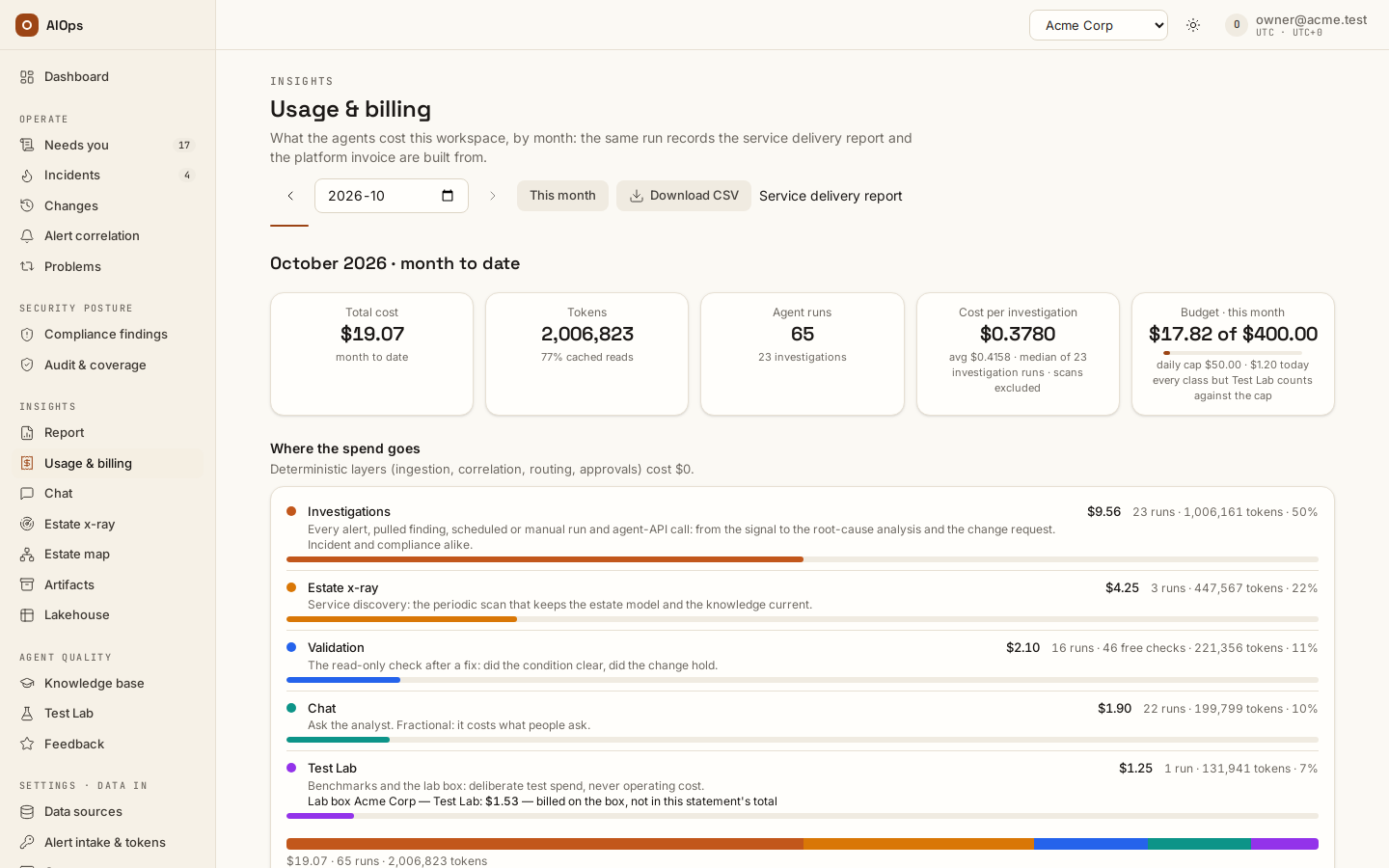
Open Insights → Usage & billing (/portal/billing). Reading it needs report.view, which every builtin role holds — owner, operator, approver, viewer and executive; only a custom role without it sees the permission notice. The page is the month-by-month statement of what the agents cost this workspace, built from the same run records as the service delivery report's cost appendix and the platform invoice. The three never disagree about the money, only about how it is grouped.
Pick a month
- Use the month picker in the toolbar, or ← and → to step one month at a time; This month returns to the current one.
- Read the title. The month in progress is labelled
month to date— October 2026 · month to date — because its figure still grows.
Months are UTC calendar months: a run belongs to the month in which it started, so a run that began at 23:30 UTC on the last day counts in that month whatever your local clock said. A month in which nothing ran says No agent runs in <month> with every tile at zero — a statement, not an error. When only the workspace's Test Lab box ran, the statement still opens, with the box's spend under Test Lab.
A month the data-retention sweep has sealed says so under the title: Sealed on <date> by the data-retention sweep: totals are the statement; the cost per investigation, daily chart, models and incidents show only records still kept. The totals, Where the spend goes and Download CSV are the sealed statement — the figures the month showed before its oldest records were removed — while the cost per investigation, like the daily chart, models and incidents, reads only the records still kept; see Data retention. When the sweep removed the month's investigation runs, Cost per investigation reads — with runs removed by the data-retention sweep and Costliest incidents says No incident records kept for this month: the data-retention sweep removed them. — the investigations ran, and Agent runs still counts them.
What the money is grouped into
Every paid run lands in exactly one of five classes. The label on the page is the customer-facing one; the technical class, as the API and the CSV spell it, is in parentheses.
| Label | Meaning |
|---|---|
Investigations (operating) |
Every alert, pulled finding, scheduled or manual run and agent-API call: from the signal to the root-cause analysis and the change request. Incident and compliance alike. |
Validation (verify) |
The read-only check after a fix: did the condition clear, did the change hold. |
Estate x-ray (xray) |
Service discovery: the periodic scan that keeps the estate model and the knowledge current. |
Chat (chat) |
Ask the analyst. Fractional: it costs what people ask. |
Test Lab (test) |
Benchmarks and the lab box: deliberate test spend, never operating cost. |
Deterministic layers (ingestion, correlation, routing, approvals) cost $0. They never appear here. When the workspace runs a Test Lab box, its spend is a second line inside Test Lab — Lab box <name>: $x — billed on the box, not in this statement's total — and is never folded into Investigations. It is billed on the box itself: it is not part of Total cost, the Test Lab figure or Download CSV, and the organization view lists the box as its own row.
Read the tiles
- Total cost — the month's spend in USD, two decimals (four while the figure is under a dollar).
- Tokens — prompt plus completion tokens; the share served as cached reads is the hint.
- Agent runs — every agent run of every class that month. A validation that ran no agent — a check code answered at $0 — is not a run: Where the spend goes counts it beside the Validation runs as a free check.
- Cost per investigation — the median cost of the month's investigation runs, with the average in the hint. Compliance scans count under Investigations but are billed once on their scan record, so the median leaves them out and the hint says scans excluded. The median is the honest typical figure: one runaway run moves the average, not the median.
- Budget · this month — the caps set under Guardrails & cost → AI budgets & kill switch against the month in progress, whichever month you are reading. On the current month it reads
$spent of $capagainst the Monthly limit (USD), with a thin progress bar, the daily cap and today's spend in the hint, and the line every class but Test Lab counts against the cap — so it can read lower than Total cost beside it. A past month shows the caps alone, such ascap $400.00/month · $50.00/day, with the line the caps in force now; the budget counts the month in progress only: the month you picked has its own figures in the tiles beside it. No cap set, with a Set one on Guardrails link, means both limits are 0. Daily and monthly limits block new runs once reached (AI budgets and the kill switch); the 70% step-down applies only to the per-investigation cost cap (The cost cap, and what happens at 70%). - Served by your endpoint — replaces the budget tile when the workspace brings its own LLM endpoint: your endpoint serves the calls and the tile names it by its host; each model is priced at its publisher's list price, set by the platform operator — never at what the endpoint reports.
Where the spend goes, by day and by model
Where the spend goes lists the five classes sorted by cost — label and meaning, cost, runs, tokens and a share bar, one colour per class — and ends in a single stacked bar for the month whose legend is the rows above it. A class with nothing in it still lists, as $0.00 · no runs. Validation counts its free checks beside its runs — 32 runs · 100 free checks · … — the validations code answered without an agent, at $0.
Daily spend is one stacked column per calendar day in the same class colours, today's column outlined and the rest of the current month empty. Hover a column for the day's total and its split; the keyboard and the screen reader get the same figures under Show as table, as rows.
By model splits the month's cost per model into prompt tokens, cached reads, cache writes, completion tokens and cost, and names where each model's price comes from — AWS price list · ap-southeast-1 · 12 Oct 2026 for a model served through Amazon Bedrock, OpenAI list price · gpt-5.6-sol · models.dev, read 14 Oct 2026 for every other model (the publisher's own price as models.dev, an open MIT-licensed dataset, publishes it), Provider or contract price, No token charge, Your rate card (runs before …) for runs your own old rate card priced, or Estimate — with the same caveats the report shows. A model with tokens and no price recorded reads Not priced yet: it shows $0 until the platform operator prices it; the operator can then re-price the history. A DeepSeek line says off-peak rate; the publisher bills twice this at peak hours (estimate): models.dev lists the off-peak rate only, and the estimate line says the publisher's list price states part of the bill — a price is configured there, and re-pricing does not change it. When the platform operator re-priced the month's history, Re-priced on under the month says when; the statement's footnote names, once, the price sources that priced the month (the AWS Price List, models.dev, a price the operator recorded, rates configured with no source recorded). Each run is priced at the rate in force when it ran. An over-estimate banner means a model has cached reads but no cached-read rate on the price map, so the figure is higher than the invoice will be; an estimate line says how much of the month was priced without a published or contract price, for which models; the mechanics, and why the booked total lags a corrected rate, are under Where the money went: cached prompt reads. A $0.0000 while agents clearly ran means not priced, never free — see Troubleshooting.
Costliest incidents is the month's ten costliest occurrences, each a link to its incident. An incident whose alert comes back inside the reopen window keeps its id, so one incident can hold several episodes; each is its own row, and the episode that cost the money tops the list instead of the sum of all of them. An occurrence starts when the incident opens, when its alert fires again after it was closed, or when an accepted risk lapses; a reopen by validation (still present after a close or a fix) continues the occurrence it found. A row whose incident came back says which time it was and sets it beside the incident's month: occurrence 3 of 3 · incident $9.33 over 3 occurrences · avg $3.11 — the occurrences that started in the month, and one carried over from before it only when it cost something in it. The line under every row splits the money, so you can tell whether it went into finding the cause or into proving the fix: triage $0.51 × 1 automatic + $2.93 × 2 re-run · validation $3.98 × 7 AI + 0 free checks · N triage tokens. Automatic triage started on its own (an alert, a schedule, a fresh analysis the platform started itself); re-run is one a person started, such as Analyse. AI counts the validation runs an agent made, each at what its run cost; N failed names runs that spent and returned no verdict, whose money is in the figure; free checks are validations code answered at $0. The tokens are the triage runs' alone: a validation run records none per model. Under the ten, Recurring: names an incident none of whose occurrences made the list though its month beats the tenth row — chronic cost in many small episodes — and Validation not tied to an incident is the validation of changes verified on their own: with every incident's validation it makes up the Validation class. An empty month says No investigations in this month. The service delivery report's cost appendix lists the same rows over its trailing period, and Operate → Problems shows under each recurring class's incident count what its incidents have cost over every occurrence (AI spend $9.33 over 3 occurrences).
The organization view
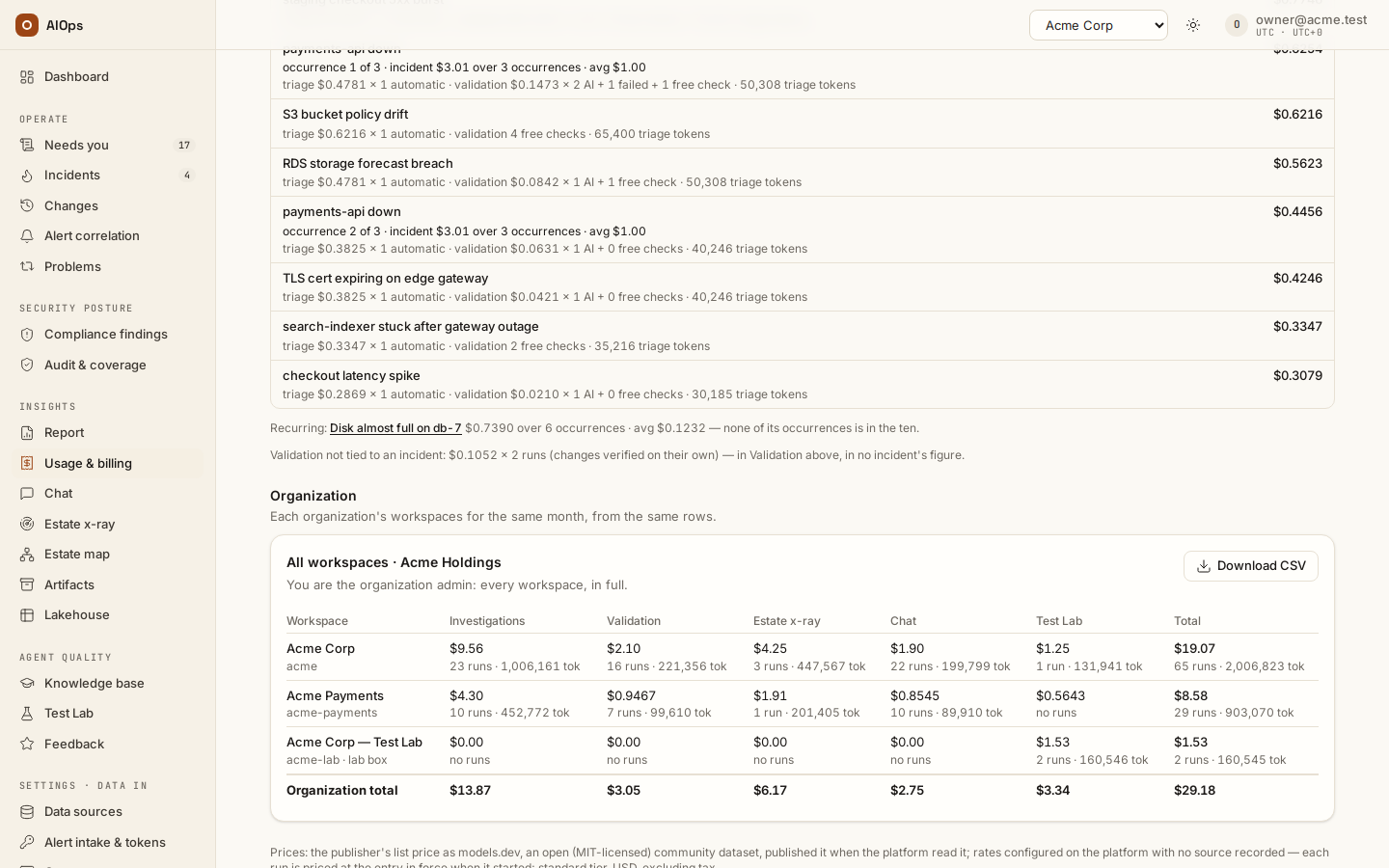
The Organization section appears only when you hold a seat in an organization, with one card per organization. All workspaces · <organization> is one row per workspace — Investigations, Validation, Estate x-ray, Chat, Test Lab and Total — with an Organization total row and its own Download CSV (the platform export's columns, month, tenant, slug, class, runs, tokens, cost_usd, byo_llm, lab, estimated_usd, unpriced_tokens, free_checks: five lines per workspace and a TOTAL line, whose last three cells are empty when any workspace's month was sealed before they were recorded). An organization admin sees every workspace of the organization; a member sees only the workspaces they belong to — those where their role holds report.view, as every builtin role does — and the card says so: it is titled Your workspaces · <organization>, its last row is Total of your workspaces (the CSV holds the same workspaces), and it reads You see the workspaces you belong to; the organization admin sees all. The Workspaces page (/portal/organization) links to the selected organization's card as Usage & billing for every workspace, or Usage & billing for your workspaces for a member.
Download the statement
Select Download CSV in the toolbar. The file has one line per class plus a TOTAL line, columns month, workspace, slug, class, runs, tokens, cost_usd, estimated_usd, unpriced_tokens, free_checks — the class in its technical spelling, so a spreadsheet can join it to the organization statement or the platform's own export without translating labels. runs counts agent runs. estimated_usd is the part of cost_usd priced from an estimate rather than a published or contract price; unpriced_tokens the part of tokens with no price recorded yet (Not priced yet, at $0 in cost_usd); free_checks the validations that ran no agent ($0, never in runs). Each is empty for a month sealed before it was recorded — such a month's runs still includes its free checks.
How it reconciles
Three surfaces show this money, and the figures are the same run records in all three: this page by calendar month, the service delivery report's Appendix · Platform cost (FinOps) by trailing period, and the platform invoice per month and workspace. X-ray and compliance scans are billed once, on their own scan record — never again under the incidents or knowledge they lead to. A validation is billed at what its run cost, a run that failed after spending included — the figure Costliest incidents shows, an incident's AI budget counts and the incident page's Spend card reads, one line per occurrence when its alert came back. A month's validation is the month its run started. Benchmarks are test spend: they appear under Test Lab here and nowhere in the operating figures. A workspace that brings its own LLM endpoint still has its tokens and runs counted, each model priced at its publisher's list price.
Next steps
- Service delivery report — the same spend over a trailing period, as an appendix to the service story.
- AI budgets and the kill switch — the daily and monthly limits the Budget tile reads; the per-investigation cap is under The cost cap, and what happens at 70%.
- Knowledge, x-ray and insights — the hub for every page of this group.