Change windows, emergency changes and rollback — set it up like the demo
Set change and freeze windows, release an emergency change with its review, verify a fix and roll a change back.
How-to · Updated 2026-10-28 · Describes release 0.1.164
Goal
Review an exact change, enforce its release rules, verify its actual result and restore recorded state when appropriate. A proposal, an approval, a write receipt and a successful verification are distinct events.
Prerequisites
- A correctly scoped change or incident, writer consent and supported operation.
members.managefor workspace window/safety settings;incidents.actto request work;approvals.decideto release the required quorum.- A known before-state/recovery method, maintenance coordination and outcome evidence.
Procedure
-
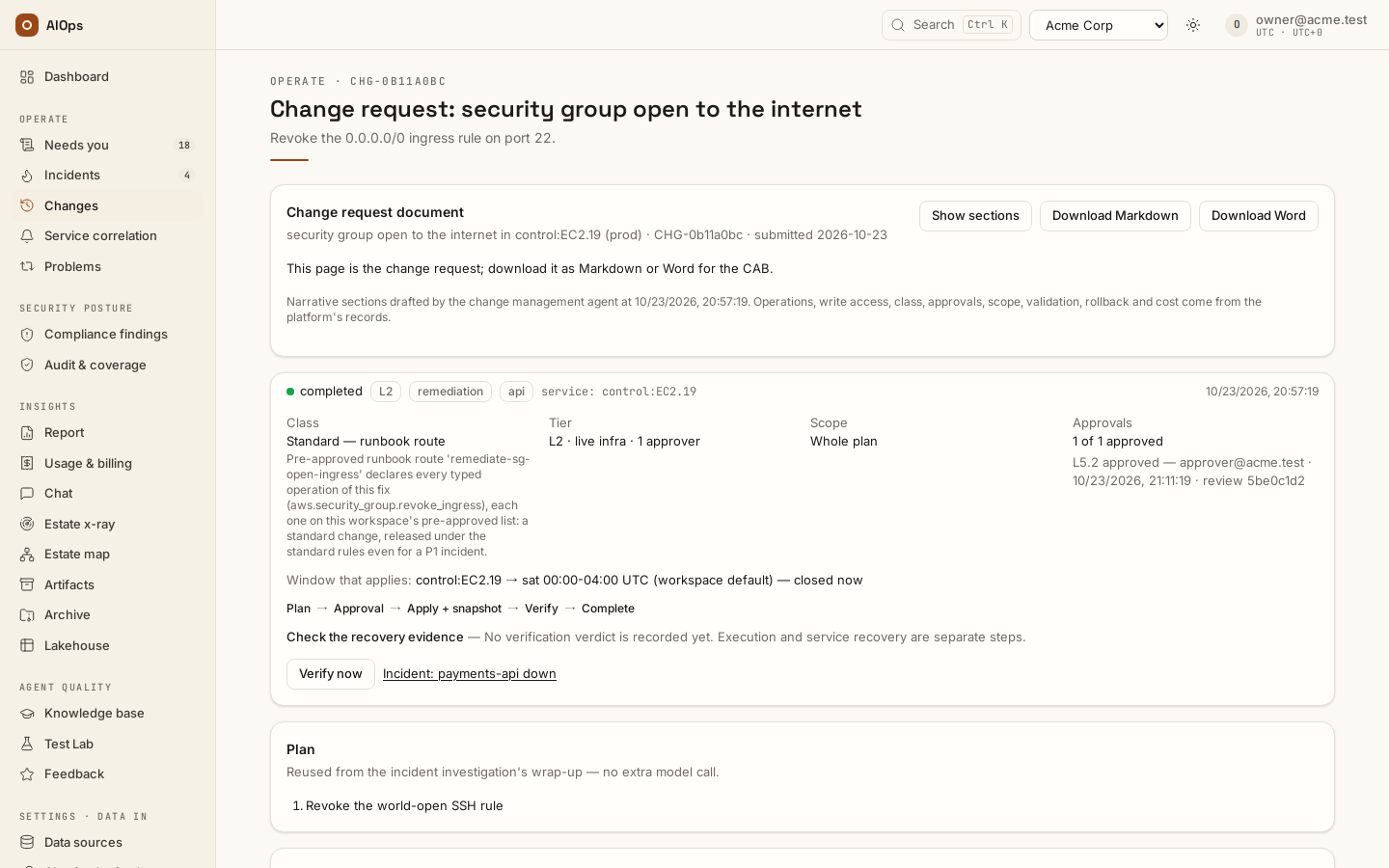
Open the change request and read class, class reason, tier, scope, approval count, current state and the blast-radius basis. Derived and Standard by default are policy choices; Reclassify raises the class (normal to emergency, never lower), records a note and clears prior votes; a certified runbook's standard moves only with its runbook. A “runbook matched” skill input is different from a pre-approved runbook route or the current revision-bound route certification. You should see the actual recorded reason and quorum for this request.
API:
GET /api/aiops/{tid}/changes/{id}—incidents.view;POST /api/aiops/{tid}/changes/{id}/class—incidents.act, with the new class and explanation.
-
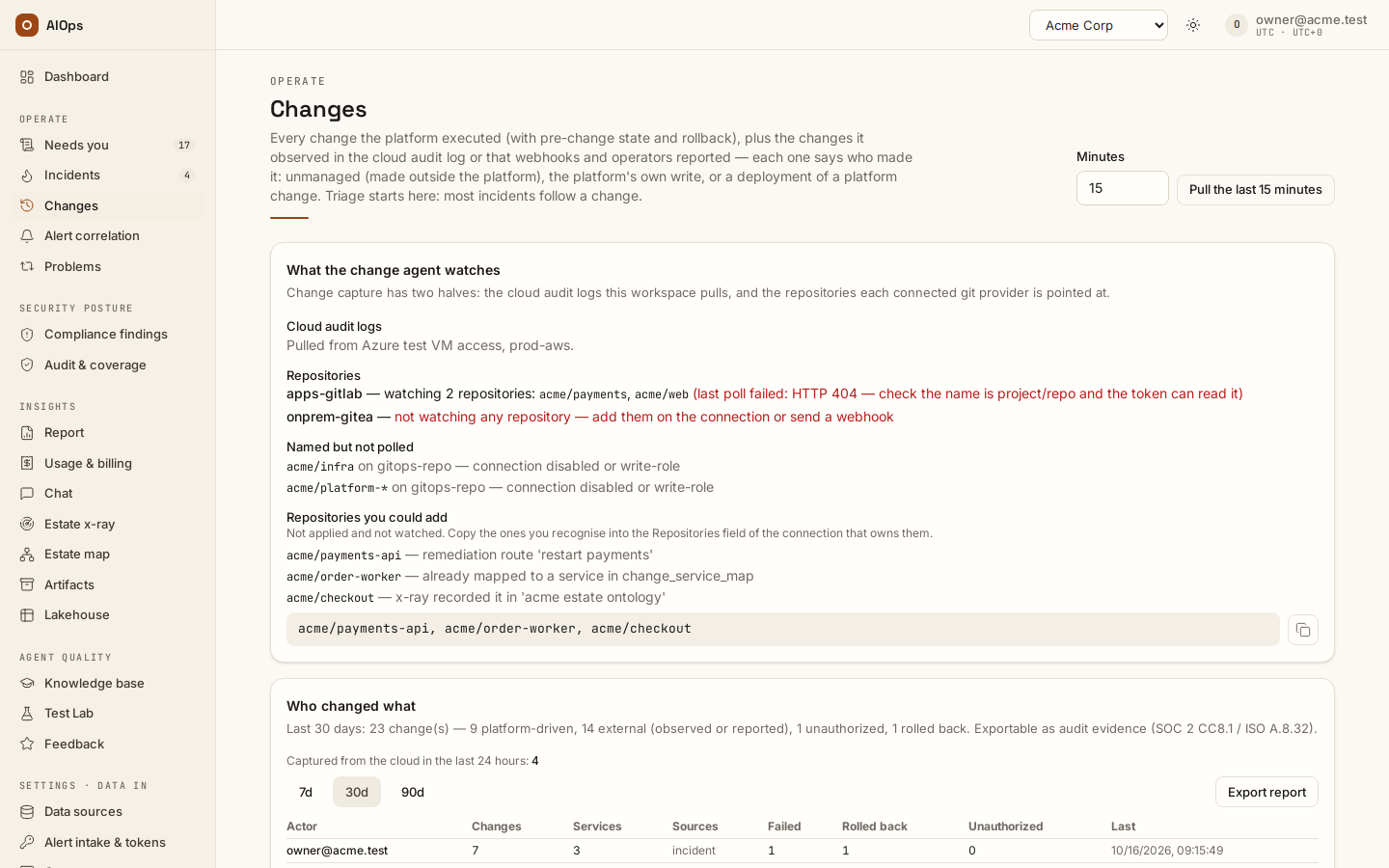
Configure a release window deliberately. The Maintenance windows card edits a workspace default plus service glob rows. The first matching service row wins; a service with no match falls back to the workspace row, and no declared row leaves releases open. Typed plans use the resolved service window; routes keep their own
params.change_window. The change and incident pages show Window that applies:<service> → <window>. Times are UTC and overnight hours wrap midnight; the hours after midnight belong to the day the window starts, so the example below is open from Saturday 22:00 to Sunday 06:00 (not Saturday 00:00–06:00, which is Friday's night). Weeks of the month (1–5, blank = every week) picks which of those weekdays:{"days":["tue"],"weeks":[2],"hours":"22:00-02:00"}is the 2nd Tuesday from 22:00 to Wednesday 02:00, read as 2nd tue 22:00-02:00 UTC; a month without a 5th such weekday never opens week 5. The same rules apply to a route's own window, the automatic lane andchange_freeze. You should see a read-back of the exact saved body and a preview's actual open/closed verdict before relying on the restriction.API:
PATCH /api/aiops/{tid}/guardrails—members.manage, for example:{"change_window":{"days":["sat"],"hours":"22:00-06:00"},"change_windows":{"payments*":{"days":["sun"],"hours":"22:00-02:00"}}}A malformed/empty release window can fail open on the checked implementation. Validate the shape and inspect the preview rather than assuming a typo restricts execution. Setting
change_windowto{}clears the legacy workspace alias too; no window is then declared.To patch a service in its window, add a row to the Patch schedules card under the windows: Service (the same pattern as its window row), Plan ahead (hours) (the lead time, 1–336, default 24), Owner (email) and optionally the Patch runbook id (blank = the first enabled step runbook with a patch step). A schedule is refused while no maintenance window applies to its service. At its lead time before the window opens, the platform plans one change request, Patch run:
<service>— N instances, for the EC2 instances of that service Patch Manager reports non-compliant (the open Patching findings, and Security Hub's SSM.2): an instance belongs to the service when itsservice,app,applicationorNametag, or its instance id, matches the pattern (our proposal). The request lists the instances in its scope and compiles the patch runbook once per instance — backup, isolation, patch, restore, every target bound by code; with no patch runbook it carries the commands to run by hand. It waits for approval, and the owner and the notification targets that takechange_scheduleare told. Review execution opens with the next maintenance window chosen: approve it and it runs when the window opens, as scheduled (step 4) — never on its own. One run per window opening, at most 25 instances (the rest wait for the next window). A run nobody approved before its window opened is rejected (the maintenance window opened before anyone approved this patch run) — one still waiting for a second approver when the window opens counts as unapproved — and the next window plans a new one (our proposal). Audit:change.patch_planned. API:PATCH /api/aiops/{tid}/guardrails—members.manage,{"patch_schedules": {"payments*": {"lead_hours": 24, "owner": "app-owner@example.com"}}};nullor{}clears.If a window holds one particular change, select Request a one-time window on that change. Enter a UTC start, end no more than 24 hours apart, and a mandatory reason. The requester needs
incidents.act; a person withapprovals.decideselects Approve one-time window or Reject. The requester cannot approve while another approver exists; sole-approver self-approval is audited. Approval is bound to this exact action digest, opens only this change during the interval, and is not a release vote. The digest and audit trail state who approved it and when; changing the reviewed plan or window makes the exception unusable and requires a new decision. -
Distinguish a freeze window from a release window.
change_freezeflags observed outside changes within that window as unauthorized; it is not a universal prevention control for all external systems. You should see the observed event, matching time and recorded authorization reason.API: workspace PATCH with
settings.change_freezeuses the same UTC day/hour shape —members.manage.
-
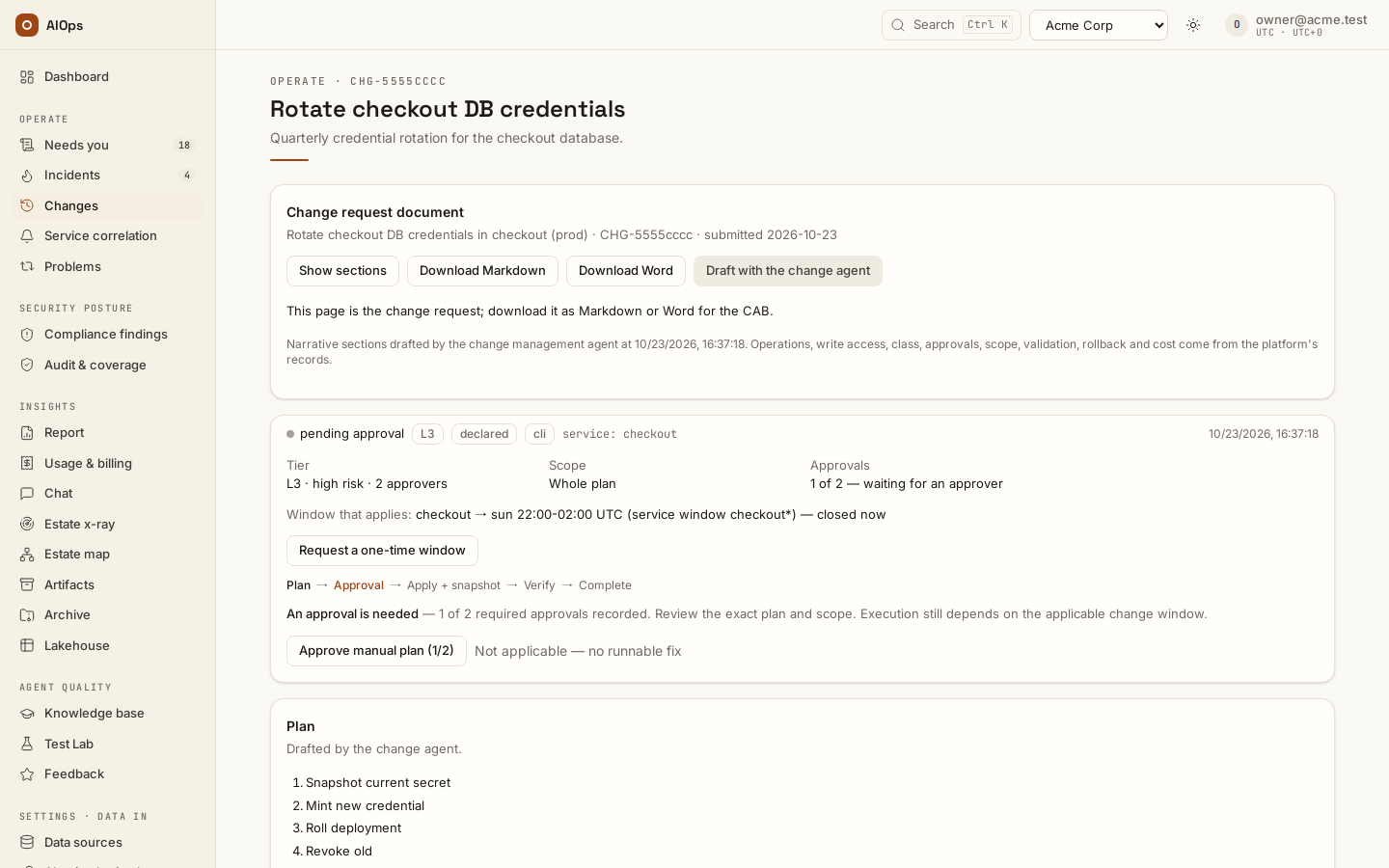
Review the action and release only through the current exact digest. Normal changes are at least L2; emergency changes are L3 with two distinct approvals. A standard PR can remain L1 because the PR is inert until merged, while a standard live-infrastructure change remains subject to the relevant L2/window rules. A Standard record for a P1/critical incident can retain emergency release rules, including two distinct approvers; read the recorded class reason and release policy. You should see the actual preview gate and the recorded first vote separately from execution.
API: change
/execution-preview,/approveand/execute; release requiresapprovals.decideand the tier/window checks.A change that writes to several resources can run one resource first: with Run a multi-resource change one resource first on (Guardrails → Pre-approved operations, off by default), the review says Canary: … runs first and the release runs the first resource's steps, reads it back with each step's own check, then the rest. A failed check stops the run before any other resource is touched and the change fails with only that resource written, so only that one needs rolling back — released as any failed change's rollback, automatic only where the workspace allows it; a check that cannot observe it does not stop the run. The first resource is the one the plan writes first (our proposal); a plan that interleaves resources runs as before. The change page records the read under What ran.
A compliance or vulnerability change can run later instead. In Review execution its dialog shows When to run: Now, At a time (UTC), or the next opening of its service's maintenance window (the window and the time it opens are shown); the button then reads Approve and schedule. Your release vote on the exact reviewed action is recorded at once. At that time the platform releases it as you through the same checks as a release now: the action unchanged (same digest), the window and the approval quorum checked again, and your role then still allowed to release it. At L2 and L3 a picked time outside the window is refused (
422); a GitOps change takes any time, since it only opens a pull request that stays inert until a person merges it. Until then the change reads Scheduled to run … with Reschedule and Cancel schedule (cancelling keeps the approvals), and the Changes list shows Scheduled · its time. If the release is refused at its time (the action changed, the window, an approver missing, your role), the change reads Not run at its scheduled time with the reason and stays approved for a person; when the reviewed action changed because the change class dropped after you scheduled it (its certified runbook was demoted or disabled), the reason says so — The change class dropped from standard to normal after this release was scheduled (…); the approvals it had no longer count. Review the change again, then release it or schedule it again. — on the change, in the audit row and in the notification; a release that ran but did not complete reads Released at its scheduled time. It did not complete: the reason, and the change itself is failed. A release the platform loses mid-way (a restart) reads Releasing and is reported as not run within the hour. An incident's fix is never scheduled: it runs as soon as it is released. Each step is audited (change.scheduled,change.rescheduled,change.schedule_cancelled,change.schedule_released,change.schedule_refused) and sent to the notification targets that takechange_schedule. Offering both a picked time and the maintenance window is our proposal while that choice is open with your change process.API:
POST /api/aiops/{tid}/changes/{id}/schedule—incidents.actorapprovals.decide(the tier decides who may release), body{"review_digest": "…", "at": "2026-11-01T02:00:00Z"}or{"review_digest": "…", "window": true};422for an incident's change, a past time, more than 62 days ahead, no window, or a time outside the window at L2/L3;409when the action changed since the review.POST /api/aiops/{tid}/changes/{id}/schedule/cancel— same permissions;409when nothing is scheduled. A new schedule on a pending one reschedules it.To refuse a request instead, select Reject beside the approval buttons and give a reason. The request becomes rejected: it leaves the waiting queue, its approval ledger shows Rejected by with the person and time, the incident's remediation step reads Not released — your reason, and the incident itself stays open for a person to re-analyse or close. That plan is not offered again: requesting or releasing it answers This plan was rejected (…) — re-analyse for a new plan, and a re-analysis drafts a new one. Only a request nobody released can be rejected (draft, planned, waiting for approval or approved); anything dispatched or finished is refused. Closing or merging the incident rejects its unreleased requests the same way. API:
POST /api/aiops/{tid}/changes/{id}/reject—approvals.decide, body{"reason": "…"}(1–500 characters).A released change whose verification never concludes does not wait forever. Once it has gone 24 hours without a verdict — none at all, or only uncertain ones (counted from the first uncertain verdict after the write, or from the write when none was recorded) — a person with
approvals.decidesees Close without verdict on its page and gives a reason. The change becomes failed with the verdict uncertain and closed without a verdict — your reason as its note, and the audit trail gets achange.closed_without_verdictrow. Nothing rolls back on the close: the rollback sweep waits while the verdict stays uncertain (a change an operator reported, or one in a computer-assist workspace, is handed to a person as usual) and Roll back stays yours to release. A later verdict still decides: cleared completes it, still present goes to the rollback sweep like any failed fix. API:POST /api/aiops/{tid}/changes/{id}/close-without-verdict—approvals.decide, body{"reason": "…"}(1–500 characters);409before the 24 hours or for any other status or verdict.
-
For an emergency, the approval that completes the quorum can permit the closed-window bypass. Inspect the bypass audit. The PIR is scheduled at submission by default since 0.1.133 (off: it opens when the write lands). You should see the review's opened/due time and pending/implemented outcome; the first vote is not a write receipt.
API: guardrails PATCH with
pir_at_submission—members.manage; the review closes viaPOST /api/aiops/{tid}/changes/{id}/pir/close—approvals.decide, with a substantive outcome note. A pending implementation cannot be presented as completed. -
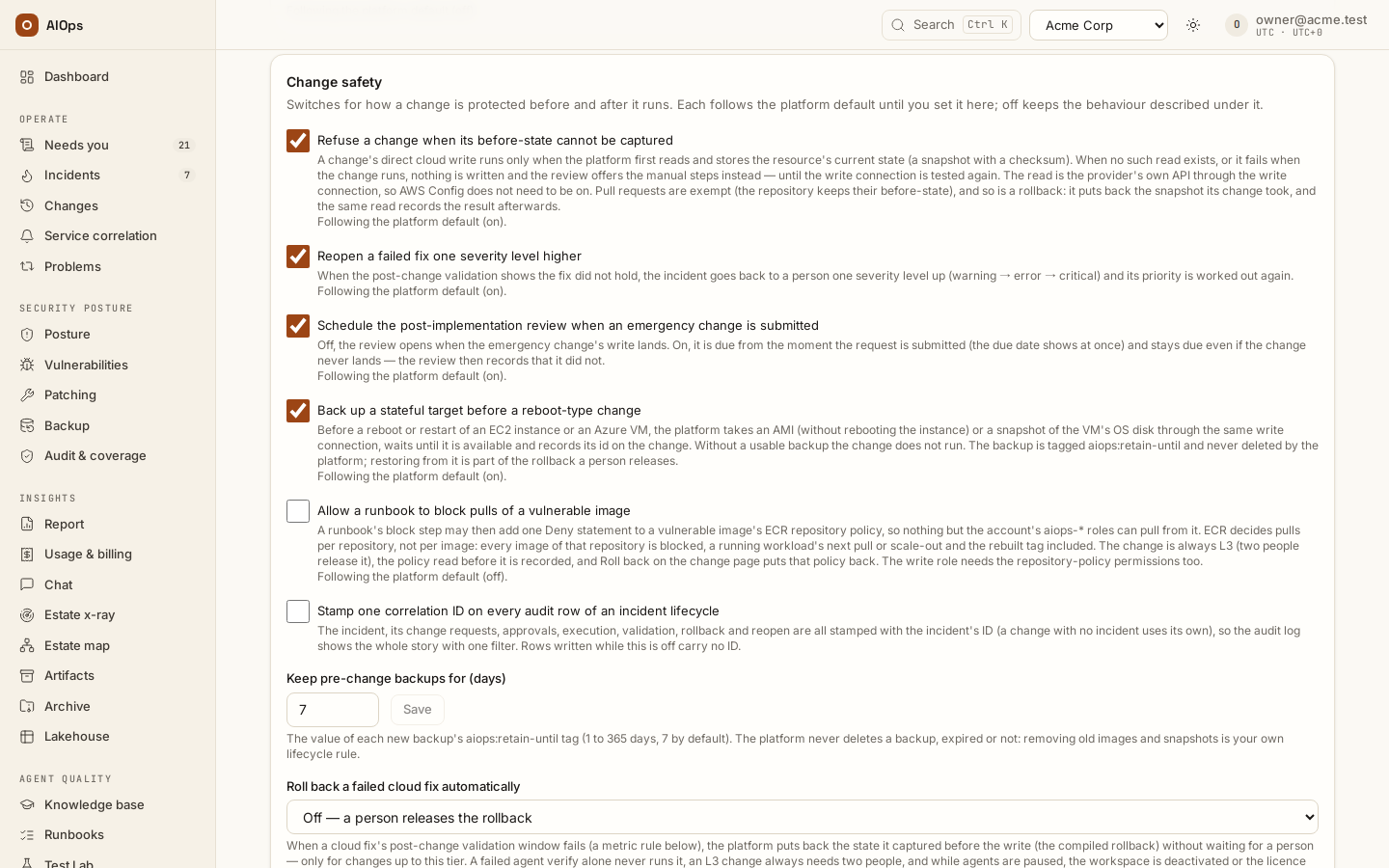
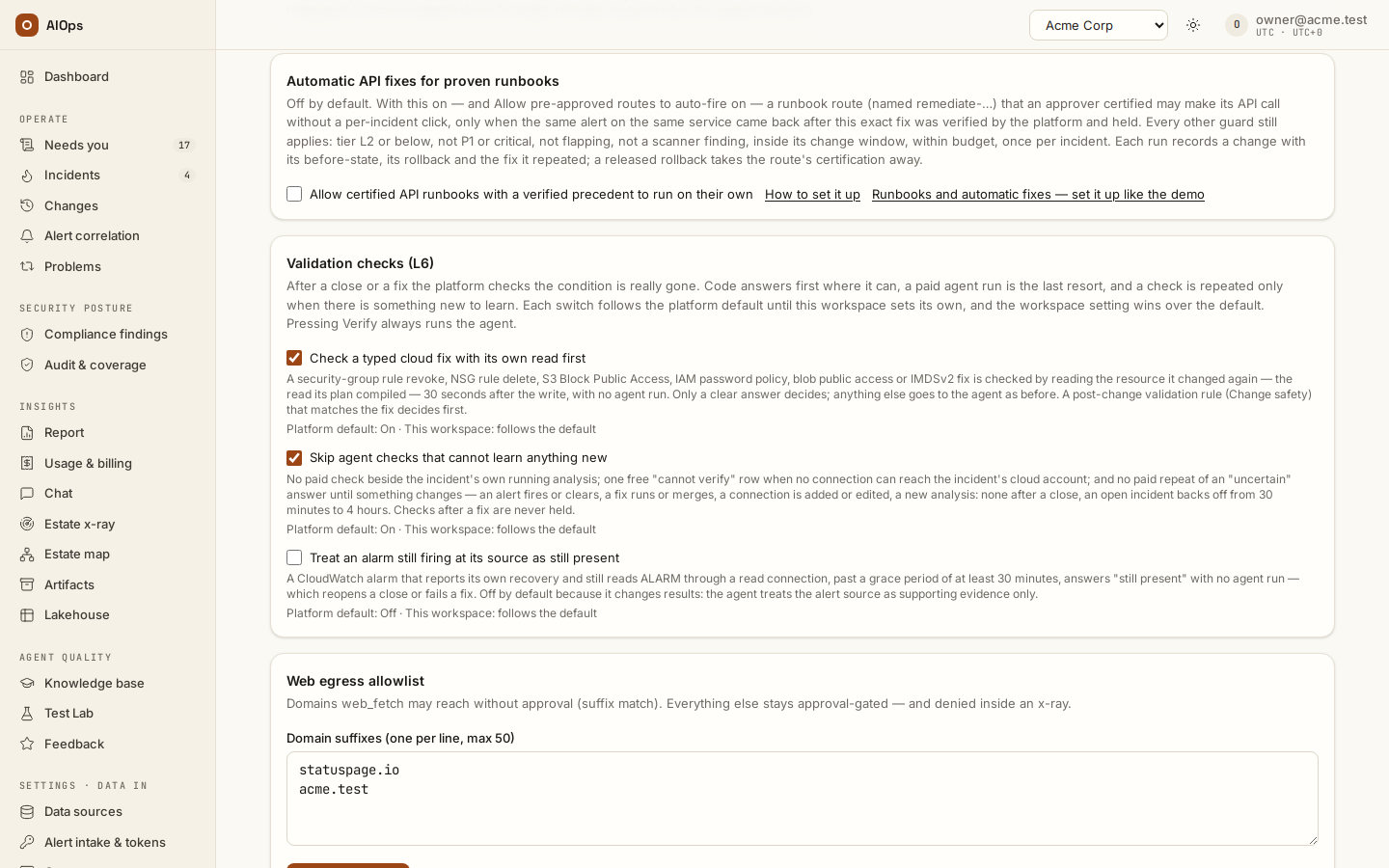
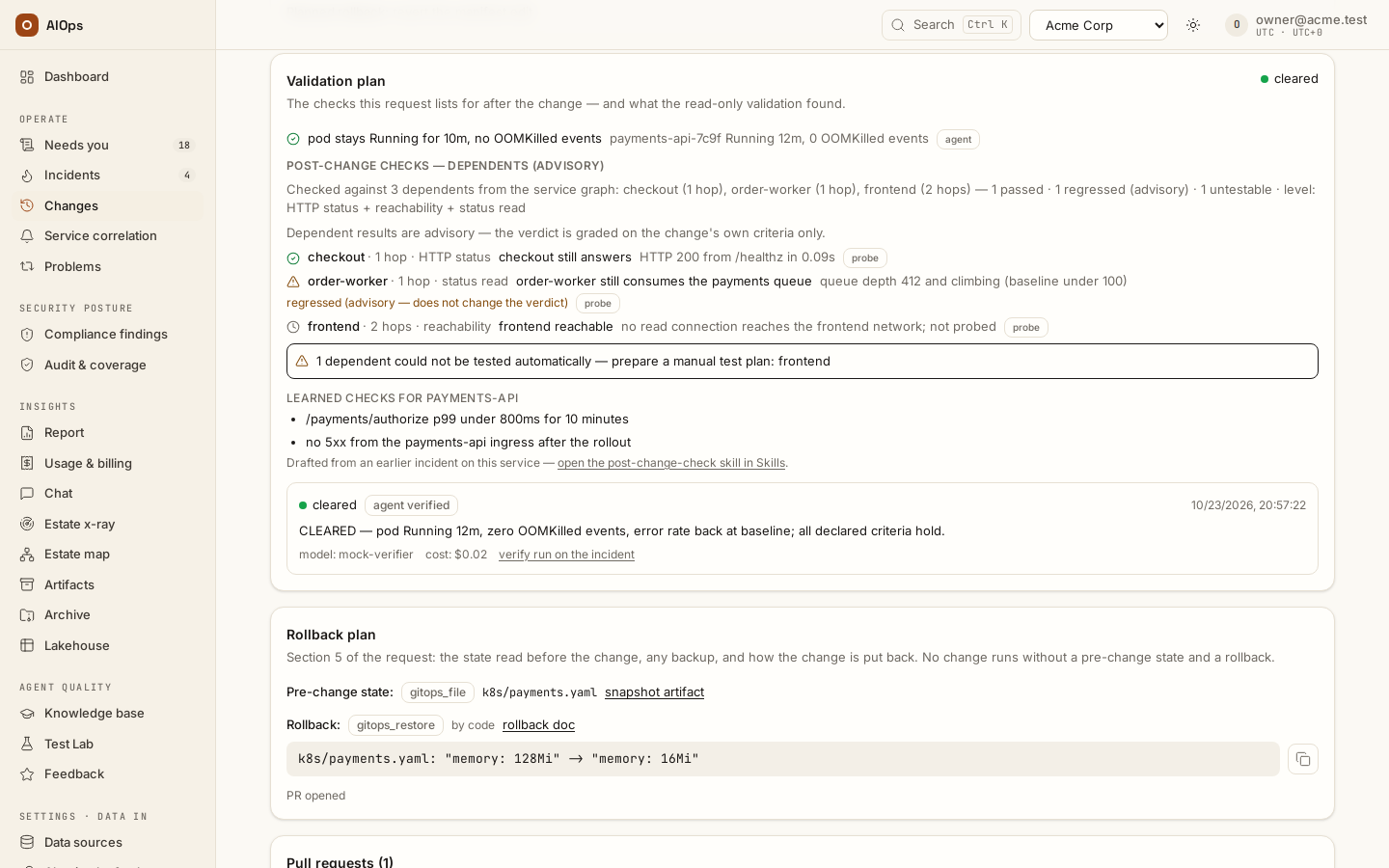
Distinguish Change safety → Post-change validation rules from the separate Validation checks (L6) card. If a metric rule matches the executed change, inspect the actual rule, threshold and period, and the rounds (three, five minutes apart by default; a rule's
minutesno longer times anything); the rounds decide before the compiled typed-fix check. Each round is read three minutes after it closes, and the change page lists every round with what it read. Every round failed fails the fix; every round clean with the alerts cleared at their source validates it; anything else goes to the verify. A gap or missing data is not equivalent to every period failing. Automatic compiled cloud rollback is limited by the configured L1/L2 policy and other guards; L3 still needs people. You should see the validation verdict, rollback decision and resource read-back rather than only a rollback plan.API: guardrails PATCH with
validation_metrics,validation_rounds,validation_interval_s,auto_rollback_cloud,reopen_raise_severityandaudit_correlation—members.manage. Enable correlation before the lifecycle starts; it does not retroactively stamp older rows.Without a matching metric window, Check a typed cloud fix with its own read first can verify supported operations through their compiled target read about 30 seconds after the write, and clears any other fix once every alert of its incident cleared at the source after the write and the changed resources on its validation plan read as expected. Skip agent checks that cannot learn anything new avoids redundant paid checks; both options default on. Treat an alarm still firing at its source as still present defaults off and changes verification behavior. Each follows the platform default until overridden. A verdict reached this way is badged platform verdict on the change page. Verify now always requests the agent, so read the automatic result before requesting additional paid work. Spend and the L6 line show the actual AI runs, failed runs and free checks.
API: guardrails PATCH fields
verify_typed_check,verify_frugalandverify_alert_rung—members.manage;nullfollows the platform default. A resource-verified finding marker is separate from the scanner’s later clear.
-
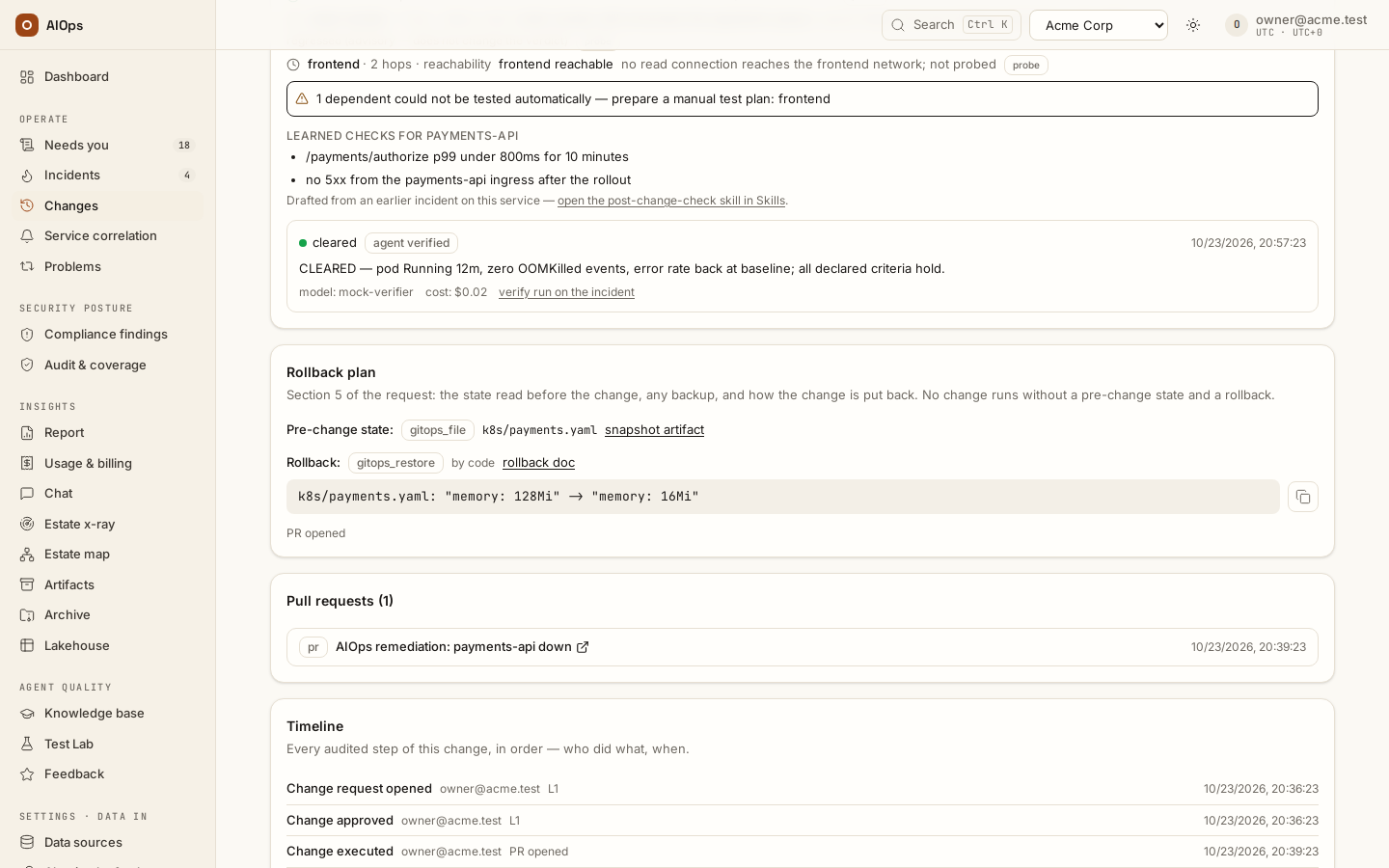
For a human rollback, use Roll back on the executed change or Undo the executed change → Review and roll back on the incident. Review the stored inverse and applicable quorum. Follow
rolling_backto the actual outcome and Verify restoration only. You should see the rollback receipt and restored-state evidence.API:
POST /api/aiops/{tid}/changes/{id}/rollback—approvals.decide; restoration verification uses/rollback-verify—incidents.act. If the outcome is uncertain, use Reconcile rollback outcome rather than retrying the write.
-
Understand the automatic sweep's decision before expecting a restore. You should see a recorded action, wait, skip or escalation reason matching this case:
Situation Expected policy boundary Eligible GitOps fix failed validation A restore PR may be opened; it remains inert until merged Provider refused before acting Skip a restore of a write that never happened The plan stopped at its backup Skip: no write step ran, nothing was applied (a person who reconciled the write as executed overrides this) Forward/rollback outcome uncertain Wait for reconciliation Compiled cloud inverse Human release unless the bounded failed-metric automatic policy applies Operator-declared rollback script Requires its configured opt-in/tier policy External work, computer-assist or unsupported/manual recovery Human escalation, not an invented executable inverse
-
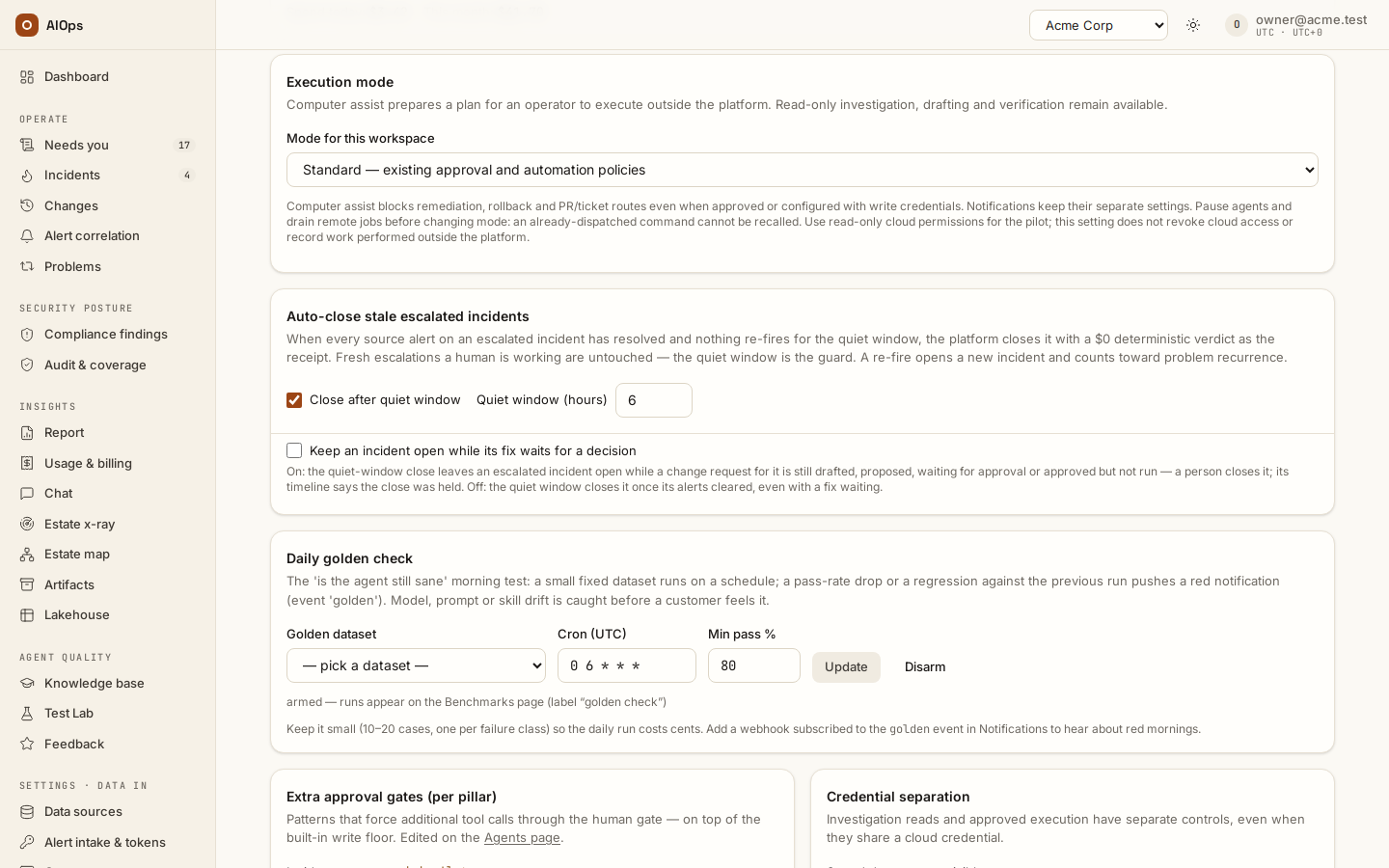
For work done outside the platform, use Execution mode → Computer assist and the documented Record external execution, Record deployment evidence or Reconcile outcome action. You should see an operator-reported receipt distinguished from a platform-executed write; merely recording it does not execute it.
API: execution mode uses guardrails PATCH —
members.manage;POST /changes/{id}/external-executionsand/application(under/api/aiops/{tid}) requireincidents.act;/reconcile-executionalso requiresapprovals.decide.
-
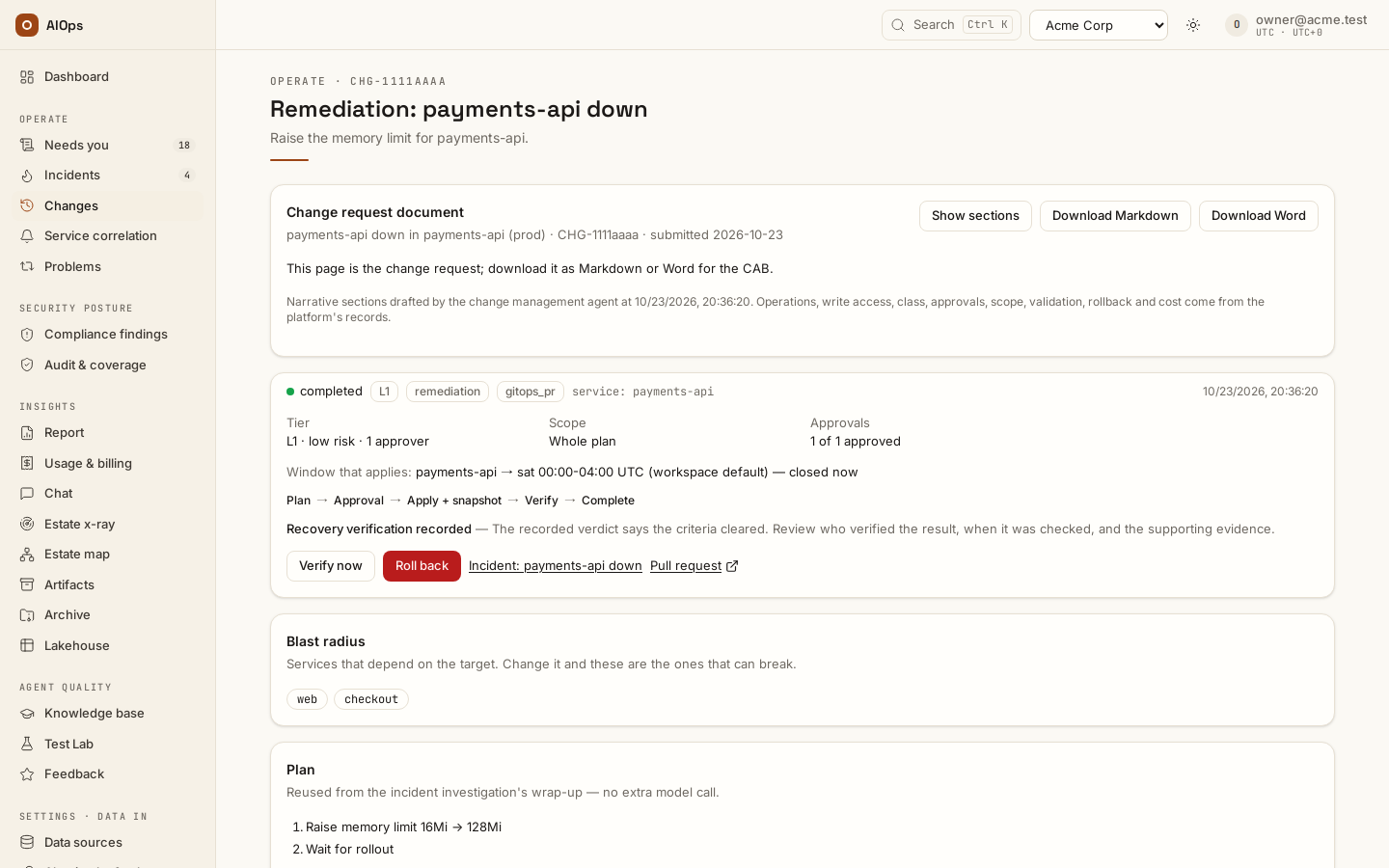
To propose a separate planned change, create it through the API/MCP, then Draft plan with the change agent. Drafting can spend model budget. You should see the resulting plan waiting for review — its Plan card reads Drafted by the change agent, as on the request pictured under step 4 — without a write merely because the plan exists.
API:
POST /api/aiops/{tid}/changes/ MCPcreate_change, thenPOST /api/aiops/{tid}/changes/{id}/plan; verify the caller's currentincidents.actpermission and plan scope.
What the ledger records as a change
| Write | Recorded | How it arrives |
|---|---|---|
| A person's write to a cloud account | Yes | CloudTrail / Azure activity log harvest |
A person's kubectl write (a pod delete included) |
Yes | EKS audit log (k8s_audit: true) or the audit webhook |
A CI/CD pipeline's service account in a namespace listed in k8s_ci_namespaces |
Yes, one row per object per pull, at most 50 objects per account | The same audit log (CI/CD service accounts) |
| An Argo CD sync, a push or merge on a watched repository | Yes | Their webhooks and the repository harvest |
| The cluster's own controllers, kubelet, leases, events, other service accounts | No | Left out of the EKS query (not read, not counted); the audit webhook drops them |
A server-side dry run (dryRun=All, how Flux compares every object it manages) |
No | Left out the same way: nothing changed |
| Pods a controller restarts on its own, nodes the cloud replaces | Not today; still open | — |
Verify and cleanup
Retain the exact request, independent approvals, before-state, provider/PR outcome, verification, rollback and PIR. Restore temporary windows/switches with read-back proof. Keep planned work and evidence intact after a refused or uncertain action. Never repeat a write to tidy the record.
Troubleshooting
| Symptom | Check | Next step |
|---|---|---|
| Change window closed | UTC body, class/tier, actual preview verdict | Use the agreed window or the genuine emergency quorum; do not relabel to bypass policy |
| Manual route only | Supported operation, writer state, consent and before-read | Repair the named prerequisite and review afresh |
| Failed with provider refusal | Provider text and whether any action occurred | Preserve the failed receipt; do not assume a rollback is needed |
| Receipt pending | Actual resource state and request identity | Reconcile before any retry |
| Route demoted after rollback | Current certification and rollback record | An approver reviews and certifies the revision again, or keeps it manual; a tick alone is not proof of certification |
| PIR cannot close | Implementation outcome still pending | Record the real outcome first |
Related
Approved fixes · Incidents · Guardrails and cost limits · Report changes to the change webhook · Audit log · Runbooks and automatic fixes · Automatic API fixes.