Runbooks and automatic fixes — set it up like the demo
Certify a remediation route so a proven fix runs without a per-incident click, and read why one did not run.
How-to · Updated 2026-10-27 · Describes release 0.1.164
What this chapter is for
Most fixes in this platform wait for a person: the analysis proposes them, someone approves, someone releases. A runbook route is the exception your workspace can choose: a remediation route you set up once, that an approver certifies, and that may then open its pull request with no per-incident click. This chapter walks through that setup the way the demo workspace does it, step by step, with the portal clicks and the exact API and MCP calls, and explains what you see when a route ran on its own, and when it matched but did not run.
Nothing here is on by default. A new workspace runs no fix on its own until a workspace owner turns on Allow pre-approved routes to auto-fire and an approver has certified a route.
Three ways a fix runs
| How | When | What runs |
|---|---|---|
| A person releases it (the default) | Every fix, unless the two cases below apply | The approver reads the exact action on the incident and releases it (Approve & create PR, Approve & run). |
| A pre-approved GitOps route opens its pull request on its own | Allow pre-approved routes to auto-fire is on, the route is certified at its current revision, the fix is tier L2 or below, and every other guard below holds | A pull request. It is inert until a person merges it. |
| An API runbook makes its call on its own | The workspace owner turned on Automatic API fixes for proven runbooks (off by default) as well as the switch above, an approver who can still approve certified the runbook, and the alert has a precedent: it came back after this exact runbook revision fixed it, the platform verified that fix and it held | The certified call — exactly its declared operation — repeating that verified fix. The first occurrence of any fix is always a person's release. Without the switch an API route always waits for a person, and its incident says so. Set up step by step in Automatic API fixes for proven runbooks. |
CLI, MCP and network routes never run on their own, and an API route only through the switch in the third row. Only an incident's fix runs on its own: a compliance control, a scanner finding, a vulnerability or a security alert is fixed only after a person approves it, whatever runbook matches; the incident's Timeline records why each time a pre-approved one matched and waited. A step runbook (next section) is the fourth way: its steps run through the reviewed plan of the change request, never as one call.
Step runbooks: ordered steps that carry their own operations
A step runbook is a route whose parameters hold runbook: an ordered procedure, the way a change request is written — check the current state, back up, change, validate, roll back — with the targets as parameters. Saving it derives the route's operations from its backup and change steps, so the list is never typed by hand.
{"runbook": {"version": 1,
  "parameters": {"instance": {"kind": "aws.ec2.instance", "from": "annotation:resource_arn", "required": true}},
  "steps": [
    {"id": "check",    "phase": "check",    "target": "${instance}"},
    {"id": "backup",   "phase": "backup",   "operation": "aws.ec2.create_image",   "target": "${instance}"},
    {"id": "fix",      "phase": "change",   "operation": "aws.ec2.reboot",         "target": "${instance}"},
    {"id": "verify",   "phase": "validate", "criteria": "The instance ${instance} passes its status checks"},
    {"id": "rollback", "phase": "rollback", "operation": "none", "reason": "a reboot leaves nothing to put back"}]}}
| Phase | What it is |
|---|---|
check |
The read of the target's current state the platform takes before each write (the pre-state on the change page). Declared, never a command. |
backup |
A backup operation before the change (aws.ec2.create_image, aws.ec2.create_snapshot, azure.compute.disk_snapshot). Only a runbook inserts one; the analysis never proposes it. It is compiled and run like a pre-change backup — through the write connection of the change step after it, waited for until available, tagged aiops:retain-until — whatever aiops_backup_before_change says, and the review adds no second backup for that target. |
change |
A typed operation — the same vocabulary as a prepared plan. |
validate |
The criteria the post-change validation reads. A standard change is still validated. |
rollback |
compiled_inverse (put back the pre-state read before the write), the revert operation it names, or none for a recovery step such as a start or reboot, and for an image rebuild (it only adds a tag). |
What a runbook can express today. Each backup and change step is one operation of the typed catalogue — the same one a prepared plan uses: security-group and NSG rule changes, IMDSv2 on an EC2 instance, starting, rebooting or restarting an EC2 instance, an Azure VM, a GCP instance or a Windows service, restarting a Kubernetes deployment, the account-wide S3 public access block and IAM password policy, blob public access on an Azure storage account, a repository edit, and the backups (aws.ec2.create_image, aws.ec2.create_snapshot, azure.compute.disk_snapshot, aws.lambda.publish_version). Eight more operations exist for runbooks only — the analysis never proposes them, so a fix gets them by naming a runbook that carries them: aws.ssm.patch_baseline, aws.ec2.isolate and aws.ec2.restore_sgs (the EC2 patch runbook below), the container image rebuild (aws.ecr.rebuild_image), the opt-in pull block (aws.ecr.block_image_pulls), aws.lambda.update_runtime and aws.lambda.update_alias (the Lambda runtime upgrade below), and the package upgrade (aws.ssm.upgrade_packages). There is no EBS volume modify and no command or script step yet: a fix with any step outside these stays a normal change that a person releases.
Container image rebuild
A vulnerable container image is never fixed by touching what runs it. aws.ecr.rebuild_image builds a new image beside it: the platform starts ONE build of your own CodeBuild project aiops-image-rebuild, which pulls the vulnerable image by its digest, upgrades the packages the scanner named to the versions it says fix them, in a layer on top of the image, and pushes the result to the same repository under a NEW tag — the image's tag followed by -aiops-chg- and the change's id (v1.4.2-aiops-chg-3f2a1b4c; the digest's head for an untagged image). The old tag and digest stay untouched, nothing running is changed, and no workload is redeployed: each one moves to the new tag through its own release. So there is nothing to undo — the rollback step is none, and a failed build leaves nothing to revert.
{"runbook": {"version": 1,
  "parameters": {"image":    {"kind": "aws.ecr.image", "from": "annotation:resource_arn", "required": true},
                 "packages": {"kind": "string", "from": "annotation:vulnerable_packages", "required": true}},
  "steps": [
    {"id": "check",   "phase": "check",    "target": "${image}"},
    {"id": "rebuild", "phase": "change",   "operation": "aws.ecr.rebuild_image", "target": "${image}",
     "args": {"packages": "${packages}"}},
    {"id": "verify",  "phase": "validate", "criteria": "The new tag reads present and the scanner scans it"},
    {"id": "undo",    "phase": "rollback", "operation": "none", "reason": "the old tag stays untouched"}]}}
- Only a runbook carries it. The analysis never proposes it; it names the runbook (Let the analysis pick a matching route instead of typed steps) and the platform binds the image (
aws.ecr.image:arn:aws:ecr:REGION:ACCOUNT:repository/NAME/sha256:DIGEST, what Inspector names inannotation:resource_arn) and the packages (annotation:vulnerable_packages, the scanner's name (MANAGER) installed -> fixed list) from the finding's alert. It runs on the native AWS API write connection only. - What it can upgrade. OS packages (
OS: apt, apk, dnf, microdnf or yum, whichever the image has) and installed Python packages (PYTHONPKG,PYTHON: pip) — only packages the image already has, and never to an older version: the build refuses a package the finding names but the image does not hold. A Debian or Ubuntu finding names the source package (expat,glibc): the build upgrades every installed package built from it (libexpat1,libc6). With apt and apk the fixed version is the least the image ends with: the build takes the newest version the package mirror has (a mirror drops a release once a newer one replaces it) and fails when that is still below the fixed version — the mirror has no fix yet, or the build could not read it; dnf, microdnf and yum install the fixed version itself, and the build fails when the package is still below it afterwards. A project created bydeploy/awsbefore 0.1.155 runs the earlier buildspec, which refuses a source package (expat is not installed in the image): re-applydeploy/awsto update it. A package compiled into the image's binaries (GOBINARY, a JAR, a Node module tree), one a dependency file in the image pins (PIP,PIPENV,POETRY: arequirements.txt,Pipfile.lockorpoetry.lockthe scanner reads, which a layer on top never edits) or one with no fixed version refuses the whole step — a partial rebuild would push an image the scanner still flags: rebuild it from source with a pull request on the Dockerfile or the dependency manifest instead. - What it runs. Before the start it reads the image by digest (its tags name the new one; a multi-architecture image is refused — the build rebuilds
linux/amd64only) and proves the new tag is free (ImageNotFoundException); the start sends exactly five variables (AIOPS_SOURCE_IMAGE,AIOPS_TARGET_TAG,AIOPS_OS_PACKAGES,AIOPS_PIP_PACKAGES,AIOPS_CHANGE) and is checked again right before it is sent; then it reads the build every 20 seconds until it ends (75 minutes at most, then uncertain: reconcile it in CodeBuild) and reads the new tag back. The receipt names the new tag and its digest; the change page's step shows them. A build the platform stopped waiting on — the wait ran out, the start's answer was lost (start uncertain), or the platform restarted mid-wait — is read again on the scheduler's tick: its build, else its new tag, records it as built or failed (the change itself stays for a person to reconcile). - Built, not deployed. Once the build pushed the new tag, the validation reads the scanner's finding on the OLD digest ($0, no agent run). Still open — the old digest is still in the registry and still scanned, whether or not a workload runs it — reads NEW IMAGE BUILT, NOT DEPLOYED: the change completes (it did what it promised), the incident is escalated to a person (the deploy is theirs; the platform never redeploys), and the incident page and its finding's page show New image built, not deployed with the new tag and digest. The incident's notification targets that take
image_not_deployedhear it then and again every 24 hours (aiops_image_reminder_h,0= once) until the scanner stops reporting the old digest; that clear resolves the incident. Once nothing runs the old digest, delete or untag it in the registry (or let the scanner's re-scan period for it end) to stop the reminders. One CVE incident can name several images: CLEARED needs every finding linked to the incident cleared, not only the rebuilt image's. Incident and finding details carry it asimage_rebuilds(images[]withnew_tag,new_digest,deployed, andremind_every_h). - The project is yours. The platform never creates or edits a CodeBuild project.
deploy/awscreatesaiops-image-rebuildwithimage_rebuild = true: its buildspec (deploy/aws/buildspec/image-rebuild.yml) refuses a tag that exists or is not a rebuild tag, and its own role pulls and pushes only repositories taggedaiops-managed=true. The write role may start only that project, and only while it carries the tag (write role permissions).
Block pulls of this image
Opt-in, off by default: turn on Allow a runbook to block pulls of a vulnerable image on Change safety first. A runbook step aws.ecr.block_image_pulls (target ${image}, rollback compiled_inverse) adds ONE Deny statement to the image's ECR repository policy — ecr:BatchGetImage and ecr:GetDownloadUrlForLayer refused to every principal but the account's aiops-* roles, so a rebuild can still pull the image — with a Sid naming the digest (AiopsBlockPulls and its first 12 hex digits).
- It blocks the repository, not one digest. ECR authorizes a pull per repository and no IAM condition names an image digest, so every image of that repository is refused — a running workload's next pull, a new node or a scale-out included, and the rebuilt
-aiops-chg-tag too, which lands in the same repository: roll the block back before the workloads move to it. Use it when nothing in that repository may be pulled until it is fixed. - Always L3. Two distinct people release it, whatever the change class, and it never runs automatically. With the switch off the review refuses the step.
- Reversible. The repository policy is read right before the write and recorded; the write is that policy plus the statement (nothing is written when the read failed, the recorded policy carries redacted bytes, or the result would pass ECR's 10,240-character limit). Roll back on the change page puts the recorded policy back, or deletes the policy when there was none, and the same read records whether it is back. A person releases it. It runs only while the repository still holds exactly the policy the block wrote: after a second block on the same repository, or an edit, it is refused (roll back the later block first, or remove the statement by hand) — putting back the recorded policy would undo those too.
- It fixes nothing. Its validation ($0) reads PULLS BLOCKED: the change completes and the incident goes back to a person — the rebuild and the deploy remain.
- The write role needs it too.
deploy/awsgrantsecr:GetRepositoryPolicy,ecr:SetRepositoryPolicyandecr:DeleteRepositoryPolicyon repositories taggedaiops-managed=trueonly withimage_pull_block = true; the guided CloudShell setup never grants them (a repository policy can also grant access).
Parameters are bound by code, never by the analysis. from is label:<name> or annotation:<name> of the alert that opened the incident's current episode — after a reopen, the alert that reopened it — taken from the incident's own alerts only, the ones carrying the service its key names (a later alert joining it never moves the target, and an alert a merge or grouping brought in from another service never binds) (Security Hub findings carry the resource in annotation:resource_arn, and so does a CloudWatch alarm on an EC2 InstanceId: the bare id in label:InstanceId is not an instance ARN and never binds), literal with a value, or plan (the analysis's own target for that step — such a runbook can make a fix standard, but it never runs on its own). A value that is not the parameter's kind exactly — an EC2 instance ARN, an Azure VM id, a security-group rule id — leaves the parameter unbound, and an unbound runbook does not run.
Edit it on the route. In the route editor (Legacy remediation routes → a route → Edit), Add runbook steps starts one; each step has its phase, operation and target, with Add step, Add parameter, Up, Down and Remove. Check runbook previews it against sample alert values: the steps with every target bound, the operations it carries, the quality check, and the Permissions the write role needs — the provider actions per step and a least-privilege IAM policy (AWS) or custom role (Azure) for the write role. For a saved runbook, Check the write connection's permissions asks the cloud whether the write connection holds them (AWS IAM policy simulation, Azure permissions; read-only, nothing runs). On AWS it simulates a resource tagged aiops-managed=true in the connection's region, the scope of the guided write role, with the backup's tags where a step creates an image or snapshot; a write role scoped by another tag key or value (a Terraform install with its own tag) reads unknown there, not missing. The route list shows the runbook as runbook · N steps, with the findings still to fix.
The quality check. An approver can certify a step runbook only when it passes every rule: at least one change step; a validate step after every change; a rollback for every change (the compiled inverse where the platform can compile one, its revert operation, or none for a recovery step); a backup of the same target before a reboot-type change or a patch (aws.ec2.create_image before aws.ec2.reboot, aws.ssm.patch_baseline or aws.ssm.upgrade_packages, azure.compute.disk_snapshot before azure.vm.restart; aws.ec2.create_snapshot takes an EBS volume, so it backs up a string parameter only, never an instance); an aws.ec2.isolate followed by an aws.ec2.restore_sgs change step on the same target, with its isolation group named (args.security_group), and a restore never before an isolation; every ${parameter} declared and bound to a kind its operation acts on; every operation in the typed catalogue (a revert is never a change step); no command, script or other free-text write in a step; a check (or backup) before the first change; and no pin on one resource (pinned_target, pinned_selector: see One use case, never one resource). Saving a draft that does not pass is allowed — the editor lists what to fix.
Certification. Only an approvals.decide holder certifies, under the same four-eyes rule as any route. A step runbook adds two conditions: its quality check passes, and its write connection does not definitely lack a permission it needs. A check the cloud cannot answer — introspection refused, or a GCP or Kubernetes connection — does not block the certification: the route reads permissions not confirmed (unknown does not mean granted) — an incident's fix runs on its own only after the check passes, and a person releases its changes until the check passes. On AWS an action the write role does not allow — no statement grants it, or a Deny or a permissions boundary refuses it — reads missing and refuses the certification, whatever condition keys IAM says it lacked: IAM lists every key the role's policies use, related to that action or not. So does a grant that holds only under a condition the check cannot supply (a source IP or VPC endpoint, a principal tag). Unknown is kept for an allow IAM answered with a key still absent and for a target whose tags cannot be read; a key the check can supply after all (a region key, a resource tag under another service's prefix) is filled in and asked again. With no target, the check simulates a resource tagged with the write connection's scope.resource_tag (Scope JSON, for example {"regions": ["ap-southeast-1"], "resource_tag": {"team": "ops"}}; deploy/aws prints it in datasource_snippet), else aiops-managed=true, in the connection's region — so a role scoped by another tag reads missing until the connection names it. A container image's ECR actions are simulated against its repository, the isolation's group side against the security groups it attaches. Before every automatic run the check runs again against the run's real targets with the tags read from them: on a target without the aiops-managed=true tag it reads missing, and on one whose tags cannot be read (an EBS volume) unknown — either way a person releases that change. A runbook built from an incident (next section) is certified only once that incident is resolved. A runbook written by hand in the route editor has no incident behind it: the approver's reading of its steps, the quality check and the permission check are its whole proof, so certify one only for a procedure your team has already run.
It carries its own operations. With A certified runbook carries its own operations on (Guardrails → Pre-approved operations; on by default), a step runbook an approver certified at its current revision pre-approves its own backup and change operations — never a revert — and Pre-approved operations applies to single-call routes only. Off, a step runbook's operations must be ticked there too.
When it makes a change standard. With Standard change for a runbook route's operations on (the default), a change request is standard when a certified runbook matches the fix exactly: the same operations in the same order, each on the target the runbook binds from the alert, nothing manual beside them. A fix with one more action, another operation, or another target is a normal change and waits for an approver. A fix whose step targets the resource of an alert merged into the incident (the resource label or resource_arn annotation of an alert another service's incident brought in by a merge, a fold or the grouping wait), and none of the incident's own, is never standard, whatever made it so — a runbook target the analysis picked (from: plan), a fixed one, or the analysis's own typed steps: the class reason says which step names which resource, and neither a person nor the automatic lane can release it; re-analyse so the fix acts on the incident's resource. The refusal is audited: Change release refused on the change's history when it is released from the change page, Fix failed with refused: … on the incident's Timeline when it is released with Approve & run, and Pre-approved route matched — not run for the automatic lane. A target that names none of the incident's resources is not refused on that ground alone: an alert's resource is often another kind of thing than the fix's target (a cluster against the deployment restarted in it, a VM against the chaos experiment stressing it). When the analysis names a runbook instead of writing steps (Let the analysis pick a matching route instead of typed steps), the platform expands the runbook's own steps from the alert; an uncertified runbook expanded that way is a normal change. A compliance control or a scanner finding is offered only the enabled step runbooks certified at their current revision whose selector matches and whose targets all come from the alert — never a single-call route, never a runbook that is uncertified, edited since its certification or disabled, never one with a target the analysis picks (from: plan, which still matches the analysis's typed steps), and none at all in a run a person left resources out of; naming one there works the same way. The change request then holds the runbook's steps instead of typed steps of its own, and a person releases it like any prepared fix: Approve & run in the incident's Prepared change section, or Review execution on the change page. An edit to the runbook drops its certification, and a demoted or disabled runbook stops matching new fixes.
When several runbooks cover one change (a proposal still open with your change process, so it is off until a workspace turns on Let several runbooks cover one change request on Guardrails → Pre-approved operations): when no single runbook covers the fix, consecutive certified runbooks may cover its steps in order — one change request carrying each runbook as a block. It is standard only when every block is certified and matches; the class reason names them, and withdrawing any one of them (demote, disable, edit) makes the request normal. With the switch off, such a fix is a normal change.
When it runs on its own. With Allow pre-approved routes to auto-fire and Automatic API fixes for proven runbooks both on, a standard change that certified runbooks made standard is released with no click, through its own change request (request, approval as certified runbook released automatically, execution), when every guard holds: each runbook still certified at the stamped revision by an approver who can still approve; the request's class is the standard those runbooks made (never a class a person raised, or one inherited from such a request); no runbook parameter takes its target from the analysis's plan (from: plan); the live analysis still matches it exactly; an incident, never a compliance control, scanner finding, vulnerability or security alert (a finding is fixed only after a person approves it, whatever runbook matches); not an incident about an unauthorized change (never, whatever runbook matches); no resource a person left out of the run (a subset chosen with Analyse with N of M open resources); release rules other than emergency (a P1 or critical fix certified runbooks made standard is released under the standard rules, so it may run too); the analysis did not ask for a person; not a reopen; the runbook has not run on this incident; the change windows are open with no freeze; no earlier automatic run of the runbook is still running, unverified or failed; the incident is neither unmapped nor flapping; the review is ready at tier L2 or below and runs only through the runbooks' own write connections; and the cloud confirms those hold every permission the runbook needs (a check it cannot answer stops the run as surely as a missing permission). Unlike a single-call API runbook it needs no precedent: the certification is the proof — for a runbook built from an incident, a certification given only after that incident was resolved; for a hand-written one, the approver's own reading of its steps. A refusal is one Pre-approved route matched — not run row on the incident with the reason. The release is checked once more under its locks right before the first step: when that check refuses it (a certification, an approval or the reviewed action no longer holds), nothing runs — the change is rejected, the incident escalated, and its Timeline reads Automatic fix refused before dispatch · nothing ran: <reason>; it uses the incident's one automatic try, so a person releases the fix. A step that fails stops the run: the change is failed, the incident escalated, waiting for a person (Automatic fix failed · a step failed). Each later step is checked the same way right before it runs, against the blast radius the release was approved on (the run's own writes reach the estate while it runs); a check that refuses stops the run there, failed the same way (Automatic fix failed · stopped before step N: <reason>).
Steps on the incident and the change. The incident's L5 row and the change page's Runbook steps card list every step in order with what became of it: the check from the pre-state read, backup and change from each step's receipt (or Running while it is in flight), validate from the post-change verdict (with the time it landed), and roll back from the rollback's result (Not needed once the change validated). Steps after a failed one read Skipped — an earlier step stopped the run; a check whose write never ran reads Not run — it reads the target right before its write, which never ran. A refused rollback shows its refusal on its own row; a rollback row behind it reads Not run — the rollback stopped at a refused step. On the change page each back-up and change step also shows the exact call bound to the approval and, once it ran, the provider's answer; the separate What ran card appears only for a reviewed step no runbook row shows. A backup step is labelled Automated (platform backup) and counts among the automatable steps, a restore Automated (released by a person); the pre-state notice leaves a backup out — creating an image has no before-state, and its wait until the image is available is its check.
In plain words: see Write, verify and certify a runbook.
Through the API: POST /api/aiops/{tenant_id}/routes/runbook-preview (body params, the route's name and selector, sample labels and annotations; datasources.view) and POST /api/aiops/{tenant_id}/routes/{route_id}/permissions-check (datasources.manage, audited route.permissions_checked). The MCP operations are preview_runbook and check_route_permissions. Incident and change details carry runbook (blocks, certified, released, steps[] with status).
The EC2 patch runbook: back up, isolate, patch, put the groups back
The happy path for patching one EC2 instance is a step runbook: an image first, the instance moved to an isolation security group, the missing patches installed, the instance's own security groups put back, and the result validated after the change. The demo workspace's example route EXAMPLE: EC2 patch with backup and isolation holds it, disabled, on a disabled placeholder write connection (example-aws-writer): it passes the quality check and reads as certified by the platform, never by a person, so it carries no operation of its own and never runs on its own. Other workspaces do not get the example: create the route from the request below. Its selector is the platform's own patch finding (service = control:PATCH.COMPLIANCE, resource_type = AwsEc2Instance); a copy for Security Hub's SSM.2 finding selects control:SSM.2. To use it, point it at your AWS write connection, set its isolation group, enable it and certify it as a person. Name it remediate-… (the example's name does not start that way): only a runbook route named so makes a fix a standard change; under any other name a certified copy still works, as a normal change an approver releases.
POST /api/aiops/{tenant_id}/routes
{"name": "remediate-ec2-patch", "priority": 60, "enabled": false, "mode": "api",
 "datasource_id": "<your AWS write connection>",
 "selector": {"service": "control:PATCH.COMPLIANCE", "resource_type": "AwsEc2Instance"},
 "params": {"runbook": {"version": 1,
  "parameters": {
    "instance": {"kind": "aws.ec2.instance", "from": "annotation:resource_arn", "required": true},
    "isolation_group": {"kind": "aws.security_group", "from": "literal", "required": true,
                        "value": "arn:aws:ec2:us-east-1:111122223333:security-group/sg-0123456789abcdef0"}},
  "steps": [
    {"id": "check", "phase": "check", "target": "${instance}"},
    {"id": "snapshot", "phase": "backup", "operation": "aws.ec2.create_image", "target": "${instance}"},
    {"id": "isolate", "phase": "change", "operation": "aws.ec2.isolate", "target": "${instance}",
     "args": {"security_group": "${isolation_group}"}},
    {"id": "isolated", "phase": "validate",
     "criteria": "Every network interface of ${instance} lists only ${isolation_group}"},
    {"id": "patch", "phase": "change", "operation": "aws.ssm.patch_baseline", "target": "${instance}"},
    {"id": "patched", "phase": "validate",
     "criteria": "AWS-RunPatchBaseline reports Success on ${instance} and Patch Manager lists no missing or failed patch for it"},
    {"id": "restore", "phase": "change", "operation": "aws.ec2.restore_sgs", "target": "${instance}"},
    {"id": "restored", "phase": "validate",
     "criteria": "Every network interface of ${instance} lists the groups recorded before the isolation and the service on it answers again"},
    {"id": "undo-isolation", "phase": "rollback", "operation": "aws.ec2.restore_sgs"},
    {"id": "undo-patch", "phase": "rollback", "operation": "aws.ec2.restore_root_volume"}]}}}
Replace the isolation group's ARN with your own group's (see The isolation group below).
How a patch finding reaches it. A patch finding keeps the reviewed plan lane of every finding. In a workspace with a write-capable connection and Let the analysis pick a matching route instead of typed steps on, its analysis is offered the runbook once it is enabled and certified at its current revision, names it, and the change request carries the runbook's steps — image, isolation, patch, restore — with the instance bound from the finding's alert. A person releases it. It is a standard change only under a remediate-… name whose operations are pre-approved — certified by a named approver while A certified runbook carries its own operations is on (the default), or ticked on Pre-approved operations; the shipped example is certified by the platform's seed and owns none. Standard or not, it never runs on its own, even with both automatic-fix switches on (When it runs on its own).
Which instance. The runbook binds ${instance} from the incident's alert, as every runbook does, and the earliest alert of the incident's current episode that is still firing wins: one patching incident holds every non-compliant node, and a node already patched clears first, so the next run takes the next node, not the patched one. Each run patches one instance.
The validate rows below are criteria: the post-change validation reads them after the whole change has run, not between steps. The platform does not confirm the isolation before it sends the patch.
| Step | Phase | Operation | What the platform does |
|---|---|---|---|
check |
check | — | Reads the instance (ec2:DescribeInstances) before the first write |
snapshot |
backup | aws.ec2.create_image |
An image with no reboot, tagged with the change, waited for until it is available |
isolate |
change | aws.ec2.isolate |
Reads the instance's network interfaces and records the groups each one has, checks the isolation group, reads the instance's patch state (ssm:DescribeInstancePatchStates: a node with nothing missing is not isolated), then moves every interface to it — one ec2:ModifyNetworkInterfaceAttribute per interface. A node Patch Manager reads compliant stops the run there: nothing changed, the change ends not_needed (Not needed — … needs no patch now), not failed, and no rollback is proposed |
isolated |
validate | — | Criterion: every interface lists only the isolation group |
patch |
change | aws.ssm.patch_baseline |
Checks the instance is an online Systems Manager node, sends AWS-RunPatchBaseline with Operation=Install and the default reboot (RebootIfNeeded), then reads the command's result (ssm:GetCommandInvocation) until it ends |
patched |
validate | — | Criterion: the command reports Success; Patch Manager lists no missing or failed patch |
restore |
change | aws.ec2.restore_sgs |
Puts the groups recorded before the isolation back on every interface |
restored |
validate | — | Criterion: every interface lists its recorded groups and the service answers again |
undo-isolation |
rollback | aws.ec2.restore_sgs |
The recorded groups back on an instance still isolated, after the root volume restore when a person releases Roll back (and an operator line per interface on the rollback plan) |
undo-patch |
rollback | aws.ec2.restore_root_volume |
The root volume replaced from the image the backup took, released by a person |
The isolation group. One security group in the instance's VPC with no inbound rule and outbound TCP 443, plus TCP 80 where the patch repositories are plain HTTP (Ubuntu's EC2 mirrors, many Debian mirrors, parts of Windows Update), and nothing else — the SSM agent and the patch repositories stay reachable. The runbook names it as a parameter of kind aws.security_group (the example: isolation_group, a literal ARN to replace with yours). Right before the swap the platform reads it and refuses — nothing changed — a group in another VPC, one that allows any inbound traffic, one with no outbound TCP 443 rule (the patch would fail) or one that allows more than outbound TCP 443 and 80 (each rule one of the two ports). An instance with any interface already in that group is refused too: an earlier isolation was never undone, and recording now would keep the isolation group as one of the groups to put back. The refusal names the earlier change when it finds it; put that change's recorded groups back first. To create one with your own access:
SG=$(aws ec2 create-security-group --group-name aiops-isolation --description "Isolation: outbound 443 (and 80) only" \
       --vpc-id vpc-0123456789abcdef0 --query GroupId --output text)
aws ec2 revoke-security-group-egress --group-id "$SG" --ip-permissions '[{"IpProtocol":"-1","IpRanges":[{"CidrIp":"0.0.0.0/0"}]}]'
aws ec2 authorize-security-group-egress --group-id "$SG" --ip-permissions '[{"IpProtocol":"tcp","FromPort":443,"ToPort":443,"IpRanges":[{"CidrIp":"0.0.0.0/0"}]}]'
# only where the repositories are plain HTTP (Ubuntu, Debian, Windows Update):
aws ec2 authorize-security-group-egress --group-id "$SG" --ip-permissions '[{"IpProtocol":"tcp","FromPort":80,"ToPort":80,"IpRanges":[{"CidrIp":"0.0.0.0/0"}]}]'
The patch sends nothing else. The call is fixed by the platform: the AWS-owned AWS-RunPatchBaseline document, the one instance, Operation=Install, RebootOption=RebootIfNeeded. BaselineOverride and InstallOverrideList are never sent — either would install whatever it names, and no IAM condition can restrict them — and a stored call that carries one is refused before it is sent. The patch baseline that applies is the instance's own (its patch group, else the account's default baseline).
How each step ends. The patch waits up to 60 minutes for the command: Success completes the step; Failed, TimedOut or Cancelled fail it (the receipt names the status and the end of the command's error output — some patches may already be installed); still running after 60 minutes (Cancelling included: the command or its reboot may still be going), or a result the platform is refused (access denied), is uncertain: the change waits to be reconciled from the command's own status, never retried by the platform. A read that gets no answer at all (a timeout) is read again at the next poll, up to 20 in a row. An instance that is not an online Systems Manager node gets no command at all. An isolation that stops part-way records which interfaces moved; the restore and the rollback lines put back the groups recorded for all of them. A restore with nothing recorded for its instance in this change writes nothing.
When the run stops. The run stops at a failed step, the incident is escalated and a person decides. When it stops after the isolation and before the restore — a failed patch, the incident closed while the patch ran, the reviewed action changed (a runbook edit, a connection change), another release took over — the platform runs the restore step anyway, through its own write connection, and records it as a compensating receipt: the instance gets its recorded groups back. It does not while the workspace's agents are paused or the licence blocks runs, nor while the patch may still be installing (the command's result is uncertain): then nothing is written, the change says the instance is still isolated, the rollback plan leads with the command that puts each interface's groups back, the Timeline reads Instance left isolated — put its groups back and the workspace's notification targets subscribed to escalate are told. A control-plane restart during the run (it runs inside the release) leaves the change dispatching to be reconciled and the instance isolated, and is never silent: two hours after the run's last step the platform reports it the same way — the rollback plan leads with the restore lines, Instance left isolated — put its groups back on the Timeline, escalate targets told — and reconciling the change (on the incident or the change page) does so at once, its answer listing the lines; the platform itself writes nothing. Roll back, released by a person (never on its own), restores the root volume from the image and then puts the recorded groups back on an instance still isolated; when that restore cannot run, the rollback is not complete and says so.
Permissions. The write role needs ssm:SendCommand on the AWS-RunPatchBaseline document and on instances tagged aiops-managed=true, the command and patch-state reads (ssm:GetCommandInvocation, ssm:DescribeInstanceInformation, ssm:DescribeInstancePatchStates), ec2:CreateImage (the backup) and ec2:ModifyNetworkInterfaceAttribute on network interfaces tagged aiops-managed=true (the security-group side of the same call is any group in the region: the instance's own groups carry no tag to scope by, so the role can attach any group there, an open one included, and the same action changes other interface attributes such as SourceDestCheck), plus ec2:DescribeSecurityGroups. The guided AWS setup grants all of them; a write role created before this release lacks the interface statement and the patch-state read — run the AWS setup again. Network interfaces do not inherit the instance's tags: tag them too, for example aws ec2 create-tags --resources eni-0123456789abcdef0 --tags Key=aiops-managed,Value=true. The route editor's permission check lists every action per step; until it can read an interface's tags before an automatic run it reads that action unknown, so a person releases the run.
On the change request. Section 4 lists each step's command in its CLI form — the create-image, the modify-network-interface-attribute once per interface (record each interface's groups first), the ssm send-command with Operation=Install and the restore of the recorded groups — for an operator who runs the change by hand.
The Lambda runtime upgrade: a version first, then the runtime, then the alias
Upgrading a Lambda function's runtime is a step runbook too, and the platform never builds or uploads code: new code comes from your own pipeline. The demo workspace's example route EXAMPLE: Lambda runtime upgrade with version backup holds it, disabled, on the same placeholder write connection as the EC2 patch example, certified by the platform and never by a person. Its selector is Security Hub's Lambda.2 finding (Lambda functions should use supported runtimes: service = control:Lambda.2, resource_type = AwsLambdaFunction); the function comes from the finding's resource_arn, and the alias name (live) and the runtime to move to (python3.12) are literals a copy sets for its own functions. Other workspaces create it from the request below, named remediate-… like any runbook route:
{"name": "remediate-lambda-runtime-upgrade", "enabled": false, "priority": 60, "selector": {"service": "control:Lambda.2", "resource_type": "AwsLambdaFunction"}, "mode": "api", "datasource_id": "<your AWS write connection id>", "preapproved": true, "params": {"runbook": {"version": 1, "parameters": {"function": {"kind": "aws.lambda.function", "from": "annotation:resource_arn", "required": true}, "alias": {"kind": "string", "from": "literal", "required": true, "value": "live"}, "runtime": {"kind": "string", "from": "literal", "required": true, "value": "python3.12"}}, "steps": [{"id": "check", "phase": "check", "target": "${function}"}, {"id": "version-backup", "phase": "backup", "operation": "aws.lambda.publish_version", "target": "${function}"}, {"id": "runtime", "phase": "change", "operation": "aws.lambda.update_runtime", "target": "${function}", "args": {"runtime": "${runtime}"}}, {"id": "runtime-updated", "phase": "validate", "criteria": "${function} reads Runtime ${runtime} with LastUpdateStatus Successful"}, {"id": "alias", "phase": "change", "operation": "aws.lambda.update_alias", "target": "${function}:${alias}"}, {"id": "healthy", "phase": "validate", "criteria": "CloudWatch AWS/Lambda Errors and Throttles (Sum, 1-minute periods) on the FunctionName dimension of ${function} (its function name, not its ARN: every version and alias of it) stay at their pre-change level for 15 minutes after the alias ${alias} moves; a query that returns no datapoints at all proves nothing"}, {"id": "undo", "phase": "rollback", "operation": "compiled_inverse", "reason": "the alias back to the version it pointed at, then the runtime of $LATEST back"}]}}}
What each step does.
aws.lambda.publish_version(the backup, target the function): publishes the function's current code and configuration as a version and waits until that version is active. When nothing changed since the last version Lambda answers with that one; either way the receipt names the version holding the code and configuration from before the change. The platform never deletes a version.aws.lambda.update_runtime(target the function,args.runtimea supported runtime identifier such aspython3.12, written in the runbook or in aliteralstring parameter — never taken from an alert label or annotation; preview, container-only and deprecated runtimes are refused, see Lambda runtimes): reads the configuration first (a container image function has no runtime and is refused; an update already in progress is never joined; a function already on that runtime is left as it is), then sendsUpdateFunctionConfigurationwithRuntimeand nothing else, guarded by theRevisionIdthat read returned (a function changed in between refuses the write), and reads the function every 5 seconds until itsLastUpdateStatusreadsSuccessful(the step completes),Failed(the step fails; the receipt carries Lambda'sLastUpdateStatusReason) or 10 minutes pass (uncertain: read its status before any retry; five unanswered reads in a row end the wait the same way). This changes$LATESTonly: whoever calls an alias keeps its version until the alias moves.aws.lambda.update_alias(target${function}:<alias>): reads the alias (the version it points at and its revision are recorded before anything is written). An alias that points at$LATESTor splits traffic between two versions (a weighted alias) is refused: nothing is written. It then reads the configuration of the alias's version and of$LATESTand writes nothing unless both run the same code, layers, handler, architecture and environment (the environment is compared by digest and never stored) — only the runtime may differ, so code your pipeline uploaded to$LATESTbut has not released never reaches the alias's callers. Then it publishes$LATESTas a version, guarded by theCodeSha256andRevisionIdit just read (PublishVersion: a function changed in between refuses the publish), waits until the version is active, and points the alias at it, guarded by the alias revision it read: an alias someone else moved in between refuses the write. An alias already on that version is left as it is. The receipt names both versions.- Validate: the example's criterion is the function's own CloudWatch
ErrorsandThrottles(as thehealthystep words them) for 15 minutes after the alias moves: the derived metric window watches it, a spike fails the fix, and no datapoints (a function nobody invokes) decide nothing. Once the window closes the platform reads the function back itself ($0, no agent run), as for any typed cloud fix (Verify recovery):GetFunctionConfigurationmust show the runtime the step sent,LastUpdateStatusSuccessful andStateActive or Inactive,GetAliasthe version the run published; the agent is asked only when a read proves neither.
Rollback. The rollback step is compiled_inverse: the change's rollback plan gives the operator lines, last step first: aws lambda update-alias back to the version the alias pointed at before the change, then aws lambda update-function-configuration with the runtime read before the change (on $LATEST only); the backup adds a line pointing the alias at the backup version only when the alias pointed at that version before the change (an unchanged function is backed up as its latest version, which the alias may never have served). A person runs them, also after an automatic run whose validation fails. Rolling back by the alias only helps callers of the alias: a caller of the unqualified function name or $LATEST runs the new runtime until the runtime line is run, and Lambda refuses that line once updates of the old runtime are blocked (runtime use after deprecation).
Permissions. The write role needs lambda:PublishVersion, lambda:UpdateFunctionConfiguration, lambda:UpdateAlias, lambda:GetFunctionConfiguration and lambda:GetAlias on functions tagged aiops-managed=true (the condition key is aws:ResourceTag/aiops-managed). The guided AWS setup grants them and lets them through its Deny statement; a write role created before this release lacks them, so run the AWS setup again. The route editor's permission check simulates them against the function and the alias the change names, with the tag assumed. lambda:UpdateFunctionConfiguration cannot be narrowed to the runtime: on a tagged function it can also change the environment, handler, memory, role, layers, VPC or KMS key. IAM has no condition key for the environment or the handler, and the role does not deny the VPC and layer keys (Lambda condition keys): AWS does not say they are present on an update that keeps the VPC, so such a Deny could refuse every runtime change of a VPC-connected function. What limits the call is the platform: the step sends Runtime and its RevisionId and nothing else, checked again right before it is sent. Tag only the functions you want the platform to change.
On the change request. Section 4 lists the backup's aws lambda publish-version, the update-function-configuration with the runtime, and the alias move as one line that publishes $LATEST and points the alias at the version it returns (record where the alias points first).
After the fix. While the change is verifying its incident stays remediating: the scanner's clear of the finding does not resolve it by itself — the change's verdict decides, the change completes, then the incident resolves.
Turn a validated fix into next time's runbook
On an incident's L5 card, Pre-approve this fix for next time (approvals.decide) uses the executed, validated typed API/CLI plan rather than copying a suggestion. An operator (incidents.act) uses Request pre-approval for next time: an approver completes its certification from Needs you or the incident. No route runs on that click.
The result is an enabled remediate-<service>-<operation> route: the opening alert's identifying labels become its selector and its write connection comes from the executed change. With A certified runbook carries its own operations on (the default) it is a step runbook built from the steps that ran — a check, a backup before a reboot-type step, each typed step (several are one runbook, on one write connection), the plan's validation and its rollback — each target bound from the opening alert's label or annotation that carries it, else from the analysis's own step (plan), never the literal target that ran. The button waits until the incident is resolved (Pre-approve once the incident it fixed is resolved), and certifying it never adds to Pre-approved operations. With that switch off the route is the compiled call of a single typed step, and an approver's certification also puts the validated operation on Pre-approved operations. The same transaction links or drafts a Knowledge runbook proposal; that proposal is still a draft until separately promoted. Editing the route before certification does not extend that list from the old incident's evidence. Repeating the same incident action reuses its route and proposal; a different fix with a colliding route name is refused, never silently retargeted.
L5 then reads Pre-approved for next time with the route name and certification status. With the runbook-route standard-class switch on (the default), the next matching alert's typed fix is standard when every operation is listed. At L1/L2 a standard change made standard by that runbook — at any priority for a certified runbook route, otherwise not at P1 or critical — can be released by an operator with Approve & run; the ledger and audit say standard change released by an operator. Normal, emergency and L3 release rules remain unchanged. This is a human release; it does not turn on either automatic-fix switch (the automatic lane for step runbooks is When it runs on its own above).
See Pre-approve this fix for next time for refusals and the REST endpoint. The MCP operation is preapprove_incident_fix.
Words used here
- Route — a saved remediation template: which incidents it matches (its selector, label patterns such as
service = promo-*), how it runs (gitops_pr,api,cli,mcp,network) and through which write connection. Routes live on the Legacy remediation routes page (/portal/datasources/legacy-routes (in the product:/portal/datasources/legacy-routes)); it has no menu entry, so open it by its address or from a Needs you link. - Runbook route — a route named
remediate-…with a selector. Its name is the convention the platform reads: only a runbook route can make a fix a standard change (see Guardrails and cost limits → Pre-approved operations). - Pre-approved — the route may run without a per-incident click. Since this release a route is pre-approved only as a certification: an approver's decision about one exact revision.
- Revision — a fingerprint (shown as 8 characters, for example
433c90b5) of what the route does: its name, selector, mode, connection, parameters, tier and lifecycle flags. Any change to one of those makes a new revision, and a new revision is never pre-approved until someone certifies it. Turning a route on or off, or changing its priority, keeps its revision. - Last editor — the person who made the route's current revision. For the two-people rule the platform counts everyone who changed a revision field since the route was last certified, not only the last one.
- Certifier unknown — a route that was pre-approved before certification existed. It keeps working as before (see Routes from before certification below).
- Skipped route — a pre-approved route that matched an incident but did not run. The incident records why.
- Precedent — what an API runbook needs before it may repeat its call on its own: the previous occurrence of the same alert on the same service was fixed by this runbook at this exact revision, the platform (not a person) verified the fix, the alert source itself reported the condition cleared after it, and the fix held through its post-close check — within 30 days, with the same call and the same write connection. The first time an alert happens there is no precedent, so a person releases the fix; that verified release becomes the precedent for the next time. Automatic API fixes for proven runbooks lists every condition.
- Ticket route — a route that runs when an incident opens or resolves (
on_open,on_resolve) to file, update or close a ticket. A ticket system preset (Jira, ServiceNow, Azure DevOps, set up from the connection's Tickets action) is fixed bookkeeping and needs no certification. A hand-written ticket route sends its one request on its own with no click, so it needs an approver's certification like any route that runs on its own (see Hand-written ticket routes below). - Runbooks in Knowledge are a different thing: guidance the agent reads while it investigates. They never run anything.
Step 1 — a write connection with consent
Every route runs through a write connection: a credential kept apart from investigation, used only for approved changes.
- Open Data sources (
/portal/datasources), add the system (for a pull-request route: GitHub, GitLab, Azure DevOps or Gitea). - Choose Approved changes only (separate credential) — or Investigate and approved changes (same credential) if the same credential should also read.
- Tick Allow use for approved plans, enter the credential, and save. A cloud connection checks its access when you save; for a repository, click Test on its row.
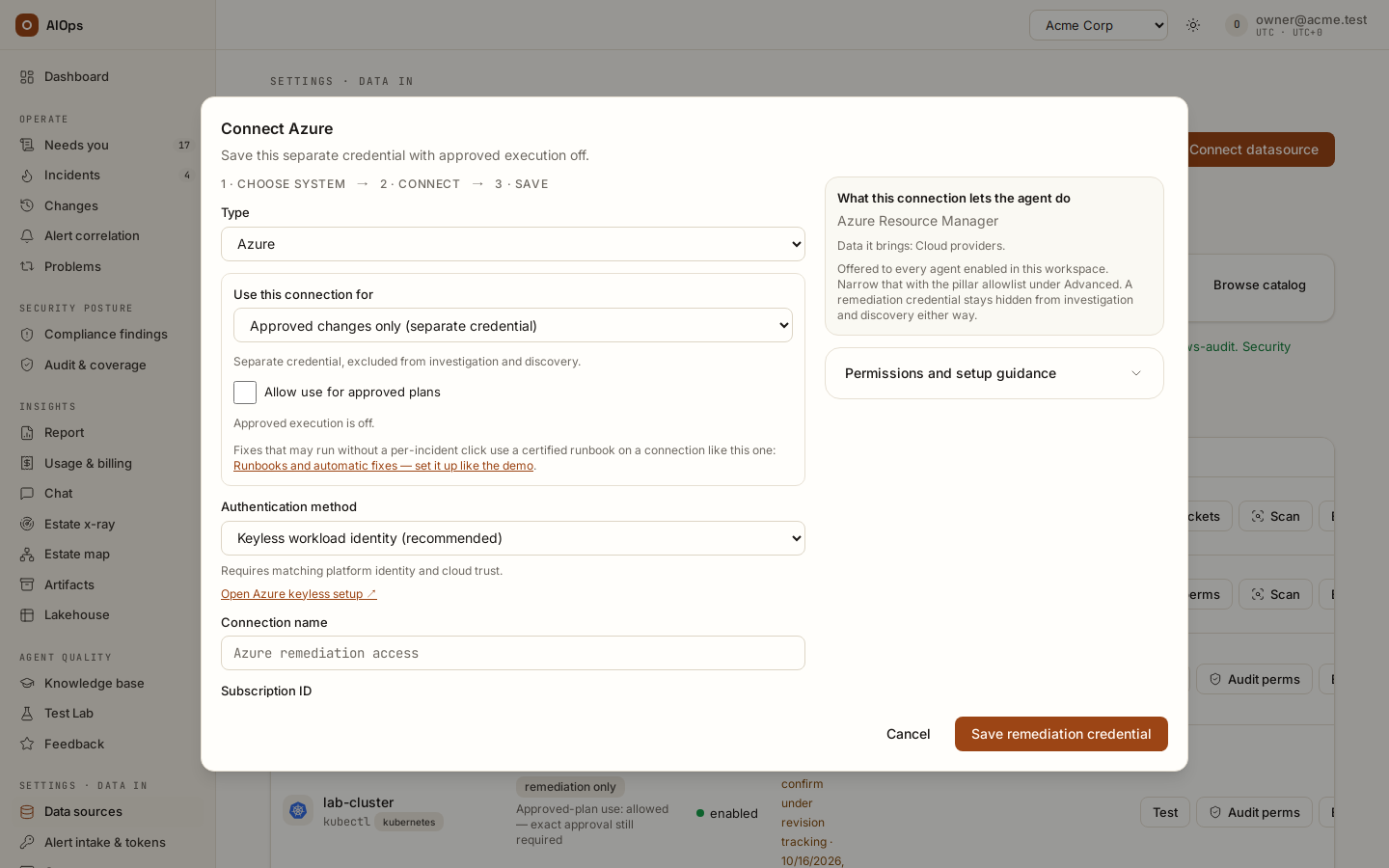
The credential needs exactly the rights its fixes need: for a pull-request route a token with Contents: read and write on the repository (repository metadata access is not enough).
Through the API (datasources.manage):
POST /api/aiops/{tenant_id}/datasources
{"type_key": "github", "name": "infra-repo-writer", "role": "write", "allow_approved_execution": true,
 "config": {"base_url": "https://api.github.com"},
 "secret_values": {"token": "<token with Contents: read and write on acme/infra>"}}
then POST /api/aiops/{tenant_id}/datasources/{id}/test. The MCP tools are create_datasource and test_datasource.
Step 2 — a GitOps runbook with a fixed edit
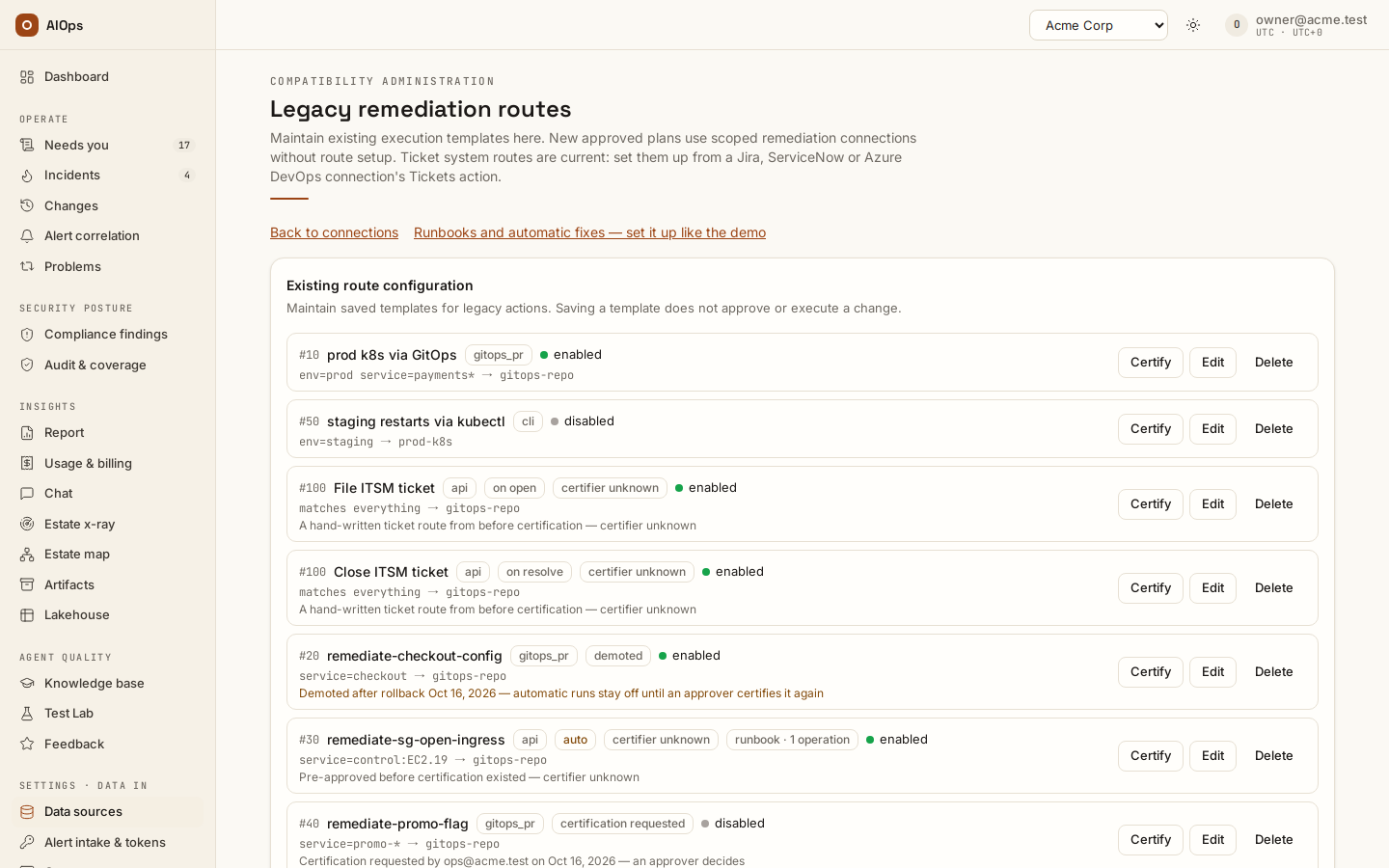
The demo's feature-flag runbook switches one flag off in one file. Its edit is part of the route, so the pull request always contains exactly what the approver certified:
POST /api/aiops/{tenant_id}/routes
{"name": "remediate-promo-flag", "priority": 50, "selector": {"service": "promo-*"},
 "mode": "gitops_pr", "datasource_id": "<the repository write connection>", "enabled": false,
 "params": {"repo": "acme/infra", "base_branch": "main", "path": "flags/promo.yaml",
            "edit": {"path": "flags/promo.yaml", "find": "new_engine: true", "replace": "new_engine: false"},
            "pr_title_template": "Runbook: switch the new engine off (${incident_title})"}}
edit.findmust appear exactly once in the file when the pull request is opened; otherwise the release is refused and nothing is committed.- A pre-approved route that carries its own edit applies that edit. When the analysis proposed a different file change, it is left out, and the change record says so (Runbook's own edit kept — proposed edit left out). This holds while Let the analysis pick a matching route instead of typed steps is on. A route that is not pre-approved yet — a certification request, or one an edit dropped — released by a person commits the analysis's file change instead; certify it first if its own edit is what should run.
- An analysis's file change only ever reaches a pull request. An API, CLI, MCP or network route runs its own configured call; a path or body the analysis proposed is never added to it.
- Create the route disabled, certify it (step 4), then enable it when you want it to act: enabling and disabling keep its certification.
In the portal: open Legacy remediation routes, click New route, choose Advanced · custom action, and fill the same fields (the JSON goes in Mode params (JSON)).
Step 3 — an API runbook with typed operations
An API runbook runs one fixed call through a cloud write connection. It declares the typed operations it performs and the before-state read and rollback that go with it:
POST /api/aiops/{tenant_id}/routes
{"name": "remediate-imdsv2-web-1", "priority": 40, "selector": {"service": "i-0123456789abcdef0"},
 "mode": "api", "datasource_id": "<the AWS write connection>", "enabled": true,
 "params": {"operations": ["aws.ec2.require_imdsv2"],
   "service": "ec2", "region": "ap-southeast-1", "action": "ModifyInstanceMetadataOptions", "version": "2016-11-15",
   "params": {"InstanceId": "i-0123456789abcdef0", "HttpTokens": "required"},
   "snapshot": {"service": "ec2", "region": "ap-southeast-1", "action": "DescribeInstances",
                "version": "2016-11-15", "params": {"InstanceId.1": "i-0123456789abcdef0"}},
   "rollback": {"service": "ec2", "region": "ap-southeast-1", "action": "ModifyInstanceMetadataOptions",
                "version": "2016-11-15", "params": {"InstanceId": "i-0123456789abcdef0", "HttpTokens": "optional"}},
   "change_window": {"days": ["mon", "tue", "wed", "thu", "fri"], "hours": "01:00-23:00"}}}
operationsmust name known typed operations; a typo is refused when you save.- Tick the same operations on Guardrails → Pre-approved operations (
members.manage). A route alone never makes a fix standard: both the route and the owner's list must name the operation. snapshotis the read the platform runs before the write, so the change records the before-state;rollbackis the call that puts it back.change_window(UTC) gates a person's release of an L2 or L3 change through this route.- One host per runbook: the values are fixed, so the approver certifies exactly what will run.
A person releases this route from the incident (Approve & run). It runs on its own only with Automatic API fixes for proven runbooks on and a precedent (see the table above). For that its call must be exactly its one declared operation — the operation's fixed values on one target, nothing added — which is why this example sets only HttpTokens=required. Automatic API fixes for proven runbooks continues from here with the alarm, the switches and the first and second occurrence.
Step 4 — certification: two people
Certifying is a separate act from writing the route, done by a different person:
- The operator ticks Pre-approved and saves. For anyone without
approvals.decide(the builtin operator) that is a request, not a pre-approval: the route stays manual, the dialog said so before saving (Saving with this ticked asks an approver to certify this revision; until then the route waits for a person.), and the save reads Saved. Certification requested — an approver decides on Needs you. - The approver opens it from Needs you. Operate → Needs you (
/portal/approvals) lists it with the chip Certify: ops@… asked to certify revision 433c90b5. The link opens the Certify route '…' dialog on the routes page.
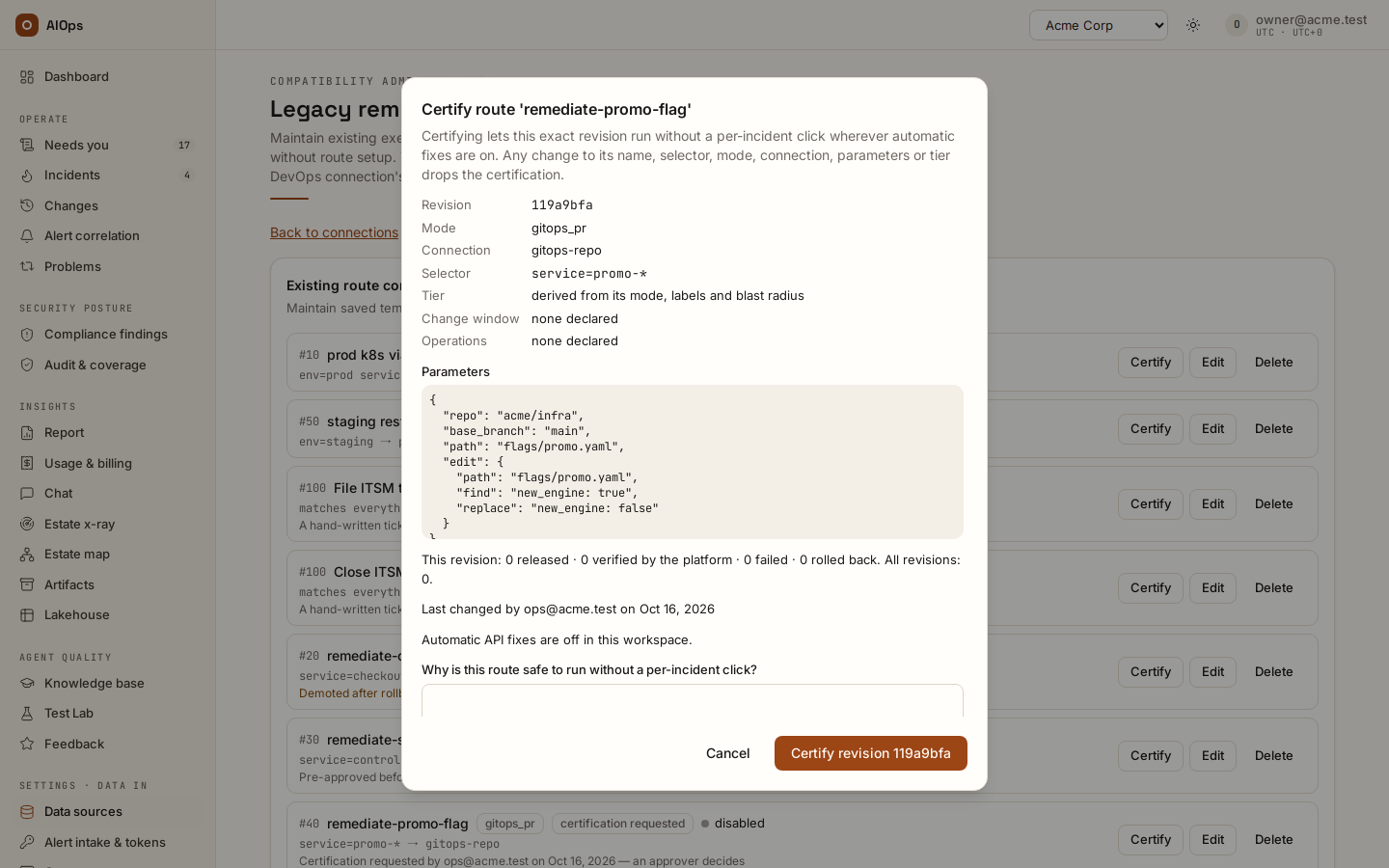
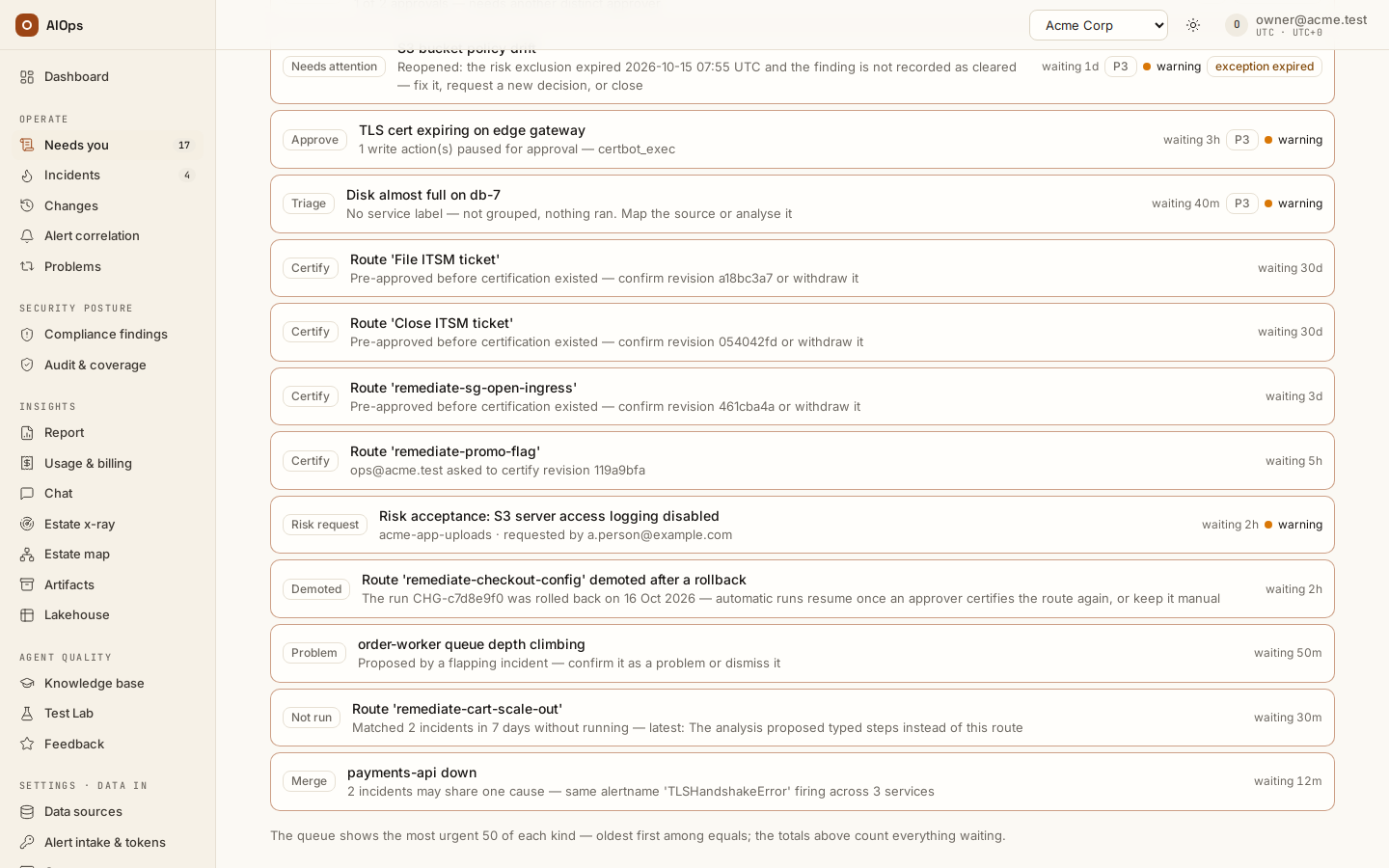 3. The approver reads what they sign. The dialog shows the revision, mode, connection, selector, tier, change window, operations and parameters (credentials hidden), the runs of this revision (This revision: 3 released · 2 verified by the platform · 0 failed · 0 rolled back. All revisions: 4.), who last changed it, and whether automatic API fixes are on in the workspace.
4. The approver writes why in Why is this route safe to run without a per-incident click? and clicks Certify revision 433c90b5. The route now reads Certified by approver@… on <date> · revision 433c90b5 and keeps its
3. The approver reads what they sign. The dialog shows the revision, mode, connection, selector, tier, change window, operations and parameters (credentials hidden), the runs of this revision (This revision: 3 released · 2 verified by the platform · 0 failed · 0 rolled back. All revisions: 4.), who last changed it, and whether automatic API fixes are on in the workspace.
4. The approver writes why in Why is this route safe to run without a per-incident click? and clicks Certify revision 433c90b5. The route now reads Certified by approver@… on <date> · revision 433c90b5 and keeps its auto badge.
Rules the server enforces, whatever client calls it:
- Only an
approvals.decideholder (builtin approver, executive or owner) certifies. Editing routes (datasources.manage) never makes one pre-approved. - The approver must not have changed the route since it was last certified while another approver exists: You changed this route since it was last certified — another approver must certify it. Every editor since the last certification counts, so a colleague renaming the route and renaming it back does not hand over the authorship. In a workspace with a single approver, that approver may certify their own revision, and the route says self-certified — no other approver.
- The approver certifies the revision they read. If someone changed the route in between, the certification is refused: The route changed since you opened it (now revision …). Review it again. The same holds for an approver who ticks Pre-approved in the route dialog: the dialog asks why (Saving certifies revision … — the one this dialog shows.) and sends the revision it shows; a tick through the API without
revisionandcertification_noteis recorded as a request. - Every byte that runs is shown. A route whose parameters repeat a credential field's value under another key (which would hide that value from the people who review it) is refused when it is saved, and never certified: The route carries a value the platform would hide from its reviewers (edit.replace): a credential field repeats it. Keep credentials in the connection.
- A ticket system preset is fixed bookkeeping and is never certified; a hand-written ticket route is.
- A note is required.
- When the person who certified a route can no longer approve (their role changed), the route reads … can no longer approve: another approver confirms or withdraws it; another approver's Certify names them as its certifier.
What drops a certification. Any change to the route's name, selector, mode, connection, parameters, tier or lifecycle flags, saved through the portal, the API or MCP. The route then reads Pre-approval dropped on <date>: ops@… changed selector, the approvers' Needs you lists it again once the route is enabled (a disabled route stays off the queue until it is enabled — then it waits there before it may run on its own), and the audit records Route pre-approval dropped by a change with the values before and after. A route changed some other way (a seed, a direct database edit) stops counting as pre-approved at the next automatic run anyway, and reads Changed outside the route form after it was certified.
Withdrawing. Withdraw certification in the Certify dialog (approvers), or clearing Pre-approved in the route dialog (route editors), puts the route back to manual. An approver withdraws a pending request from the same dialog.
Through the API:
GET  /api/aiops/{tenant_id}/routes                          (datasources.view)
POST /api/aiops/{tenant_id}/routes/{route_id}/certification  (approvals.decide)
{"action": "certify", "revision": "<the revision field from GET /routes>", "note": "one fixed flag edit, inert PR"}
{"action": "withdraw", "note": "no longer needed"}
The MCP tool is certify_route. GET /routes returns, per route, revision, certification (status certified, requested, dropped, withdrawn or demoted; by, by_label, at, source, note, self_certified, current), last_edit, runs, and, for an approver, certify_check (whether they made this revision and whether they are the only approver). POST and PATCH /routes answer with a notice when a pre-approval became a request or was dropped.
Hand-written ticket routes
A route that runs when an incident opens or resolves (Run when the incident opens, Run when the incident resolves) and is not a ticket system preset sends one request you wrote, on every matching incident, with no click — so it follows the rules of every route that runs on its own: api mode only, to a ticket, paging or webhook system, never through a write connection, and nothing is sent until an approver certifies its revision exactly as in step 4. The rules, the messages you see and the placeholders are in Ticket systems → Advanced routes; a ticket system preset (the connection's Tickets action) needs none of this.
Step 5 — the switches
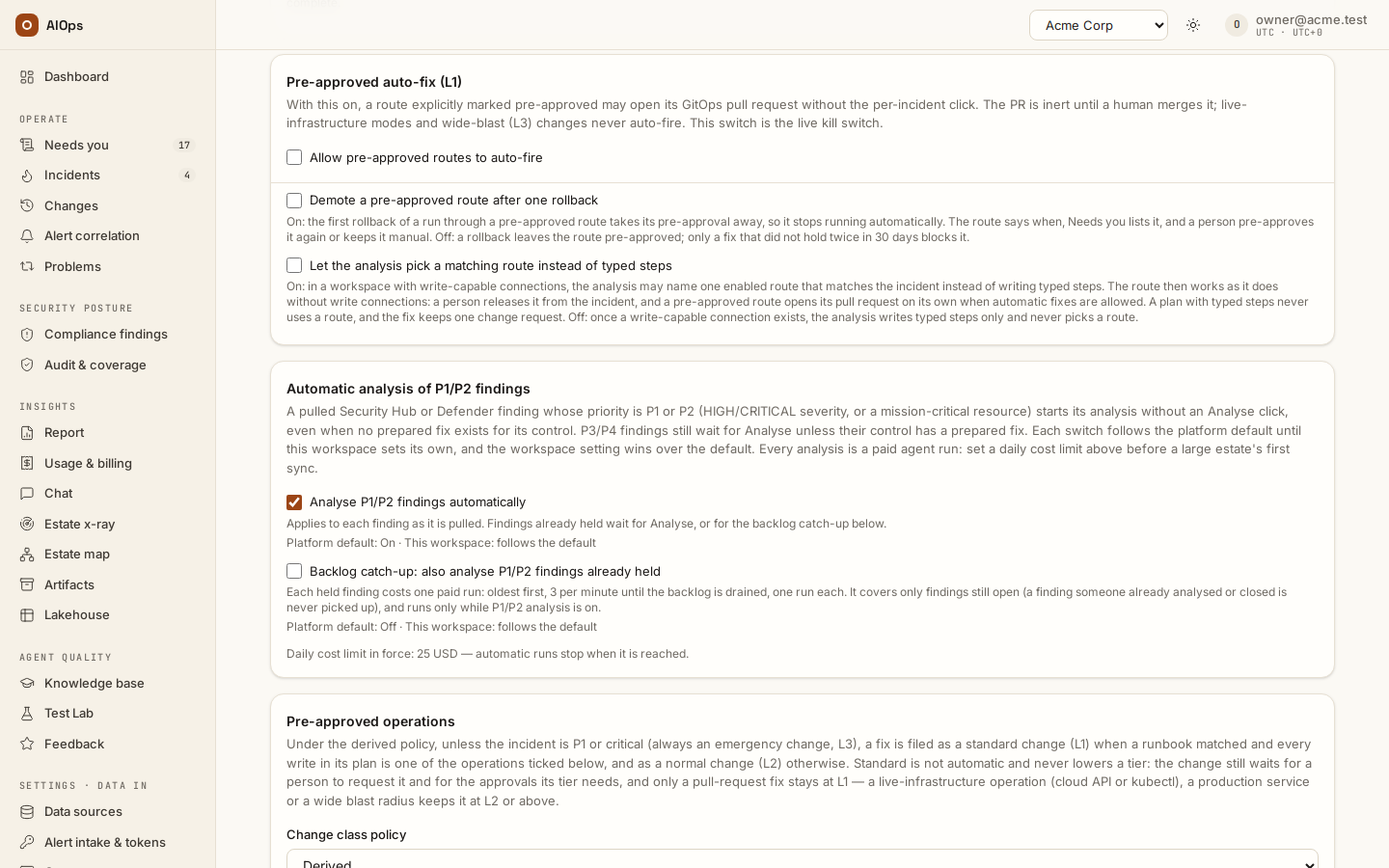
All are on Guardrails (in the product: /portal/guardrails) and saved the moment you tick them (members.manage). The first three are off by default; Standard change for a runbook route's operations is on by default since 0.1.133, and each row says whether it follows the platform default. Through the API: PATCH /api/aiops/{tenant_id}/guardrails (MCP patch_guardrails); GET /guardrails reads the values in force.
| Switch (field) | What it does here |
|---|---|
Allow pre-approved routes to auto-fire (auto_remediation) |
The master switch for anything that runs on its own, and the live kill switch. Off, every fix waits for a person. |
Let the analysis pick a matching route instead of typed steps (runbook_routes_with_typed_plans) |
Needed in a workspace with write connections, as in the demo: there the analysis writes typed steps, and only with this on may it name your route instead. A step runbook is offered with its steps in order (phase, operation, target, criteria), and the analysis that names it writes its summary, fix and rollback from those steps — never calling one of them unsupported or advising against what a step does. |
Demote a pre-approved route after one rollback (demote_on_rollback) |
One rollback of a run through a pre-approved route takes its certification away. |
Demote a certified runbook when its fix deviates (demote_on_deviation, on by default) |
A failed validation, or a fix that did not hold, takes a certified runbook's certification away. |
Standard change for a runbook route's operations (runbook_standard_change) |
A fix inside a certified runbook route's operations is recorded as a standard change. |
The demo turns on the first two:
PATCH /api/aiops/{tenant_id}/guardrails
{"auto_remediation": true, "runbook_routes_with_typed_plans": true}
What the incident page shows
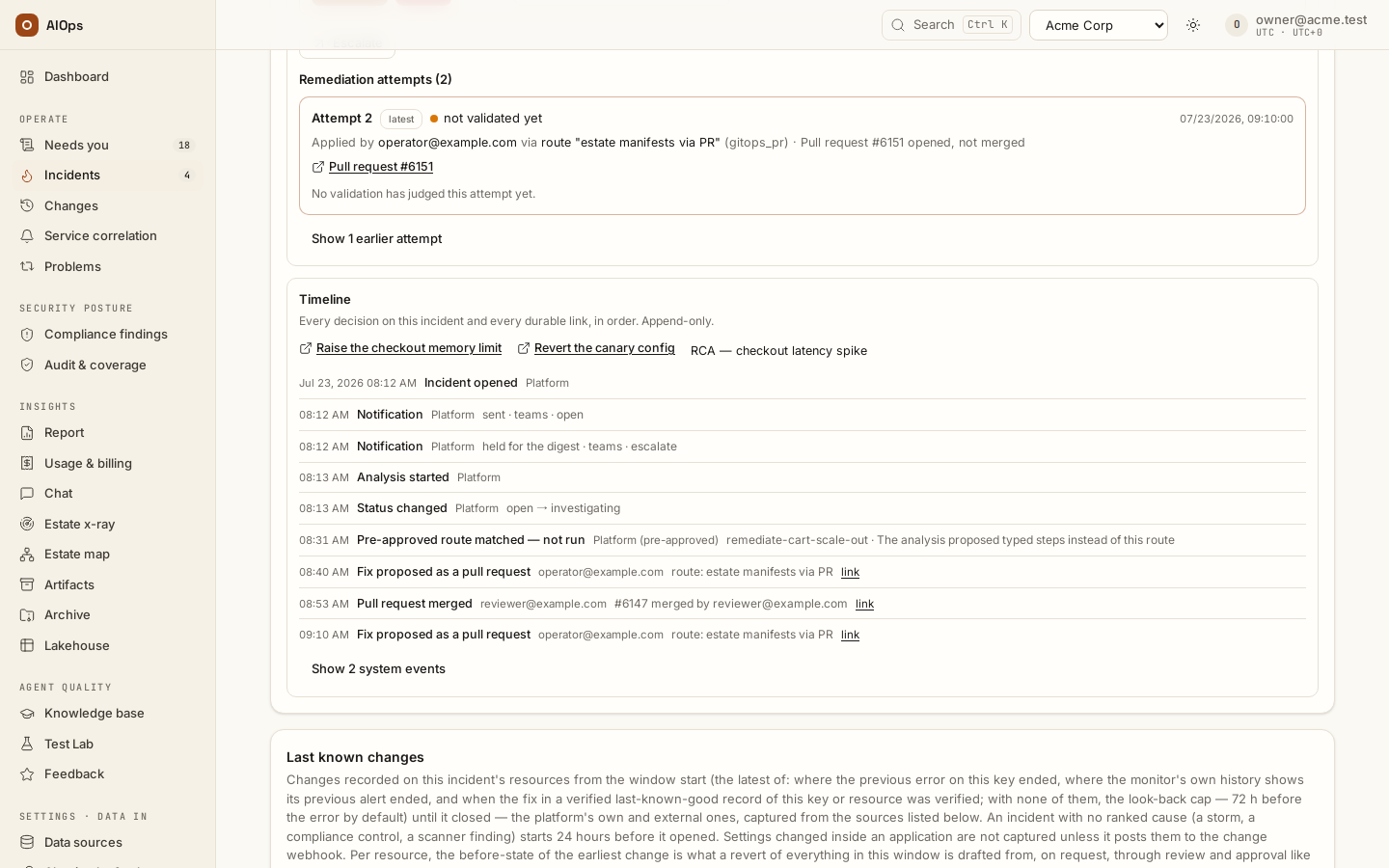
- The plan names the route it would use and, for a pull-request route, the edit it would commit.
- Fix applied automatically (pre-approved) on the Timeline when the route opened its pull request on its own; the actor reads Platform (pre-approved).
- Pre-approved route matched — not run with the route and the reason, when it matched and did not run (the next section).
- Automatic fix blocked when the route would have run but the incident is unmapped, flapping, or the route's last fix on this key did not hold twice in 30 days, or the analysis's file change would point the pull request at another file.
- The change record (Operate → Changes) of every route run carries one line: Route 'remediate-promo-flag' revision 433c90b5 · certified by approver@… on <date> · released automatically (pull request) — or released by ops@…, certifier unknown, not certified.
Why a route did not run
When a pre-approved route matched an escalated incident and did not run, the incident's Timeline shows Pre-approved route matched — not run once per reason. When nothing pre-approved matched, nothing is written.
| Reason on the Timeline | What to change | Listed on Needs you |
|---|---|---|
| Automatic fixes are off for this workspace | Turn on Allow pre-approved routes to auto-fire (shown only for a pull-request route: a route that could not run on its own even with the switch on says that instead) | no |
| Computer-assist mode: the platform makes no writes | Switch back to standard execution, or release it outside the platform | no |
| A cost limit or Pause all agents stopped automatic work | Resume agents or raise the limit | no |
| An automatic fix already ran once on this incident | Nothing: one automatic try per incident | no |
| A finding is fixed only after a person approves it: a compliance control, scanner finding, vulnerability or security alert never runs on its own | Approve and release the finding's prepared plan | no |
| The latest analysis has not finished | Wait for it | no |
| The analysis proposed typed steps instead of this route | Review the typed steps, or re-run the analysis | yes |
| Routes are not offered to typed plans | Turn on Let the analysis pick a matching route instead of typed steps | yes |
| The analysis was not offered this route | Update the private-network agent, or check the write connection | yes |
| The analysis chose no route / The analysis chose route '…' | Check the route's selector and name | yes |
| Route '…' matched first and is not pre-approved | Fix the priorities, or certify that route | yes |
| The route is not pre-approved / was demoted after a rollback / the runbook was demoted (its fix deviated) | Ask an approver to certify it | no (Demoted covers it) |
| The route changed after it was certified | Ask an approver to certify the new revision | yes |
| Tier L3 (wide blast radius or a forced L3): two people release it | Nothing: L3 is never automatic | yes |
| An API route: automatic API fixes are off | A person releases it from the incident | no |
| Only API routes may run on their own; a cli/mcp/network route waits for a person | A person releases it | no |
| An API runbook's own guards: certifier unknown or lapsed, its operations or its call, no snapshot or rollback, the selector, more than one runbook, a P1 or critical incident, the analysis asked for a person, a reopen, a run of the route already on the incident, a change window or freeze, an earlier automatic run, No verified earlier fix of this alert by this runbook revision: … | Each reason and its remedy are in the guard table of Automatic API fixes for proven runbooks (Every guard, and what to change when one stops a run) | as listed there |
| A person chose which resources this run fixes — a person releases it | Release the change from the incident or the change page, or re-analyse with every resource ticked | no |
| The release was refused: … | Read the detail (a disabled connection, a review that changed) | yes |
A refused release that never reached a change record does not use up the incident's one automatic try: once the cause is fixed, the next escalation can still run it.
Needs you → Not run lists, for route editors (datasources.manage), each route that matched incidents in the last 7 days without running for a reason a route edit or a setting would fix: Matched 2 incidents in 7 days without running — latest: The analysis proposed typed steps instead of this route. The same line sits under the route on the routes page with Acknowledge, which takes it off the queue until a newer skip happens (PATCH /routes/{route_id} with {"skips_acknowledged": true}; audit Not-run notice acknowledged).
Rollback and demotion
A pull request is verified by the periodic recheck once it is merged; a released API call is verified right after it runs. Two switches take a route's certification away: Demote a pre-approved route after one rollback (its first released rollback; off by default) and Demote a certified runbook when its fix deviates (a failed validation, or a fix that did not hold; on by default). What the route and Needs you → Demoted then show, and how to certify it again: Demotion. A fix that did not hold twice in 30 days blocks the route on that incident key, whatever the switches say (Automatic fix blocked).
Routes from before certification
Routes that were pre-approved before this release read Pre-approved before certification existed — certifier unknown with the badge certifier unknown. They keep everything they did before: the automatic pull request, the standard-change class, demotion. Approvers see the enabled ones on Needs you → Certify (Pre-approved before certification existed — confirm revision … or withdraw it); a disabled one stays off the queue until someone needs it. Certifying one names its certifier; withdrawing one makes it manual.
API and MCP reference
| Call | Permission | MCP tool |
|---|---|---|
GET /api/aiops/{tenant_id}/routes |
datasources.view |
list_routes |
POST /api/aiops/{tenant_id}/routes |
datasources.manage (a preapproved: true is a request unless you are the only approver) |
create_route |
PATCH /api/aiops/{tenant_id}/routes/{route_id} (also skips_acknowledged, demotion_acknowledged, certification_note, and revision — an approver's preapproved: true on an unchanged revision certifies only with the revision they reviewed and a note) |
datasources.manage |
patch_route |
DELETE /api/aiops/{tenant_id}/routes/{route_id} |
datasources.manage |
delete_route |
POST /api/aiops/{tenant_id}/routes/{route_id}/certification |
approvals.decide |
certify_route |
GET /api/aiops/{tenant_id}/needs-you?type=route_certification / ?type=route_skipped |
incidents.view (approvers / route editors see their own kind) |
needs_you |
PATCH /api/aiops/{tenant_id}/guardrails |
members.manage |
patch_guardrails |
POST /api/aiops/{tenant_id}/incidents/{incident_id}/remediation-preview, then POST .../remediate with its review_digest |
approvals.decide to release |
preview_remediation, remediate_incident |
Every route create, change and delete is audited with the values before and after (credentials masked, long values shortened, each with a fingerprint) and, for a parameter or selector edit, each changed value by its path — for example params.snapshot.region "ap-southeast-1" → "us-east-1" — so an edit deep in a long runbook stays readable (a whole value too long to show is left out of a change rather than shortened before the edit). Every certification, request, drop, withdrawal and acknowledgement has its own audit row (see Audit log).