Connect AWS
Review a CloudShell setup command, import its public output and verify separate AWS connections.
How-to · Updated 2026-10-27 · Describes release 0.1.164
Before you start
Choose one AWS account and region. You need permission to manage connections in this workspace and an AWS administrator who can review and create the IAM roles and CloudFormation change set shown by the setup command. Use AWS CloudShell in the account you intend to connect.
Open Keyless cloud access — AWS (in the product: /portal/connect/keyless?provider=aws). The page names the roles in one of two ways:
- Any account. When the installation lets its own AWS roles assume any role named
aiops-*that a workspace External ID guards, and this workspace's reads run on the platform's own roles, enter any account: the command createsaiops-<workspace>-readand, if selected,aiops-<workspace>-write. No platform staff step is needed, with two exceptions. The AWS account that hosts the platform itself needs its exact read/write pair prepared by platform staff, as described in Keyless AWS: any-account mode and prepared pairs in the platform console guide; once they publish it, this setup creates that pair under the names they chose. The workspace's other accounts stay in this mode. A workspace with a private-network agent, which runs its reads with its own identity, uses the prepared flow below. - Prepared by platform staff. Platform staff configure the workload identities, publish this workspace's runtime reader and prepare the exact read/write role ARNs for each account. Any staff AWS setup for the workspace (a reader role, or a prepared pair for an account that does not host the platform) puts all of its accounts on this flow. A published platform role alone is insufficient.
If the page shows Platform setup required, use its platform-administrator handoff; do not substitute another workspace's role.
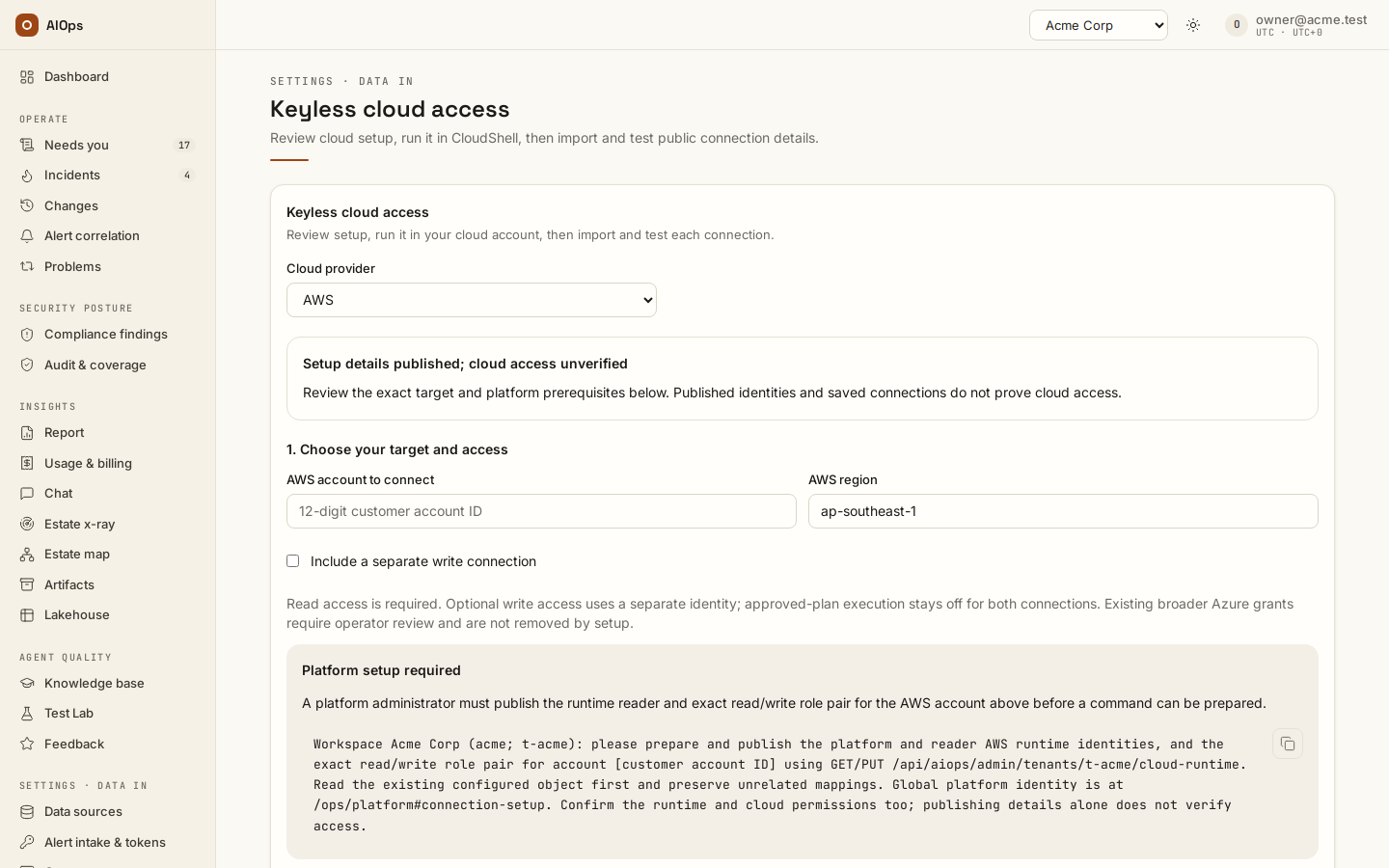
For platform staff: workspace metadata is managed through GET and PUT /api/aiops/admin/tenants/{workspace_id}/cloud-runtime. Read the current configuration and preserve unrelated fields when publishing reader and aws_targets. For the account that hosts the platform, publish only its pair in aws_targets, with no reader.aws_role_arn: that keeps any-account mode for the workspace's other accounts. Clearing the workspace's reader.aws_role_arn and its other aws_targets returns it to any-account mode where the installation allows it; Azure fields do not affect AWS. The global Customer connection setup screen does not edit these workspace mappings. Any-account mode's own roles are deployment settings, not workspace metadata: the control-plane role (AIOPS_PLATFORM_AWS_ROLE_ARN, or Platform AWS role ARN in Customer connection setup) and the runner role (chart value aiops.runner.serviceAccount.awsRoleArn). When the page asks for them, publish them there; a reader written into a workspace's cloud-runtime moves that workspace to the prepared flow for every account.
1. Review the target and command
- Enter AWS account to connect and AWS region.
- Leave Include a separate write connection off for investigation only. Select it only if you also want the bounded write role. In an AWS account other teams share, also select Leave out account-wide settings (shared account). It is off by default; see Leave out account-wide settings for what the writer then cannot do, and what it still can.
- Select Preview setup command. Review the target, trusted platform/reader identities, exact role ARNs, permission summary and complete script.
- Copy aws keyless setup command into AWS CloudShell. The command checks the signed-in account and existing ownership, prepares a CloudFormation change set, then asks you to type
applybefore executing that exact change set. Review it before continuing. Deletes, replacements and conflicting ownership stop the setup.
The setup creates or reuses the reviewed identities and IAM policies. It does not create workloads or enable scanners. The optional writer's permissions are one inline policy and four customer-managed policies attached to it only (backup and restore, Reachability, image rebuild, Lambda runtime): IAM caps a role's inline policies at 10,240 characters. The optional writer permits only the operations named in the preview: its instance actions (start, reboot and the metadata options) and its security-group ingress changes act only on resources tagged aiops-managed=true in the selected region, while the account's S3 Block Public Access, the IAM password policy and Security Hub finding workflow updates are not bounded by that tag. The policy files for a role you create by hand (deploy/aws/policies/aiops-read-inline.json and aiops-write-inline.json, see the end of this page) allow more: stopping a tagged instance, SSM Run Command on tagged instances and a bucket's Block Public Access. It does not enable AIOps execution consent.
Leave out account-wide settings
Three of the writer's statements change settings of the whole account: AccountS3BlockPublicAccess (the account's S3 Block Public Access), AccountPasswordPolicy (the IAM password policy) and SecurityHubWorkflowStatusOnly (the workflow status of any Security Hub finding). In an account other teams share, select Leave out account-wide settings (shared account) with Include a separate write connection: the command then creates the writer without those three statements, and the preview's summary gains a line that starts Account-wide settings left out. Everything else the writer may do is unchanged. Running the command again without the option puts the three statements back on the same role; the change set updates the inline policy and replaces nothing.
The option does not make the writer touch only tagged resources. These statements stay, and the tag does not bound them:
IsolationSwapGroupSide: a tagged network interface can be moved into any security group in the region, an open one included.ReachabilityPathEndpoints: Reachability paths can be created to any network interface in the region.PreStateReadsForRollbackandReachabilityAnalysisReads: account-wideec2:Describe*, instance and launch-template user data included, and the load balancer and Network Firewall reads.PatchCommandStatusReads: the output of any SSM command run in the region.
What you lose with it:
- The account-setting fixes stay manual. The platform cannot apply the account S3 Block Public Access fix (Security Hub S3.1) or the IAM password policy fix (IAM.7, and IAM.11 to IAM.17 that read the same policy), nor their restores. The change request is still drafted with the fix and its backout, a step runbook's permission check reads the action as missing, and a person applies it in the account.
- Suppress at source does nothing on AWS. Accepting a risk with the workspace switch
aiops_risk_suppress_at_sourceon cannot set the finding's workflow status toSUPPRESSEDin Security Hub. The acceptance still holds in the platform, which suppresses re-sends until it expires, and its receipt records the refusal.
The option is AWS only: the Azure writer is already bounded by its resource group. It exists in this guided setup only: the Terraform module and the policy files at the end of this page have no such variant, so remove the three statements from them yourself.
One setup covers one region. The read role allows its regional reads, such as inventory, metrics, logs and Security Hub findings, only in the region you enter. IAM roles are global and the first region's CloudFormation stack owns them, so running the setup again for the same account with another region stops with Existing role aiops-<workspace>-read is not owned by this stack. No changes made. To cover several regions of one account, use roles that allow them: the Terraform module named at the end of this page (its read role is not limited to a region, and its write role takes the list in regions), or roles you create by hand. Then list the regions in the connection's Scope JSON under Advanced connection settings, for example {"regions": ["ap-southeast-1", "eu-west-1"]}; the estate harvest and the platform checks read each region listed there.
Keep the workspace External ID stable. The platform supplies this value in the generated trust and every keyless AWS connection. It is a workspace binding, not a credential or permission grant. Deleting a connection leaves the External ID and cloud roles unchanged. A change to an established External ID requires a coordinated trust migration by your administrator.
2. Paste public output and preview connections
When CloudShell finishes, copy only its final JSON object into Public CloudShell output. Its schema is aiops.cloud.bootstrap.v1; it contains the workspace, account, region and role ARNs, with no access keys or session tokens. The page rejects unexpected fields, a different target and role ARNs that differ from the ones the reviewed command named.
Select Preview connections. Review the investigation connection and, if requested, the separate write connection. Both start with Allow use for approved plans off. An exact existing keyless connection is reused; an identity already connected with different scope, authentication or consent blocks the import. The import never silently edits that connection.
Select Import connections. Saving is separate from checking access. If only one connection saves before an error, correct the error and retry: the page checks existing connections again and reuses the exact saved match.
3. Test and inspect the result
Use Test read connection and, when present, Test write connection separately. Read the result and the runtime that performed the check. A queued private-agent check is still pending.
An AWS identity check proves authentication; it does not prove every evidence permission or execute a repair. Audit perms on the connection's row in Data sources (in the product: /portal/datasources) performs bounded introspection and IAM simulation. Review checked scopes, missing permissions and coverage limits, then verify a real resource, metric or log read you need. A connection's scope hints do not replace IAM restrictions.
Then harvest the account's inventory: open Data sources (in the product: /portal/datasources) and choose Harvest now on the read connection's row (datasources.manage). Importing the connections does not start a harvest, and the scheduled one runs once a day by default. The harvest makes deterministic API calls through the read role and books no model spend. You should see the line under the connection's name change from not harvested to Harvested <time> ago · N entities, U unmodelled. The API call, and what a 504 means, are in Estate harvest.
The guided read role allows every AWS read that the platform checks EST-01 to EST-06 make (backups, public storage, open security groups, encryption, audit logging and IAM hygiene), so keep Platform checks (EST-01..06) ticked on this connection. Their regional reads cover the role's region only.
An Estate x-ray scan of the read connection is optional: it is an agent run that spends model budget, up to the budget you set when you launch it. Then send a validation alert before connecting real CloudWatch alarms.
No alarms in the account? A workspace owner can turn on Built-in detection under Data sources: fixed CloudWatch rules over the estate inventory, read through this connection with cloudwatch:ListMetrics and cloudwatch:GetMetricData (the guided setup's read role grants both in its region). It starts in shadow mode and creates nothing in your account.
Optional: more of the estate on the map
The harvest always reads the tag listing and the typed reads. Three AWS features you may already run add to what it sees; none of them is required, and AIOps never turns one on.
- Untagged resources: AWS Resource Explorer. Turn Resource Explorer on (it is free) in each region the connection reads, with a default view. The harvest then lists every resource of a type Resource Explorer supports, tagged or not, for this connection's account only. It never calls
SearchorListResourcesin a region without an active index and a default view, because that call is what makes AWS set one up, and an agent's call to Resource Explorer needs approval, because its reads are POST requests. A filtered default view narrows what is listed. Until a region has an index, the harvest's Coverage says no active index or default view. - AWS Config's recorded inventory. Where the Config recorder is on, the harvest also runs one
SelectResourceConfigquery per region, in pages of 100, and adds what nothing else listed. It is on by default; setconfig_inventory: falsein the connection's configuration to leave it out. The query itself is not billed: the Config recorder bills per item it records. A region where Config recorded nothing gets a Coverage note, and the harvest goes on without it. The separateconfig_history: trueasks Config for the before-state of outside writes (Manage connections). - The service map: CloudWatch Application Signals. Where your services send traces to Application Signals, or to X-Ray only, the connection reads their dependencies hourly and records them as traced service dependencies, with the service names Application Signals uses; no trace content is read. It is the Service map (Application Signals / X-Ray) job under Jobs this connection runs (the job table). If the workspace also reads the same traces through Tempo or Jaeger, untick it: the same pair reported under two scope names is dropped as ambiguous.
The guided read role grants all of these reads, and nothing that sets Resource Explorer up.
Creating the role by hand
The guided setup above is recommended: it names the role, writes the trust for you and checks the account. If your administrator creates the role directly in IAM instead, all of these must hold for keyless access to work:
- Platform setup covers the role's account. In any-account mode (see Before you start) it covers every account except the one that hosts the platform itself, with nothing to prepare. With roles prepared by platform staff, staff publish this workspace's reader identity and the exact read and write role ARNs for the account, and the platform is set up for only those roles: a further role in that account also needs staff to grant the workspace reader (and the platform role, where its grants name exact roles)
sts:AssumeRoleandsts:TagSessionon it, besides 2 and 3 below. Test cannot check the reader's grant. Until the setup covers the account, the connection form shows Platform setup required with a handoff for your platform administrator; a trust policy alone does not replace that setup. - The role is named
aiops-…. The platform's own AWS permission reaches only roles namedaiops-*, in any account and with no path, so a role named otherwise is refused whatever its trust says. Staff-prepared roles follow the same rule; only in the account that hosts the platform can staff prepare another name, since a trust there that names the platform role needs no permission. Use the name the guided setup creates,aiops-<workspace>-read, oraiops-<workspace>-writefor a separate write role; another name that starts withaiops-also works. The connection form warns when the name is outsideaiops-*. - The role trusts both platform identities, with session tags. The connection form shows this policy filled in, with a copy button, under Trust policy for a role you create yourself:
{
  "Version": "2012-10-17",
  "Statement": [
    {
      "Effect": "Allow",
      "Principal": { "AWS": ["<platform role ARN>", "<workspace reader role ARN>"] },
      "Action": "sts:AssumeRole",
      "Condition": { "StringEquals": { "sts:ExternalId": "<workspace External ID>" } }
    },
    {
      "Effect": "Allow",
      "Principal": { "AWS": ["<platform role ARN>", "<workspace reader role ARN>"] },
      "Action": "sts:TagSession"
    }
  ]
}
The second statement is required: the platform's workload identity carries session tags, and AWS refuses the role switch without sts:TagSession even when the External ID matches. For a separate write role, list only the platform role in both statements; a write role never trusts the reader. In any-account mode the workspace reader is the platform's runner role (the platform role itself on an installation without runners); the form fills in the ARNs. Through the API, GET /api/aiops/{tid}/platform-identity (datasources.manage) returns them: aws.role_arn is the platform role, runtime.reader.aws_role_arn the workspace reader and aws.external_id the External ID. Name the exact roles; do not trust the platform account root or a wildcard.
Test runs as the platform role, so its verdict covers only the platform role's half of the trust. When it passes and scans run as a separate workspace reader, Test also reads the role's trust policy (iam:GetRole, included in ReadOnlyAccess and SecurityAudit) and warns, naming the reader, when the policy does not allow it: Estate x-ray scans and investigation reads would be refused. When it cannot read or fully evaluate the policy, the result says so. When Test fails, its result names what to check and ends with AWS's own reason, such as not authorized to perform: sts:TagSession on resource: <role ARN>.
To create the connection for a role you made yourself through the API instead of the form, send POST /api/aiops/{tid}/datasources (datasources.manage; a personal access token needs the write scope):
{
  "type_key": "aws",
  "name": "aws-123456789012-read",
  "role": "read",
  "config": {
    "role_arn": "arn:aws:iam::123456789012:role/aiops-acme-read",
    "region": "ap-southeast-1"
  }
}
Send no access key and no external_id: a connection with a role_arn and no access key is keyless, and the platform writes the workspace External ID into it (a different value is replaced, and the replacement is audited). A key field holding only a ${access_key_id}-style placeholder counts as no key. role is read when left out, and a name already used in the workspace is refused with 409. Add "scope": {"regions": [...]} to config for more than one region. Then run Test with POST /api/aiops/{tid}/datasources/{id}/test and the permission audit with POST /api/aiops/{tid}/datasources/{id}/audit-permissions.
Existing credentials and approved changes
Existing connections remain available in Data sources (in the product: /portal/datasources). For an approved static-credential setup, select Connect datasource → AWS, choose the credential authentication method and supply the required key values. Temporary credentials require the access key, secret key and session token together. The public CloudShell-output field never accepts secrets.
To use a writer for a repair, separately enable Allow use for approved plans on that connection and review the exact action and target prepared by the incident or Change. Cloud grants, connection consent and plan approval are separate controls. A passing connection check is not proof of repair or recovery.
The read role's backup:ListProtectedResources, rds:DescribeDBInstances and ec2:DescribeInstances are all the platform's Backup findings need; it never writes a backup plan.
Keep the roles current: when a release adds a permission, run the setup command again (or update the role from the policy files). The setup does not remember Leave out account-wide settings (shared account): select it again on every re-run, or the three statements come back. 0.1.117 added inventory reads to the read role; 0.1.119 added ec2:ModifyInstanceMetadataOptions and ec2:DescribeInstances to the write role for the IMDSv2 fix. 0.1.142 added Resource Explorer's GetIndex, GetDefaultView, ListResources and Search, config:SelectResourceConfig, Application Signals' ListServices and ListServiceDependencies, and xray:GetServiceGraph to the read role. Until the setup is re-run, the harvest's Coverage lists those reads as denied and falls back to AWS Config's 7-type list, and the hourly service-map sync records AccessDenied. 0.1.144 added config:DescribeConformancePacks, config:DescribeConformancePackCompliance, ssm:DescribeInstanceInformation, ssm:DescribeInstancePatchStates and backup:ListBackupJobs (the compliance reports) and ec2:DescribeVpcEndpoints, DescribeTransitGateways, DescribeTransitGatewayAttachments, DescribeTransitGatewayVpcAttachments, DescribeTransitGatewayRouteTables and SearchTransitGatewayRoutes (the network path), and health:DescribeEvents (the automated triage's cloud-health step) to the read role; until the setup is re-run, Scores lists those calls as denied. 0.1.144's pre-change backup adds ec2:CreateImage, ec2:CreateSnapshot and ec2:CreateReplaceRootVolumeTask on instances and volumes tagged aiops-managed=true, the same three plus ec2:CreateTags on the images, snapshots and restore tasks it creates (only with the aiops:change tag), and ec2:DescribeImages, ec2:DescribeSnapshots, ec2:DescribeReplaceRootVolumeTasks to the write role — nothing that deletes an image or a snapshot. Until the setup is re-run, a reboot with Back up a stateful target before a reboot-type change on stops at its backup step with UnauthorizedOperation, before anything is changed. 0.1.145 lets the write role run iam:SimulatePrincipalPolicy on its own ARN only (explicitly denied on any other principal), so a step runbook's permission check can answer; until the setup is re-run the check reads unknown and a certified runbook's change waits for a person instead of running on its own. 0.1.146 adds lambda:ListFunctions, ecr:DescribeRepositories, ecr:DescribeImages and ecr:ListTagsForResource to the read role (secret-named Lambda environment values are masked in what the read returns); until the setup is re-run, the harvest's Coverage lists lambda:ListFunctions as denied. It adds to the write role ssm:SendCommand with the AWS-owned AWS-RunPatchBaseline document only, on instances tagged aiops-managed=true (plus ssm:GetCommandInvocation, ListCommandInvocations and DescribeInstanceInformation to read the result), and Reachability Analyzer: create a network-insights path and start an analysis only with the aiops:change tag on what it creates, start it only on a path that carries the tag, delete only what carries the tag, and the network reads the analysis needs — account-wide ec2:Describe* (which includes instance and launch-template user data), elasticloadbalancing:Describe* and the Network Firewall reads; ssm:GetCommandInvocation and ListCommandInvocations return the output of any command run in the region, not only the platform's. Nothing uses those two yet. AWS-RunPatchBaseline accepts a BaselineOverride (which can name other package sources) and an InstallOverrideList, and IAM cannot restrict a document's parameters, so a session of the write role can install packages on an instance tagged aiops-managed=true; before this release the guided write role had no SSM access. The backup's ec2:CreateTags is now bound to the backup's own create calls and its two tag keys, so it can no longer re-tag an image or snapshot that already exists. 0.1.153 adds ec2:ModifyNetworkInterfaceAttribute to the write role for the EC2 patch runbook's isolation and restore: on network interfaces tagged aiops-managed=true, and on any security group in the region (the groups it attaches, the instance's own included). The group side cannot be narrowed by tag, because the instance's own groups carry none: a session of the write role can move a tagged network interface into any security group in the region, an open one included, and ModifyNetworkInterfaceAttribute also changes the interface's other attributes, such as SourceDestCheck. Network interfaces do not inherit the instance's tags, so tag them too. Until the setup is re-run, an isolation step stops at its first interface with UnauthorizedOperation, nothing changed. The patch step uses the 0.1.146 ssm:SendCommand and ssm:GetCommandInvocation, and adds ssm:DescribeInstancePatchStates to the write role: a node Patch Manager already reads compliant is not isolated. The platform never sends BaselineOverride or InstallOverrideList. 0.1.153 also adds rds:DescribePendingMaintenanceActions to the read role, for built-in detection's scheduled-maintenance rule R36; until the setup is re-run, the detection card's Other reads line says needs rds:DescribePendingMaintenanceActions and only EC2 events are read. 0.1.154 adds to the write role codebuild:StartBuild and codebuild:BatchGetBuilds on the one CodeBuild project aiops-image-rebuild in the connection's region while it carries aiops-managed=true, and ecr:DescribeImages: the container image rebuild. The project is yours to create (deploy/aws with image_rebuild = true); its own role pushes the new tag, so the write role holds no ECR write itself. The write role is explicitly denied the StartBuild overrides that change what the build runs (buildspec, source, secondary sources, build image, compute, environment type, privileged mode, fleet, and any variable but the five the platform sends), so a start always runs the project's own buildspec — which pushes only a new -aiops-chg- tag it has proved free, upgrading only packages the image already has. IAM cannot limit the tag ecr:PutImage writes: make the tagged repositories' tags immutable so ECR itself refuses an overwrite. Until the setup is re-run, a rebuild stops at its start with AccessDeniedException before anything is built. The opt-in pull block needs ecr:GetRepositoryPolicy, ecr:SetRepositoryPolicy and ecr:DeleteRepositoryPolicy on the tagged repositories, which the guided setup never grants: use the Terraform module with image_pull_block = true, or add those actions to the write role's policy and to its Deny statement's NotAction list yourself. The 0.1.154 neighbour reachability check (aiops_reachability_checks, off by default; Verify recovery) uses the 0.1.146 Reachability Analyzer statements, and 0.1.155 adds ec2:CreateNetworkInsightsPath on the network interfaces in the region: AWS authorizes a path's create against its source and destination interfaces as well as the path, and a path changes neither. Until the setup is re-run, every reachability row reads not observed with UnauthorizedOperation. 0.1.155 also corrects the write role's restore of an image backup (the EC2 patch runbook's rollback): 0.1.144 allowed ec2:CreateReplaceRootVolumeTask on the image only with the aiops:change request tag, which a call carries only for what it creates, so AWS refused Roll back on the existing image. The role now allows the restore from this account's own image or snapshot that carries the aiops:change tag (a backup the platform made: the write role cannot tag an image that already exists, and one another account owns is refused), with the restore task tagged on create, on an instance tagged aiops-managed=true, and only the new root volume the restore creates, never an existing volume swapped in. IAM has no key to refuse a restore to the instance's launch state or one that deletes the replaced volume: the platform sends neither, and a person releases every restore. Until the setup is re-run, a patch's rollback is refused with UnauthorizedOperation before anything changes, and the step runbook's permission check reads ec2:CreateReplaceRootVolumeTask missing. 0.1.155 also adds to the write role lambda:PublishVersion, lambda:UpdateFunctionConfiguration, lambda:UpdateAlias, lambda:GetFunctionConfiguration and lambda:GetAlias on Lambda functions tagged aiops-managed=true, for the Lambda runtime upgrade; UpdateFunctionConfiguration could change any setting of a tagged function, and the platform sends only Runtime. Until the setup is re-run, a runtime upgrade stops at its backup with AccessDeniedException, nothing changed. With 0.1.155 the write role's backup and restore, Reachability, image rebuild and Lambda statements move from its inline policy into those four managed policies, which the re-run creates and attaches (its inline policy alone would exceed IAM's limit); nothing needs deleting first.
This guided flow uses CloudShell. For infrastructure as code, the platform's source repository includes the Terraform module deploy/aws. With trust_mode = "role" it writes the same trust as the guided setup and creates two roles: <name_prefix>-read (the AWS managed ReadOnlyAccess and SecurityAudit policies, an inline policy with the reads those two leave out, and an explicit deny on object, item and secret contents) and <name_prefix>-write (an allowlist of the platform's fix operations in one inline and four managed policies, its instance and security-group actions only on resources tagged aiops-managed=true in the regions you list). Set name_prefix to aiops-<workspace>. It prints both role ARNs and creates no connection: add the connections afterwards, in the form or through the API above, with the Scope JSON its datasource_snippet prints — on the write connection it carries resource_tag, the tag the step-runbook permission check simulates (without it the check assumes aiops-managed=true, and a role scoped by another tag reads missing). The module and its two policy files (deploy/aws/policies/aiops-read-inline.json, aiops-write-inline.json) are in the platform's source repository, not on this installation, and the portal does not offer them for download: ask your platform administrator or the vendor for them.