Manage connections
The connector catalog, the connect form per kind, keyless cloud access, secrets and rotation, Test and its failures, the connected list and its actions, and legacy routes.
How-to · Updated 2026-10-27 · Describes release 0.1.164
Before you start. Open Settings · Data in → Data sources (/portal/datasources). The destination and connection list need datasources.view; creating, verifying, editing, disabling or deleting a connection needs datasources.manage. Which credential may do what, and what counts as a write, is on Read and write roles, and the write gate; ticket systems have their own page.
Concepts
Terms shared with the rest of the guide — tenant, pillar, pillar agent, incident, approval gate — are defined once in the Glossary. The concepts below are specific to this page.
Connector type vs datasource. The platform ships a catalog of connector types (Prometheus, Grafana, AWS, kubectl, Jira, a generic API, a generic MCP server and so on). Connector types are platform-owned: your platform staff decide which ones exist and which are enabled, on the console described in Platform configuration. You connect datasources — instances of those types, for a cluster, an account, a region or an environment. Two AWS accounts are two datasources, one account may be reached by several (one role per job, for example), and the agents get a distinct tool per datasource. The catalog on this page shows only the types your platform staff have left enabled.
Three kinds. Every connector type is one of three kinds, and the kind determines the tool the agent gets.
| Kind | Tool the agent gets | Example types |
|---|---|---|
api |
<name>_request — HTTP calls against a base URL |
Prometheus, Grafana, Jira, Generic API connector |
cli |
<name>_exec — a fixed binary, arguments only, never a shell string |
Kubernetes (kubectl + kubeconfig), SSH, Generic CLI connector |
mcp |
one proxied tool per server tool, named <name>_<tool> |
Kubernetes (MCP), Generic MCP connector |
Native tools. Some catalog types bind a native tool instead of the generic one, even though they are cataloged as api. AWS uses a SigV4-signed aws_request, Azure an AAD-authenticated azure_request, Google Cloud a service-account gcp_request, a Log Analytics workspace (KQL) a sentinel_query, and a network device gets net_exec over netmiko. These types carry credentials rather than a base URL, so no <name>_request tool is rendered for them at all. The first datasource of each of those types (by name; in an estate x-ray, the first one selected) takes the canonical tool name; every further datasource of the same type gets its own name-prefixed native — a second AWS account named prod-eu becomes prod-eu_aws_request, and its tool description says it is bound to that account only. There is no one-account limit, and a fragmented multi-account estate is fully reachable inside one agent run.
Prometheus is the one type that gets a native in addition to its generic tool: alongside <name>_request it binds a prometheus_query PromQL tool (a second Prometheus datasource gets <name>_prometheus_query).
Use a name your team recognises. For example, Production metrics or AWS Europe. Spaces and punctuation are supported: the platform creates a compatible internal tool name automatically. Connection names must be unique within the workspace.
The write gate is a floor, not a setting. Read/write classification happens in one place for all connector types, on an allowlist over default-deny: a call runs freely only if it is classified as a read. Everything else is gated, regardless of what the credential is actually permitted to do at the far end. A pillar's own approval list can only add gates on top; it can never remove the floor. An incomplete read rule costs one extra gated call. It can never turn a write into a silent read. What counts as a write, and what happens to a gated call, is on Read and write roles, and the write gate.
Browse the connector catalog before you connect
- Open Settings · Data in → Data sources. The Available connectors card lists every connector type your platform staff enabled, grouped by category; select Browse catalog to open it.
- Narrow the list with Filter by category, which filters your connections below it too, then choose Connect on a connector to open its form. Connect datasource at the top of the page opens the same form with no type chosen.
- Creating a connection needs
datasources.manage; without it neither button is shown.
A connector you already use carries a connected badge and can be connected again: one connector type may serve several accounts or environments.
The categories and what each one wants from you:
| Category | What it is for | Have ready |
|---|---|---|
| Alerting | Where your alerts fire from | Base URL plus an API token; then point the source's webhook at this platform |
| Metrics | Time-series the agent queries during diagnosis | Prometheus-compatible URL; SaaS backends also need a key |
| Logs | Log search backends for error and timeline correlation | Loki URL, or Elasticsearch URL plus basic auth or an API key |
| Tracing | Distributed traces for latency and dependency work | Tempo or Jaeger query endpoint URL |
| Dashboards | Grafana as an umbrella over its own backends | Grafana URL plus a service-account token; Viewer role is enough |
| Kubernetes | Pods, nodes, events, rollouts | A view-only ServiceAccount kubeconfig, or a Kubernetes MCP server URL |
| Cloud providers | AWS, Azure, GCP infrastructure state and audit trails | Cloud credentials with a read-only policy — see Cloud account below |
| Git & IaC | Change history plus the GitOps remediation path | A git host token; Contents: Read and write on the one repository used for remediation pull requests |
| ITSM / tickets | Change tickets the agent correlates on last-change checks, and the ticket system each incident is filed in | Jira site URL plus an account email and an unscoped API token; a ServiceNow integration user (the itil role to file tickets); an Azure DevOps PAT with Work Items |
| Databases | Connections, locks, slow queries | A read-only login on a replica, never the application's write credential |
| Messaging / queues | Queue depth and consumer health | Management URL plus a monitoring-tagged user |
| On-prem / network | SSH hosts, network devices and firewall management APIs (FortiGate, Palo Alto Networks) | SSH host, user and key; device credentials over ssh (telnet is supported but sends them in cleartext); a firewall's management URL and a read-only admin's API key |
| Security findings | Cloud security services and SIEM queries for the SecOps pillar | A Log Analytics workspace plus an AAD app, or cloud credentials with security-read access |
| Cost / FinOps | Billing and cost APIs for the FinOps pillar | Cloud credentials with Cost Explorer or Cost Management read; a Kubecost URL |
| Custom & generic | Anything not in the catalog | Generic API base URL (plus an OpenAPI path); MCP streamable-HTTP URL plus a key; or a binary on the platform host |
Each connector type has its own integration page: its fields, what Test runs, the tool the agents get and its read surface.
- Alerting — Alertmanager, Datadog, Dynatrace, Grafana, Opsgenie, PagerDuty, Zabbix
- Metrics — AWS, Azure, Datadog, Dynatrace, Google Cloud, Grafana, New Relic, Prometheus, VictoriaMetrics
- Logs — AWS, Datadog, Dynatrace, Elasticsearch / OpenSearch, Grafana, Log Analytics workspace (KQL) — optional, Loki, Splunk
- Tracing — AWS, Dynatrace, Grafana, Grafana Tempo, Jaeger
- Dashboards — Grafana
- Kubernetes — Kubernetes (kubectl + kubeconfig), Kubernetes (MCP)
- Cloud providers — AWS, Azure, Google Cloud
- Git & IaC — Argo CD, Azure DevOps (Repos, Boards), Gitea, GitHub, GitLab
- ITSM / tickets — Jira, ServiceNow
- Databases — PostgreSQL
- Messaging / queues — RabbitMQ
- On-prem / network — FortiGate (FortiOS REST API), Network device (Cisco / pfSense via netmiko), Palo Alto Networks (PAN-OS API), SSH (remote host, read-only)
- Security findings — AWS, Azure, Elasticsearch / OpenSearch, Google Cloud, Log Analytics workspace (KQL) — optional
- Cost / FinOps — AWS, Azure, Google Cloud, Kubecost
- Custom & generic — Generic API connector, Generic CLI connector, Generic MCP connector
Connect a datasource
Every connector type uses the same form. These steps are common to all of them; the sections that follow cover only what differs.
- Select Connect datasource, then choose a connector. Requires
datasources.manage. - Pick the connector in Type. The description and the category help panel update as you choose. The type is chosen once and is not editable afterwards, so a wrong type means delete and reconnect.
- Enter a Name. It must be unique in the tenant and it becomes part of the tool name the agent sees. A duplicate is rejected with
409 datasource '<name>' already exists. - Fill Notes for the agent (what is this, what matters). This text rides into the tool description and into the estate x-ray context, so write operator context rather than a label:
Prod cluster metrics; checkout and payments are the critical services.The field stores up to 2,000 characters, but only the first 400 reach the tool description — lead with the part the agent needs. - Fill the connector's own fields. They are generated from the connector type's own schema, so they differ per type; the per-kind sections below cover the ones that need explanation.
- Set the Pillar allowlist if this connector should serve only some pillars (
incident,compliance,change,secops,finops,improvement,reporting). Nothing checked means all pillars. - Under Use this connection for, choose investigation, a separate execution credential, or a shared credential. For either execution choice, enable Allow use for approved plans only when intended.
- Leave Enabled checked. Investigation/shared access uses Connect and verify. An opted-in AWS/Azure execution credential uses Save and check access. Other execution credentials are saved for later plan review. Disabled connections are saved without a check. There is no action or route to configure here.
For an enabled read connection, the dialog saves the row and performs a real read or health check with the saved configuration. Read the result before continuing:
- Connected — verified from the control plane means the test passed. Continue setup, or choose Discover this connection if discovery is enabled.
- Needs a fix keeps the saved connection and explains the failed test. Choose Edit to correct it or Retry to test again.
- A queued private-network check is waiting for the agent's verdict. The connection row receives that result.
- An unavailable test leaves the connection saved but unverified. Verify connection retries it; Open the agent guide explains a missing private-network vantage point.
You can close the result and return later. The row's Test button repeats the connector's read or health check; editing an endpoint or credential makes older results stale. A write connection stays access not yet verified after saving: no automatic probe runs, and even a successful manual read check does not verify an approved fix.
API
An api connector gets <name>_request: the agent supplies a path, method, query and body, and the platform supplies the base URL, the authentication headers and the read/write gate.
| Field | What it does |
|---|---|
| Base URL | Where the agent sends requests. Cluster-internal DNS is fine for the agent; note that the Test probe is blocked on private addresses by default. |
| Token / API key | Stored write-only. Sent as Authorization: Bearer unless a custom header is set. |
| Custom auth header | Sends the raw token under a header you name, for example X-API-Key. |
| Basic-auth username / password | For appliances that only speak basic auth. |
| OpenAPI/Swagger schema path | On the Generic API connector. Points at the API's own spec, for example /openapi.json (pfSense uses /schema/openapi). The agent fetches it and discovers endpoints instead of guessing paths, and Test probes that exact path. |
| Skip TLS verify | Type true to accept a self-signed appliance certificate. It is injected into every api type that has a base-URL field, not just the generic one. |
| X-Scope-OrgID tenant id(s) | On the Prometheus and Loki connectors, for multi-tenant backends (Mimir, Cortex, a shared Loki). Comma-separate the tenants; the agent passes org_id per query and the first entry is the default. |
| Path prefix | Prometheus only: the path prefix a Mimir or Cortex deployment serves the PromQL API under. |
Cloud and SIEM types are cataloged as api but carry credentials instead of a base URL, so they have no Skip TLS verify field and no <name>_request tool. They are covered under Cloud account below.
CLI
CLI connectors run a fixed binary with an argument array — never a shell string, so there is no shell-injection surface. The binary must exist on the platform host.
- Choose Kubernetes (kubectl + kubeconfig), SSH (remote host, read-only) or Generic CLI connector in Type. Requires
datasources.manage. - For kubectl, paste the complete kubeconfig of a view-only ServiceAccount into the kubeconfig field. It is a secret field and is parsed as YAML on save, so a paste that lost its line breaks is rejected at save time rather than mid-investigation.
- For SSH, fill host, port, the read-only user, and paste the private key in PEM form. The key is checked for its
-----BEGINarmor. - For a Generic CLI connector, give the binary name on PATH.
- Select Connect and verify, then wait for the read result.
You know it worked when Test reports ok naming the binary it found and the real probe command it ran — kubectl get nodes for kubectl, uptime on the remote host for ssh — with the last line of that command's output.
The connection vector is preconfigured for the agent, which passes only the remote command: it must not pass --kubeconfig, --context, the key path or user@host itself. In an investigation, a chat turn and an estate x-ray only kubectl has the platform's verified read adapter; every other call is refused with Investigation connections are read-only. This operation was not executed; prepare an incident change using a write connection and obtain approval., never offered for approval.
- kubectl —
get,describe,top,explain,api-resources,api-versions,cluster-info(notcluster-info dump),version,logs,events,helpandauth can-irun.diffis in the catalog's read verbs but is refused (Kubernetes (kubectl + kubeconfig)). - ssh — the catalog lists
cat,ls,ps,df,free,uptime,uname,tail,head,grep,netstat,ss,ip,hostname,id,du,vmstat,iostat,top,stat,last,w,whoas read verbs, but no SSH command runs in an agent today, read verbs included (SSH). - Generic CLI connector — the catalog lists
get,list,describe,statusandversion, but no call runs in an agent today, whatever its first word, which is why a new generic CLI connector stops on every call.
Network device
A network device is cataloged under On-prem / network as Network device (Cisco / pfSense via netmiko). It is technically an api-kind row that binds the net_exec native rather than an HTTP tool, so you will not find it in the CLI group — but the form and the read gate behave like a CLI connector.
- Choose the netmiko device_type:
cisco_ios,cisco_ios_telnet,cisco_nxos,cisco_asa,cisco_xr,paloalto_panos,juniper_junos, orlinuxfor pfSense. Prefer an ssh type:cisco_ios_telnetsends the username, password and every command in cleartext across your network. Requiresdatasources.manage. - Fill Host (IP or DNS), Port (blank means ssh 22 or telnet 23 by device type), Username and Password.
- Leave Enable secret empty on a read-role datasource. Configuration pushes need the enable secret; put that on a separate write-role datasource, invisible to the agent and available only through approved execution supported by that connector. Network configuration currently uses the legacy executor; connecting a credential alone does not add a supported prepared operation.
- Select Connect and verify — the probe opens a real netmiko session and reads the device prompt without running any command.
You know it worked when Test reports ok and names the prompt it read.
Free read commands are show, display, dir, get, ping, traceroute, trace, more, get_config, get_facts, who, uptime. Anything else, and any config payload at all, is gated. A second device of the same type gets its own <name>_net_exec tool.
If you connect no network devices at all, ask your platform operator to disable the Network device type in the connector catalog. A disabled type stays disabled across upgrades.
MCP server
- Choose Generic MCP connector, or the cataloged Kubernetes (MCP) type, in Type. Requires
datasources.manage. - Enter the streamable-HTTP MCP server URL.
- On the Generic MCP connector only, optionally add an Auth token, and set a Custom header name if the server does not want
Authorization: Bearer. The cataloged Kubernetes (MCP) type takes a URL and nothing else — put an unauthenticated or network-restricted server behind it, or use the generic connector when the server needs a credential. - Select Connect and verify — the probe performs a real MCP initialize and list_tools handshake.
You know it worked when Test reports ok and states how many tools the server advertises.
Only tools the server annotates readOnlyHint=true run without a gate. Everything else is gated, and a tool whose name looks mutating (delete, create, apply, exec, scale, restart, deploy, revoke, purge and similar) is gated even if the server claims it is read-only — the hint is server-asserted and is never trusted on its own. MCP tools can never shadow a platform tool: MCP loads lazily at the start of a run, a name that is already registered wins outright, and the skipped proxy is logged.
Cloud account (AWS, Azure, GCP)
Cloud accounts do not look like the generic API flow. There is no base URL to type, no Skip TLS verify field and no <name>_request tool — the endpoints are the provider's fixed public APIs and the platform signs each call itself. What you supply is an identity.
AWS. Start with Authentication method → Keyless. Enter the region and the role ARN created using this workspace's trust instructions. The runtime must already have a supported workload identity; the form cannot create it. Expand Permissions and setup guidance for the trust/setup steps. To use static or temporary credentials instead, explicitly choose the credential method, then enter access key ID, secret access key and, for temporary credentials, session token. See Connect AWS. The CloudShell setup's read role includes the component-version reads eks:ListAddons, eks:DescribeAddon, eks:DescribeAddonVersions and ec2:DescribeImages; existing connections must re-run the read bootstrap (the CloudShell setup command) to receive them.
Azure. Start with Authentication method → Keyless. Enter subscription, directory and application client IDs from the federation setup. The runtime must have the matching projected federation token. Choose the credential method explicitly for a client secret. Import Azure setup output (optional) can fill these values. The read check reads the configured resource group, or lists the subscription's resource groups when none is set; it does not prove future repair permissions. Green reads Azure AD token acquired — ARM read verified for subscription resource-group list (or … for resource group <name>). A missing role fails with Grant the app registration the Reader role on this resource group|subscription (Access control (IAM) > Add role assignment > Reader), or fix the subscription ID … followed by ARM's own message, which names the rejected scope. Log Analytics workspace (KQL) — optional is a separate connector for workspace queries; ARM, Azure Monitor, Activity Log and Resource Graph use the Azure connection. See Connect Azure.
When editing AWS or Azure, Keep current authentication preserves the stored method and credentials. Choose a new method explicitly to replace them. Switching to keyless clears the relevant stored keys or secret; blank fields alone do not create federation. Optional scope and low-level fields live under Advanced connection settings.
Google Cloud. Create a service account with viewer-level roles, download its key, and paste the whole file into Service account key JSON. It is a secret, multi-line field and is parsed as JSON on save. The platform signs a JWT with that key and exchanges it for an access token.
Each cloud type also offers an optional Scope JSON field ({accounts: [], regions: []}, {subscriptions: []}, {projects: []}). Be clear about what it is: it is recorded on the datasource as operator intent and is not enforced as a boundary. The real boundary is the credential — scope it in IAM, in the Azure role assignment, or in the service account's roles. Use Audit perms after connecting to confirm what the identity can actually reach.
Your cloud audit log is read too. An investigation-enabled aws or azure connection (read or read_write) also feeds the change ledger from the cloud's own audit log — CloudTrail write events, or the Azure Activity Log plus one Resource Graph resourcechanges query (Change Analysis) for the property diff — about every 15 minutes, and each captured change is judged against the cloud-estate compliance controls. AWS needs cloudtrail:LookupEvents on the read identity; Azure needs nothing beyond the subscription-scope Reader role above. AWS has no Change Analysis; the before-state of an external write comes from AWS Config configuration history when the recorder is on (config_history: true in the connection's configuration, off by default: up to 50 Config reads per pull, and the Config recorder bills per item it records, not per read) — CloudTrail records who did what, not the state. It needs config:GetResourceConfigHistory and config:ListDiscoveredResources on the read identity (the bundled CloudFormation template already grants them). config_history is only this before-state: the estate harvest reads AWS Config's inventory on its own, unless config_inventory: false is set on the connection. Unticking Change capture under the connection's Jobs this connection runs (harvest_changes: false in its configuration) opts that one connection out, and write-role connections are never read this way. Google Cloud is not captured yet. Writes to application configuration held in the cloud — Parameter Store, AppConfig, Secrets Manager, Lambda and ECS configuration, EKS add-ons and versions, RDS parameter groups, App Service settings — are marked as configuration changes; the values written to Parameter Store, Secrets Manager, AppConfig or a Lambda or ECS environment are never stored, only which key changed. Settings changed inside an application are not captured. Changes captured from your cloud audit log.
Connecting a second account of the same cloud is the normal way to cover a multi-account estate. The second and later datasources get name-prefixed natives (prod-eu_aws_request, sandbox_azure_request), and the tool description tells the agent which account each one is bound to.
Keyless cloud access — no long-lived key
Keyless access needs a configured workload identity on the platform or private agent, plus permissions in your cloud account. Open Alert intake & tokens (in the product: /portal/tokens) and follow its provider panel. AWS uses a role ARN and workspace External ID; Azure uses subscription, directory and client IDs with a matching projected federation token; GCP keyless access is unavailable on this shared deployment: use a dedicated customer service account's JSON key. A private-agent installation does not change that requirement. Empty secrets do not create cloud authentication. Follow the complete AWS, Azure or GCP guide.
Creating the AWS role by hand
Prefer the guided setup on Keyless cloud access (in the product: /portal/connect/keyless?provider=aws). A role created directly in IAM works only once platform setup covers its account:
- Any-account mode covers every account except the one that hosts the platform, with nothing to prepare, but the role must be named
aiops-*, with no path: the platform's own AWS permission reaches no other name. The guided setup's names areaiops-<workspace>-readandaiops-<workspace>-write. - Otherwise platform staff prepare the account for this workspace: they publish the workspace reader and the exact read and write role ARNs, and the platform is set up for only those roles. Another role in a prepared account can be its own connection once staff also grant the workspace reader (and the platform role, where its grants name exact roles)
sts:AssumeRoleandsts:TagSessionon it; Test cannot check the reader's grant. See Several connections into one cloud account.
Until the setup covers the account, the connection form shows Platform setup required with a handoff for your platform administrator. Then the role's trust needs both statements below, for the platform role and the workspace reader role; the form shows them filled in under Trust policy for a role you create yourself. A separate write role lists only the platform role.
{
  "Version": "2012-10-17",
  "Statement": [
    {
      "Effect": "Allow",
      "Principal": { "AWS": ["<platform role ARN>", "<workspace reader role ARN>"] },
      "Action": "sts:AssumeRole",
      "Condition": { "StringEquals": { "sts:ExternalId": "<workspace External ID>" } }
    },
    {
      "Effect": "Allow",
      "Principal": { "AWS": ["<platform role ARN>", "<workspace reader role ARN>"] },
      "Action": "sts:TagSession"
    }
  ]
}
sts:TagSession is required because the platform's workload identity carries session tags. Details: Connect AWS.
Reaching an estate the platform cannot — the private-network agent
Run a private agent inside the network that can reach the intended datasource. The installation requires an actual container, the platform URL, a workspace-scoped token, image-registry access and a usable model gateway. The UI generates Docker and Kubernetes installation commands after you complete the required fields. First verify its heartbeat, then a real read from an Investigate only or shared connection. Private-agent verification does not test write-role credentials. Install a private agent.
Keyless cloud access
A walkthrough with English narration and synchronized captions: review the cloud target and complete CloudShell command, paste public output, preview separate connections and test each identity. The Azure section shows the staff application-approval handoff. The AWS section shows staff-prepared roles; an installation in any-account mode needs no staff step for AWS except in the platform's own account (Connect AWS). Recorded on the production portal UI with local sample responses; no cloud setup command or repair is executed in the recording.
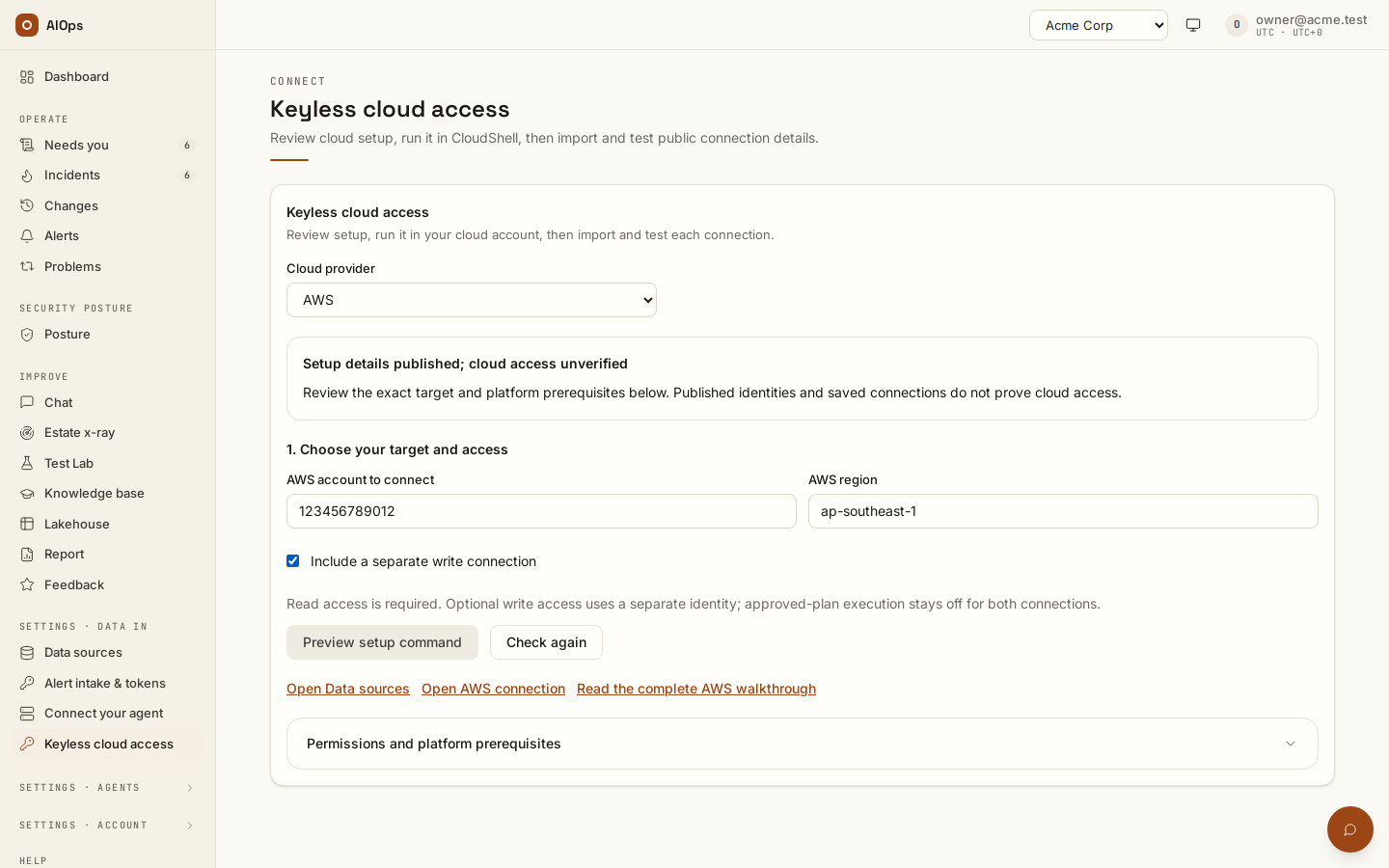
Video: CloudShell setup, public output and connection verification — Watch (2 min) · Captions
Recorded 16 Sep 2026 on 0.1.77 — the page has changed since; see Connect AWS and Connect Azure.
Open Keyless cloud access (in the product: /portal/connect/keyless). Choose the target, check the platform prerequisites, and select Preview setup command. Review the full command before running it in CloudShell and confirming apply. Paste only its final public JSON, select Preview connections, then Import connections. Saving does not run tests or enable execution consent. Exact matching connections are reused; conflicting identities block import without overwriting existing settings.
| Cloud | Required setup | Connection fields |
|---|---|---|
| AWS | Runtime reader; the installation's any-account roles (aiops-<workspace>-read/-write) or exact staff-prepared customer roles; caller identity permissions and target trust with this workspace's stable External ID |
Import the reviewed account, region and role ARNs from public output |
| Azure | Configured control-plane/reader federation and projected tokens, reviewed cloud roles, then staff-approved workspace application bindings | Import the reviewed directory, subscription and client IDs from public output |
| GCP | Deferred in this guided CloudShell flow | Existing service-account connections use the dedicated Google Cloud guide |
If platform prerequisites are missing, copy the handoff for your administrator. Global identity metadata is available in Customer connection setup; workspace readers, prepared AWS role pairs and Azure application bindings use the staff GET/PUT /api/aiops/admin/tenants/{workspace_id}/cloud-runtime API. After Azure staff verify the returned IDs, use Refresh application approval before importing.
Connections saved; access unverified. means configuration exists. Test read and write connections independently, inspect each result and runtime location, then verify the resource, metric or log reads you need. A passing identity or scope check does not prove all cloud permissions or a successful repair. Cloud IAM, connection execution consent and exact-plan approval are separate controls. AWS setup and External ID lifecycle.
The setup commands create IAM identities and trust, with an optional empty tagged Azure resource group. They do not create workloads or enable scanners. Infrastructure-as-code export is deferred. For GCP, follow the existing service-account JSON-key guide.
Follow a complete example: AWS · Azure · Google Cloud.
Secrets, rotation and secret_ref
Credential material never lives on the datasource row. Every secret field is written to a per-tenant secret store under an opaque reference, and the row keeps only that secret_ref. The API never echoes a secret back and the form never renders one; on Edit a secret field shows a placeholder, not a value.
What a security reviewer needs to hear, stated plainly:
- Secrets are stored in the platform database, one row per reference, holding a JSON object of that datasource's secret fields.
- They are encrypted with Fernet only when the deployment sets a secret key. With no key configured they are stored as plaintext JSON and the platform logs a loud warning at startup. That configuration is intended for demonstration only. If your deployment must protect credentials at rest, confirm with your platform operator that the key is set before you connect anything real. The platform-side half of this is in Security and data.
- Secret fields are write-only in both directions: they can be set and replaced, never read back, and no API response contains one.
- Deleting a datasource erases its stored secrets — but only after the row is actually deleted, so a delete that is refused cannot destroy the credential.
To rotate a credential: open Edit, type the new value into the secret field, and save. Leaving a secret field blank keeps the stored value; only a non-empty value rotates it. Requires datasources.manage. The rotation is applied after the row commits, so a save that fails — a lost race on the unique-name constraint, for example — cannot leave a rotated credential on disk while the row reverts. For a read connection, confirm the new read-check result succeeds. A write connection saves without a probe; its rotated credential is exercised by the next approved operation, whose result must be reviewed.
There is no scheduled or automatic rotation, and no expiry warning. Include a read check in the rotation runbook for read connections. For write connections, review the next approved operation's result; a read check cannot certify its write permissions.
Test a connection and read the failure
Test performs a real per-kind connectivity check with a five-second cap, stores the verdict on the row and writes an audit event. A broken configuration is always reported as a failure with a detail string, never as an error page. Requires datasources.manage.
What each kind actually probes:
- Most
apitypes hit a known health endpoint with the rendered auth headers: Prometheus/-/healthy, Grafana/api/health, Loki/ready, Alertmanager/-/healthy, Elasticsearch/_cluster/health, GitHub/rate_limit, GitLab/version, Datadog/api/v1/validate, New Relic/v2/applications.json, Dynatrace/api/v2/problems?pageSize=1(sent asAuthorization: Api-Token), FortiGate/api/v2/monitor/system/status, Palo Alto Networks/api/?type=version(the key inX-PAN-KEY). Anapitype with no known health path is probed at its base URL. - The Generic API connector is the case where that matters: the probe hits the base URL — or the OpenAPI path if you set one. Any response below HTTP 500 counts as reachable, because a 404 on a bare base URL is expected. A 401 or 403 is reported as reachable but auth rejected.
- Genuine credential checks run for the identity-carrying types: AWS does a SigV4-signed
sts:GetCallerIdentityand reports the principal ARN; Azure performs the AAD client-credentials grant and then reads the configured resource group (or lists the subscription's resource groups when none is set), which is what proves the Reader assignment at that scope (see Cloud account above for the verdict text); the Log Analytics workspace (KQL) connector performs the same grant against the Log Analytics audience, which also proves the app may request that scope; Google Cloud exchanges the service-account JWT and then lists one project; Postgres connects and runsSELECT 1. clitypes check the binary on PATH and then run a real probe command —kubectl get nodes --request-timeout=5s -o name, oruptimeon the remote host for ssh. Both prove authentication and reachability, not just that the binary exists.mcptypes perform the MCP handshake and report the tool count. A network device opens a netmiko session and reads the prompt.- A FortiGate or Palo Alto Networks connection whose management URL is a private address is not dialled from the platform: Test gives no verdict and says Not a failure, because the estate harvest reads the firewall over that address from inside your network (a platform installed in your network reaches it; a hosted platform needs a route to it). Run Harvest now on the connection's row and read its Coverage: a harvest that lists the firewall's interfaces and policies proves the connection. The row reads not tested from the platform — its harvest runs from inside your network, and the code is
inside_network. An address the workspace allows (ssrf_allow_hosts) is tested as before, and so are the private agent's own check and a workspace whose network guard is off (a platform installed in your network).
A green Test proves only the operation named in its detail, such as a health request, identity lookup or resource-group read. It does not prove access to all data or permission to execute a fix. Audit perms on the connection's row can inspect grants where supported; the actual approved operation proves write access. Saving a write connection does not run this test, and private-agent checks apply to read connections.
Read the failure
| Verdict | What it means |
|---|---|
ok · <detail> |
Reached and authenticated. The detail names what was proven — the STS principal, the tool count, the probe output. |
failed · SSRF guard: '<host>' resolves to non-public address … |
The SSRF guard blocked the probe, not the connector. The message says so outright: the agent's own request tools are not SSRF-guarded, so the datasource still works. |
failed · reachable but auth rejected (HTTP 401/403) |
The endpoint answered; the credential did not satisfy it. |
failed · HTTP <code> <path> |
The health endpoint answered with an error. The first 120 characters of the response body follow, which is usually enough to identify the cause. |
failed · binary '<name>' not found on PATH |
A CLI connector whose binary is not on the platform host. |
failed · '<command>' failed (exit <n>) |
The CLI probe ran but the command failed — a bad kubeconfig, an unreachable API server, missing RBAC. The tail of its output follows. |
failed · <field> not configured |
A required field is empty, or the rendered template still contains a ${placeholder}. |
failed · <ExceptionName>: … |
Transport-level failure — DNS, TLS, timeout, refused connection. |
failed · DecodingError: unsupported content-encoding '<name>' |
The endpoint compressed its answer with an encoding the platform does not decompress. It reads gzip and deflate, and asks MCP servers for uncompressed answers. Turn that compression off for the platform's requests. |
failed · MCP handshake failed: DecodingError: response exceeded 2097152 bytes |
One JSON answer from the MCP server was larger than 2 MiB. The platform reads at most that much of any one answer from a connection. |
The stored result appears in the Last test column as ok or failed plus a timestamp. A test you run now replaces that cell in place with the live verdict and the beginning of its detail string; hover the cell to read the whole string.
Grounded states on a connect suggestion
Estate x-ray can recommend a datasource for you to connect, and those recommendations carry a different, deterministic status that is worth recognizing because it is computed before anything is contacted:
| State | Meaning | What to do |
|---|---|---|
ready |
The suggestion is complete and can be applied as-is | Apply it, then Test |
needs_credentials |
Valid, but the listed secret fields are still empty | Fetch those credentials, fill them, then Test |
needs_endpoint |
The URL is network-scoped — cluster DNS, a private address or a single-label host — so the platform may not share that network | Expose a read-only route, or replace the URL, before connecting |
needs_datasource |
It depends on a datasource that is not connected yet | Connect the dependency first |
invalid |
It references something that does not exist, or duplicates a datasource you already have | Discard it |
needs_endpoint and the SSRF Test failure are the same underlying fact seen from two directions: an address the agent can use but the platform's own probe cannot verify. Both are described in Estate harvest and x-ray.
What the connected list shows
The connected list is searchable and sortable, and honors the category filter above it. Disabled connections are hidden: tick Show disabled connections (it carries their count, and appears only while one exists) to list them. The choice is remembered for you in this browser.
| Column | Meaning |
|---|---|
| Datasource | Name, connector type key, category badges, and a discovered · <status> link to the most recent x-ray scoped to this single datasource. An AWS or Azure connection also shows its account (account not confirmed — Test it to group it for an untested access key), the other read connections reaching it, and a Runs: line with the jobs it runs. |
| Role | read; a credential with a write use reads remediation only (kept out of every agent, used only for approved changes) or read + approved changes (the same credential also investigates), with whether approved-plan use is allowed and why a plan can or cannot run on it. |
| State | enabled or disabled. A disabled datasource is dropped from every agent registry and every scheduled job (see Disable and enable). |
| Last test | never, or the last stored verdict with its timestamp. |
Operate a connected datasource
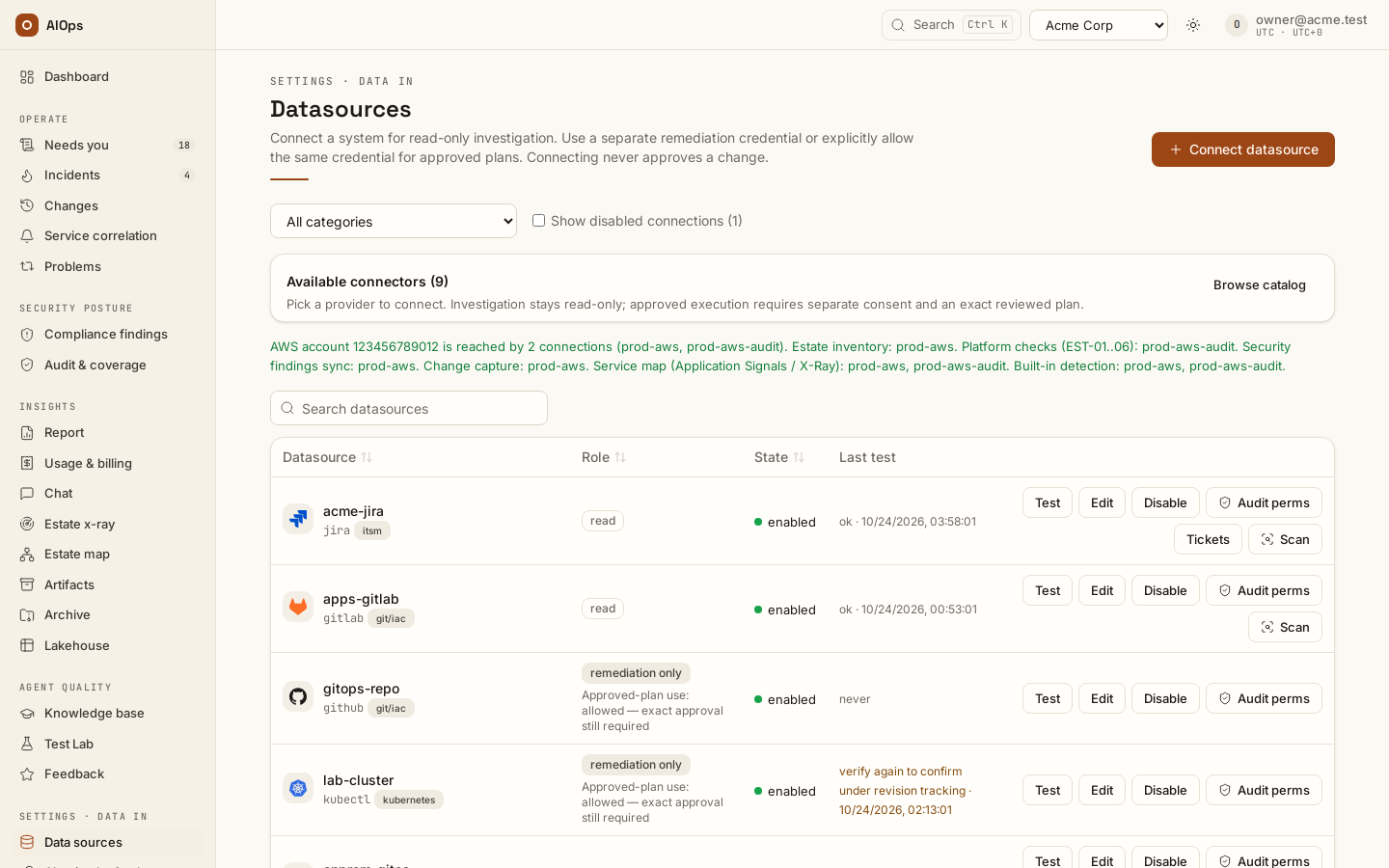
Connection rows offer Test, Edit, Disable (Enable on a disabled connection), Audit perms, Tickets (a ticket system), Harvest now (a connection that runs Estate inventory), Scan (not on a remediation-only credential) and, on a disabled connection only, Delete, subject to role and connection type. Management actions require datasources.manage. Test is covered above.
Audit perms
Audit perms answers "what can this credential actually do?" It introspects read-only wherever the provider exposes an API for it: AWS IAM policy simulation, GitHub token scopes, kubectl auth can-i --list, GitLab token self-introspection, Grafana RBAC, Argo CD can-i, RabbitMQ user permissions, Elasticsearch _has_privileges, Splunk capabilities, Jira mypermissions, Datadog key validation, Zabbix role type, Azure effective actions, GCP testIamPermissions, and a Generic MCP connector's own tool list. Nothing is executed against your estate, and an introspection error is reported inside the dialog rather than raised.
The audit runs as soon as the dialog opens. It shows a verdict badge — over-privileged, least-privilege OK or not introspectable — plus the role, the identity, a recommendation paragraph, a notes list that includes the gate classification for that connector type, and Re-check / Close. The Read access and Write / destructive access panels appear only when introspection actually succeeded. Where a provider has no self-permission API the platform says so rather than guessing; that includes the cataloged Kubernetes (MCP) type, which reports not introspectable. Use the Generic MCP connector if you want the tool-list audit, or the kubectl type if you want can-i.
Treat the verdict as least-privilege hygiene, not as the runtime guardrail. The runtime guardrail is the read/write gate, and it applies whatever the credential is allowed to do.
Scan
Scan launches a read-only estate x-ray scoped to that single datasource and takes you to the Estate x-ray page, where the new scan appears at the top. It answers "what is actually in here?" — inventory, risks, coverage. When it finishes and has produced a report, the discovery is persisted as a versioned runbook in the Knowledge base named datasource-scan-<name> and materialized into the agent skill catalog, so later investigations and full-estate scans build on it instead of rediscovering it. A re-scan supersedes the previous version rather than duplicating it.
Requires datasources.manage in an enabled workspace; Estate x-ray is included by default. A write-role datasource is refused at launch with a 400, and the launch is refused with a 409 if it would exceed the tenant's concurrent-scan cap.
Edit
Edit reopens the form. The connector type is fixed. Secret fields are blank; fill one only to rotate it.
Editing preserves existing configuration and stored authentication unless you change them explicitly. AWS/Azure offer Keep current authentication. Use an explicit authentication method change to clear or replace credentials; changing purpose or execution consent invalidates old execution reviews. API clients should omit unchanged PATCH fields rather than send placeholder values.
Disable and enable
Stop using a connection by disabling it, not by deleting it. Disable asks first; Disable connection in that dialog turns it off and the row leaves the list (tick Show disabled connections to see it; a link from a change or an incident opens the page with disabled connections listed). While a connection is disabled:
- agents and remediation routes no longer use it, ticket routes on it file nothing;
- scheduled jobs skip it: estate inventory harvest, scanner findings sync, change capture, built-in detection and lakehouse collection;
- a pending change whose step needs it cannot be approved or released: its review is refused and nothing runs;
- its settings, stored credentials and history are kept.
Enable on a disabled row turns it back on, with no confirmation; a refusal shows on that row. A read connection is back in use at once. On a write-capable connection (remediation only, or read + approved changes) the enabled state is part of its execution consent, so disabling and enabling each make a new connection revision: Test it again before an approved plan can run on it, and a pending change through it must be reviewed and approved again. The Enabled box under Edit → Advanced · agent access and automation credentials is the same switch.
Delete
Delete is offered only on a disabled connection: disable it first. It removes the datasource and its stored credentials after a confirmation, and cascades its collection specs. The delete is refused with a 409, inside the dialog, while something still depends on the connection:
- a pending change whose step needs it — the dialog names the change (
CHG-…) and links to it in the Changes list. A request nobody has released yet (draft, planned, waiting for approval or approved) can be refused with Reject on its page (approvals.decide); a released one has to finish first, or, once it has gone 24 hours without a verdict, be closed with Close without verdict on its page. A Test Lab rehearsal's change that a finished Test Lab run left inverifyingdoes not hold it; while its run is still running (the lane writes real resources, rolls them back and cleans up through it) or while it is mid-write, it holds it like any other; - a remediation route that references it (even a disabled route) — Open the routes that use this connection lists them; remove or repoint the route first;
- a running Estate x-ray scan, Test Lab job or private-agent connection check — wait for it to finish.
Rows already collected into the lakehouse are not removed; retention sweeps those.
Ticket systems
Connect Jira Cloud, ServiceNow or Azure DevOps once and every incident the Incident agent handles gets one ticket: filed when the incident opens, the analysis written back and the ticket closed when it resolves — whoever or whatever resolves it (a person, the source alert clearing, the quiet-expiry close, the agent, the post-fix check, a merge or a storm split). Built-in detection is the exception: a held warning files no ticket until Analyse (or an unheld alert joining it) lifts the hold, an unidentified service signal waiting in the triage queue files none until Analyse either, and an incident detection stopped watching (Turn off, a rule switched off, a connection opted out) gets the write-back but keeps its ticket open — nothing was seen to clear.
The Tickets action, Check, the API calls, what is written, how closing works, inbound tickets and the failure cases are on Ticket systems. Ticket routes are current, not legacy: they live on the routes page below only because they are routes.
Legacy remediation routes
Historical route-based records keep their original review and execution behavior. Administrators maintaining those records can use the explicit legacy compatibility page (in the product: /portal/datasources/legacy-routes) or existing route APIs/MCP tools. This page is not part of normal connection setup. A new incident or Change uses its prepared steps and opted-in connection; an invalid or empty structured plan cannot fall back to a legacy route.
A route runs without a per-incident click only when an approver certified it — the step-by-step setup of a write connection, a runbook route, its certification and the switches, the way the demo workspace does it, is in Runbooks and automatic fixes — set it up like the demo.
Create a remediation route
This historical link is retained for existing bookmarks. New connections and supported prepared plans do not require a route. Use the legacy compatibility page only for an existing integration that still depends on that contract. Its execution remains subject to connection consent, exact review and approval.
After the pull request is opened
The platform creates a branch and pull request; it does not merge or deploy it. Review, merge and deploy through your normal process, then inspect recovery verification. An open PR is not an applied fix. GitHub tokens need Contents: Read and write for the intended repository; a read-only test cannot prove that grant. Repository actions produce an append-only PR artifact.
Use cases
Onboarding a production cluster
A platform owner creates a view-only ServiceAccount, pastes its kubeconfig into a kubectl datasource named prod-eks, and writes in the notes that payments and checkout are the critical namespaces. Test runs a real kubectl get nodes against the cluster, proving RBAC and reachability in one click. Audit perms runs kubectl auth can-i --list and reports read access with no writes: least-privilege confirmed. She presses Scan; when it finishes, the estate map, the risks and a datasource-scan-prod-eks runbook are on record, and the incident agent starts its next investigation already knowing the cluster. Finally she connects a GitHub identity scoped to the infrastructure repository, records confirmed repository ownership and enables approved-plan use. A repository-owned fix is then prepared as an exact file edit for human review and pull request creation.
Reaching a fragmented multi-account estate
An operator with four AWS accounts connects all four, each with its own read-only credential and its own notes naming what lives in it. The first becomes aws_request; the others become prod-eu_aws_request, sandbox_aws_request and data_aws_request, each bound to one account. A single estate x-ray launched across all four merges them into one registry and produces one inventory, one risk list and one service graph rather than four disconnected scans.
Troubleshooting
Symptoms that are not specific to datasources — a run that never starts, an approval queue that looks empty, spend reading $0.0000 — are collected in Troubleshooting.
| Symptom | Cause | What to do |
|---|---|---|
| Test fails saying the host resolves to a non-public address, and that "the agent can still use this endpoint" | The SSRF guard blocks the probe on private and metadata addresses by secure default. The agent's own request tools are not SSRF-guarded, so the connector still works. | Either accept it, or add the host to the tenant SSRF allowlist, or turn the tenant SSRF guard off — both on Guardrails and cost limits. |
| Test fails with a connection or DNS error | The platform genuinely cannot reach the endpoint. | Use an address reachable from the platform, or expose the service through something that is. |
| Test fails with a certificate error | Self-signed appliance certificate. | Set Skip TLS verify to true, or install a trusted certificate. |
| Test on a generic API says "reachable but auth rejected (HTTP 401/403)" | The endpoint answered; the credential did not satisfy it. | Check the token, the custom auth header name, or the basic-auth pair. |
Test on a CLI connector says binary '<name>' not found on PATH |
The binary is not on the platform host. | Use a connector whose binary the deployment ships (kubectl and ssh are included), or ask your platform operator. |
| Test on kubectl or ssh says the probe command failed with an exit code | The binary is there but the credential is not accepted — bad kubeconfig, unreachable API server, missing RBAC, refused key. | Read the output tail in the detail string; fix the credential at the source and re-test. |
| Test on a network device says netmiko is not installed | The image was built without network-device support. | Ask your platform operator for an image that includes it. |
| Test on a keyless AWS connection says AWS refused this keyless role | Platform setup does not cover the role's account (staff have not prepared it, or it hosts the platform itself), with staff-prepared roles the platform is not granted this role, the role's name is outside aiops-*, or the role's trust lacks sts:AssumeRole with the workspace External ID or sts:TagSession for the platform role, which Test runs as. Missing trust for the workspace reader role does not fail Test: it passes as ok from the control plane only and names the reader to add, and Estate x-ray scans and investigation reads fail until it is added. |
The result names which, then AWS's own reason (not authorized to perform: sts:…). Send the form's platform-setup handoff, or fix the trust as in Creating the AWS role by hand. |
| Test on a cloud account says the credential is not configured | A required field is empty, or a template placeholder was never filled. | Reopen Edit and complete the identity fields; for AWS confirm both the key id and the secret. |
| Save rejected: "not valid YAML" or "missing -----BEGIN block" | A multi-line paste lost its line breaks. | Repaste the complete file into the multi-line field. |
| Save rejected: "already exists" | Datasource names are unique per tenant. | Choose a distinct name, for example per environment or region. |
| No Delete on a connection | Delete is offered only on a disabled connection. | Disable it, tick Show disabled connections, then Delete. |
| A connection disappeared from the list | It is disabled; disabled connections are hidden. | Tick Show disabled connections, then Enable it if you still need it. |
Delete refused with a 409 |
A pending change still needs the connection, or a remediation route still references it. | Follow the link in the dialog: Reject a request nobody has released or let a released change finish, or delete or repoint the route, then delete the datasource. |
| Scan is unavailable | Missing permission, disabled workspace or outdated client | Confirm datasources.manage, the selected workspace and current client version; no feature grant or terms action is required. |
Scan refused with a 400 naming a datasource |
It is a write-role, remediation-only credential. | Connect a read-role twin for investigation and scanning. |
| Scan refused with "would exceed the max N concurrent scans" | The tenant already has that many scans running. | Wait for one to finish, or cancel one on the Estate x-ray page. |
| The agent never uses a connected datasource | It is disabled, its role is write, the pillar allowlist excludes that pillar, or platform staff restricted or disabled that connector type. |
Check State, Role and the pillar allowlist on Edit. A State of type disabled by platform means staff disabled the connector type: ask your platform operator to enable it. If all three look right, ask them about the type's pillar list. |
| Every call to one connector is gated or refused | The call classifies as a write — often a POST the catalog does not recognize as a query — or the connector is SSH or a Generic CLI connector, whose calls are all refused in an agent run (CLI). | Use an endpoint the connector's read set lists (The read/write gate in detail); an adopted read path does not change what an agent may call in this release. For host evidence, connect the metrics or log backend the host reports to. |
| Audit perms says "not introspectable" | That provider exposes no self-permission API; this includes the Kubernetes (MCP) type. | Rely on the gate classification line, and on scoping the credential at the source. |
| A connector you expected is missing from the catalog | Platform staff disabled that connector type for this deployment. | Ask them to enable it, or use the Generic API, MCP or CLI connector. |
Limits and gotchas
- Secrets are never displayed again after they are stored. Blank means "keep". To replace a lost credential, rotate it on Edit — there is no read-back, from the portal or the API.
- There is no scheduled rotation and no expiry warning. A credential that rotated away surfaces as a failed Test, and only when someone runs one.
- The connector Type is fixed at connect time. A wrong type means delete and reconnect.
- The portal Edit form keeps config keys it does not show (adopted read paths, pending candidates,
gate_paths). A config PATCH over REST or MCP replaces the whole config, so send the current config back with your change. - The datasource Name must be unique. Characters outside letters, digits,
_and-are rewritten to a safe tool name; the original name stays an alias, so routes and approval gates written with it keep working. - Notes are stored up to 2,000 characters; only the first 400 reach the tool description the agent reads.
read_post_pathswidening applies to POST only, is denylist-checked on every adoption, and is ignored by every agent run in this release — investigations, chat and estate x-ray alike.- Scope JSON on a cloud connector is operator intent, not an enforced boundary. Scope the credential itself.
- The concurrent-scan cap is a best-effort runaway guard, not a hard limit: simultaneous launches can overshoot it slightly. The per-scan budget is the real cost ceiling.
- If platform staff disable a connector type, every datasource of that type stops being rendered into agent registries, and routes pointing at one escalate instead of executing. The rows stay on this page, and their State reads
type disabled by platform. - Execution-only connections stay outside investigation registries. Opted-in AWS/Azure execution credentials offer a safe access check on save; no read check or permission audit certifies a repair. Shared connections remain usable for reads when execution consent is off.
- MCP servers are connected over streamable HTTP from this page; there is no portal path for a stdio server.
- A git connection's Repositories watch list, and when a repository needs a webhook as well, are on Report changes to the change webhook.
Confirm repository ownership once
For a write GitHub, GitLab, Azure DevOps or Gitea connection, a workspace owner can add Repository ownership: the exact repository key, its base branch and the resource identities it manages, one per line. Use the identities shown by your incident or verified inventory. This records ownership; it does not approve any change.
Connection managers can keep existing ownership bindings while updating credentials, but only an owner can change those bindings. After saving, select Test saved repository connection, then return to the incident to review its prepared pull request. A successful check establishes access and identity, not permission to perform every future operation.
Next steps
- Read and write roles, and the write gate — before you enable a connection for approved plans.
- Choose your connection — alert source, read connection, write credential or private agent.
- AWS · Azure · Google Cloud · Kubernetes · On-premises · Private network — the guide per estate.
- Estate harvest and x-ray — what Scan and Harvest now produce.