Security and data handling
Understand data boundaries, credential storage, redaction and approval rules.
Concept · Updated 2026-10-27 · Describes release 0.1.164
Who this chapter is for
Your security reviewer, and anyone who has to sign off on connecting this platform to production systems. Everything below describes shipped behavior, with the file-level mechanism named where it helps you verify it. Where the platform is weaker than you would like, this chapter says so rather than leaving your penetration tester to find it.
Three claims are load-bearing, and the rest of this chapter is the evidence for them:
- Credentials are write-only. They enter the platform, they are used to make a call, and no interface reads them back.
- No write reaches your estate without a named human — either a person releases it, or, only where your workspace owner turned on automatic API fixes, it repeats unchanged a fix a named approver certified and a named person released before, which the platform verified. The agent cannot loosen that itself, and neither can your own operators. Ticket routes, which run when an incident opens or resolves, write only to a ticket, paging or webhook system, never through a write connection; a hand-written one runs only once an approver certified it (Runbooks and automatic fixes).
- Platform staff are not members of your tenant. They see your tenant's data only through a membership row you can see and revoke.
Where every credential lives
The tenant secret store
Every credential you type into the platform lands in one place: a per-tenant secret store, backed by a dedicated database table (app/aiops/secrets.py). The record that references it — the datasource row — holds only a secret_ref pointer, never a value.
| Credential | Where the value lives | What the row keeps |
|---|---|---|
| Datasource credentials (API keys, passwords, kubeconfigs, service-account JSON, PEM keys, cloud role details) | Tenant secret store | secret_ref (the datasource id) |
| Company IdP client secret | Tenant secret store | client_secret_ref + a has_secret flag |
| Webhook ingest token | Nowhere — only its SHA-256 | The hash, in tenant settings |
| Personal access token | Nowhere — only its SHA-256 | The hash plus the last 4 characters |
| Browser session cookie | Nowhere — only its SHA-256 | The hash plus an expiry |
| Runner token (platform-side) | Nowhere — only its SHA-256 | The hash |
Four properties of the store matter to a reviewer:
- Encryption is conditional. When the platform operator sets
AIOPS_TENANT_SECRET_KEY, the stored JSON is encrypted with Fernet under a SHA-256-derived key. When that key is not set, values are stored as plaintext JSON and the application logs a loud warning at every startup: "tenant datasource secrets are stored in PLAINTEXT in the database." Ask your platform operator to confirm the key is set on the instance serving you. This is a yes/no question with a yes/no answer. - Turning encryption on is retroactive. A plaintext row read while a key is configured is re-encrypted in place on that read.
- It fails closed, not open. An encrypted row read with the key missing or wrong returns nothing and logs an error. The tool call then fails for want of a credential rather than silently running unauthenticated.
- Nothing outside that module touches the table. The store is the designed replacement seam for a Kubernetes Secret, Vault or OpenBao backend.
The limit, stated plainly: encryption is at rest only, and the key is an environment variable in the same process environment as the application. Anyone who can read that process's environment can decrypt the store. External key management is a designed seam, not a shipped feature.
What the console can and cannot show back
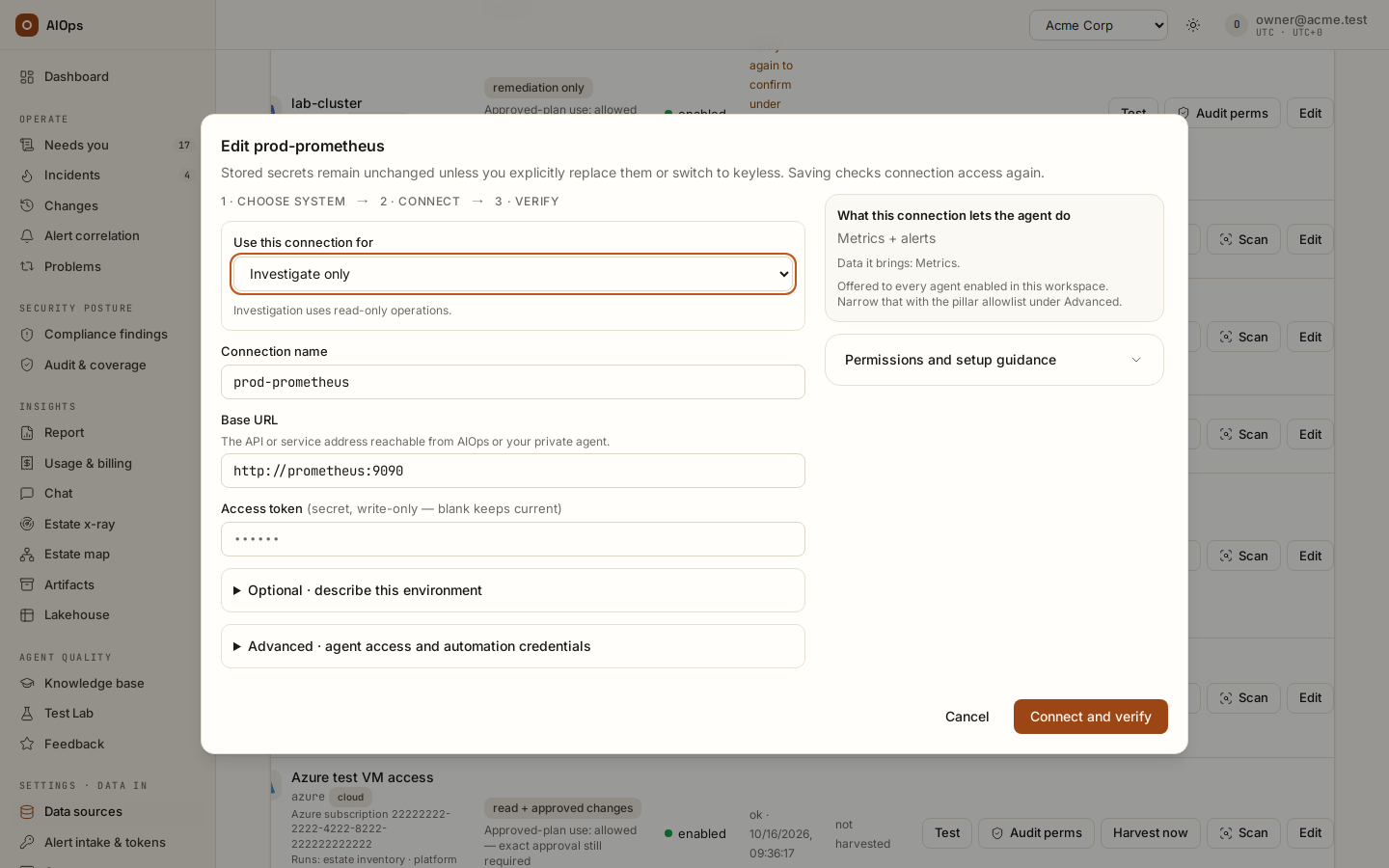
- Secret fields render as password inputs and are write-only. No REST endpoint, MCP tool or console screen returns a stored secret value.
- On Edit, a stored secret is never filled in: a single-line secret field shows a masked placeholder and the label (secret, write-only — blank keeps current), a multi-line one such as a kubeconfig reads (unchanged — paste full content to rotate), and the dialog states: "Stored secrets remain unchanged unless you explicitly replace them or switch to keyless." An AWS or Azure connection shows no secret field while Authentication method is Keep current authentication (Stored credentials remain unchanged.); choose Replace access keys or Replace a client secret to enter a new value, which is stored write-only.
- The Company IdP panel shows a secret stored badge and nothing else.
- Deleting the datasource deletes its secrets, and only after the database row commits — a failed delete never destroys a credential.
The caveat you must design around: only fields the connector marks as secret get this treatment. Non-secret configuration — base URLs, regions, account ids, the operator notes in Description — is returned by the datasources API and readable by anyone holding datasources.view. Never paste a credential into a non-secret field.
Rotate a credential
Permission required: datasources.manage.
- Open Data sources.
- Find the datasource and select Edit.
- Leave every field you are not rotating blank.
- Paste the new value into the secret field, in full — the platform validates YAML, JSON and PEM formats at save time, so a kubeconfig that lost its line breaks in the paste is rejected with a 400 rather than failing mid-investigation.
- For investigation/shared access, select Connect and verify and inspect the read-check result. Opted-in AWS/Azure execution-only access offers Save and check access; other execution credentials are saved without that check. A read check never proves permission for every write.
A datasource.update row in Audit records the changed field names, never secret values. The rotation is written to the secret store only after the database row commits, so a rejected save never leaves a rotated credential behind.
What leaves your network, and to whom
There are seven categories of outbound traffic.
1. The model gateway
The investigation loop calls one language model endpoint, configured by your platform operator as a model id, a base URL and an API key. If your operator points that base URL at a model you host, nothing in this category leaves your network at all. If no model is configured, the platform runs a deterministic mock and makes no model call whatsoever.
What a request to that endpoint contains:
| Part of the request | Contents |
|---|---|
| System prompt | The pillar persona, your active Knowledge items for that pillar, a description of your configured remediation routes, your own per-agent prompt text, and the names of available skills |
| First user message | The incident title, its correlation key, the grouped-alert count, and the labels and annotations of up to five of its alerts (400 characters each), all wrapped in untrusted-data fences |
| Tool results | The output of every read the agent performs — this is your estate's telemetry, logs, configuration and command output |
| Nothing else | No credential, no secret-store value, no user email, no session token |
The honest part: tool output is the substantial thing that leaves, and by default it is sent raw. The optional tool-output PII scrub (aiops_pii_scrub_tool_output) ships off. Estate x-ray is the exception — it forces the scrub on, with no flag to disable it, because estate data flows heavily there. If your threat model requires that no unredacted log line reaches the gateway, ask your platform operator to enable that scrub; see PII: the floors and the switches below.
Two mechanical limits bound the volume: any single tool output is truncated at 24,000 characters before it enters the conversation, and once total tool output in one run exceeds roughly 200,000 characters the oldest tool messages are elided from the context.
2. Web search
The web_search tool calls one fixed search endpoint — DuckDuckGo's HTML endpoint by default, or Tavily or Brave when your operator configures an API key. Only the query string leaves, truncated to 256 characters, and the query passes the PII scrubber before egress. That is deliberate: the query is the one field a hijacked agent could use to smuggle estate data to a third party, so credential and identifier patterns are neutralized on the way out. web_search is never approval-gated, because there is nothing sensitive left in it to gate.
3. Web fetch and arbitrary HTTP
| Tool | Behavior |
|---|---|
web_fetch |
Free for domains on your web-fetch allowlist (suffix match, maximum 50 entries). Any other URL is approval-gated, and denied outright inside an estate x-ray. |
http_get |
Always approval-gated, on every run, with no configuration that can free it. It is the general-purpose exfiltration channel and is treated as one. |
Both honor the SSRF guard, which resolves the target host and rejects private, loopback, link-local and cloud-metadata addresses. Your own configured datasource hosts stay reachable.
4. Your own datasources, and the clouds you connect
The agent calls the endpoints you configured, with the credentials you supplied. For the native cloud connectors this means fixed vendor endpoints, and only for a cloud you actually connected: AWS STS and service endpoints, Microsoft's identity and management endpoints plus Log Analytics, Google's OAuth and service endpoints. For a GitOps remediation the platform calls your source-control API — hosted or self-hosted, whichever base URL you configured. When an Amazon SNS subscription points at the intake, the platform confirms it by fetching the SubscribeURL SNS sent, and only a genuine https://sns.<region>.amazonaws.com address.
5. Your identity provider
If SSO is enabled, the platform fetches the issuer's discovery document and JWKS to verify token signatures, and caches both for one hour. Each fetch must finish within 10 seconds and stay under 256 KiB, or the token is checked against the issuer's userinfo endpoint instead. The platform asks for uncompressed answers and refuses a compressed one. A signing key larger than 4096 bits, or with a public exponent that is not an odd number from 3 to 65537, is refused.
6. Notifications and pagers
The targets your workspace owner configures under Settings · Account → Notifications & on-call: the Teams, Slack and webhook URLs they enter and the SMTP relay that sends email. A pager goes only to its vendor's fixed endpoint — PagerDuty events.pagerduty.com (EU events.eu.pagerduty.com) or Opsgenie api.opsgenie.com (EU api.eu.opsgenie.com) — never to a URL typed in. Every message passes the PII scrubber before it leaves.
7. The price lists
Once a day by default the control plane downloads published model prices from two fixed addresses: the AWS price list (pricing.us-east-1.amazonaws.com) and models.dev (models.dev/api.json). It sends nothing about your workspace. An installation without that egress turns the sync off and records prices by hand.
What never leaves
There is no telemetry, no analytics beacon, no usage reporting and no phone-home to the platform vendor. The console is a self-contained bundle: no CDN script, no external font, no third-party tag. You can verify this at the network layer with an egress allowlist containing only the seven categories above — the platform will function normally.
PII: the floors and the switches
The scrubber replaces detected values with a correlation-preserving pseudonym:
[REDACTED:email:9f4c2ab71e08d5c3]
The hash is the first 16 hex characters of SHA-256(tenant_salt + value). The same value produces the same token within your tenant, so joins and correlation survive redaction; a different tenant salt makes the same value produce a different token, so tokens are not linkable across tenants. The transformation is one-way. A scrubbed record cannot be un-scrubbed, which is why the optional patterns are deliberately conservative — a false positive destroys data permanently.
Chokepoints with no off switch
These are code, not settings. No endpoint, flag or role can disable them.
| Chokepoint | What is scrubbed |
|---|---|
| Lakehouse capture | Every row written to the lake — keys and values — passes the scrubber. The write function requires a PII context and takes no bypass parameter |
| Estate x-ray | Tool outputs, plus the finished report and its recommendations; the mission ledger is scrubbed at capture |
| Chat answers | Every answer, before it is persisted or returned |
| Artifacts | Title, metadata and body content, plus URL scheme filtering (anything that is not http/https is dropped), applied on write — artifacts are append-only, so unscrubbed content there would be permanent |
| Chat audit rows | The question is stored as a SHA-256 hash only. The question text lives in the session row, not the audit trail |
| Lakehouse erasure audit | The search term is stored as a hash only |
| Webhook tokens in intake URLs | A token in one of the platform's own intake URLs — the path segment after the workspace slug, or a token= query value — is redacted before a captured change, an alert or a scanner finding is stored, and reads [REDACTED:secret] where an older record still holds it. Records written before 0.1.120 in estate x-ray scans, knowledge, chat history, the audit trail and the lakehouse are not rewritten: mint a new token where one travelled in a URL |
The always-on detectors are: secrets (API keys, tokens, private-key blocks, JWTs), email addresses, payment card numbers (Luhn-validated), and phone numbers. They are listed read-only on the Guardrails page so you can see the baseline.
Chokepoints you configure
| Setting | Default | Who sets it |
|---|---|---|
Extra PII patterns (pii_patterns) |
Empty; a curated recommended pack is offered for adoption | You, on Guardrails & cost — permission members.manage |
| Scrub alert labels and annotations at ingest | Off | Your platform operator, install-wide |
| Scrub agent tool output before it reaches the model | Off | Your platform operator, install-wide |
| Redact IPv4 addresses | Off (noisy, but relevant under GDPR) | Your platform operator, install-wide |
Say this out loud in your review: the last three are install-wide environment settings, not per-tenant controls. You cannot turn tool-output scrubbing on for your tenant alone from the console. Raise it with your platform operator as a change to the deployment.
You may add up to 20 regular expressions. Each is compiled and validated on save — an invalid expression is rejected with a 400, and a pattern that later fails to compile is skipped rather than taking ingestion down. The Guardrails page flags how many recommended patterns you have not yet adopted, which is the review signal when new defaults ship.
A detection is surfaced, never silently swallowed
When the scheduled collector finds PII in telemetry it is pulling from your systems, it writes a pii.detected audit row and opens a compliance incident against the datasource. Your own leak is reported to you, not quietly redacted away.
Erase a value from the lakehouse
Permission required: members.manage. Requires the lakehouse feature.
- Open Lakehouse.
- Enter the value to erase — at least 3 characters.
- Confirm the erasure.
You should see a deleted-row count returned, and a lake.erased audit row whose payload carries a hash of your search term and the count, never the term itself. The erase matches both the literal value and the value's own pseudonym token, so erasing an address also removes the rows the scrubber already protected. Lakehouse also offers a full drop of the tenant's lake.
The limits: artifacts are append-only and have no erase path by value. Investigation transcripts have no per-value erase path. Closed records — resolved incidents, finished scans, terminal changes, cleared findings, with their runs and artifacts — age out on the workspace's retention window (Guardrails & cost → Data retention, default one year); the audit trail never does. There is no delete-tenant endpoint in this release — removing a tenant's data entirely is a platform-operator database task.
The record archive. When the platform operator configures an archive bucket, records past the window are archived before they are removed: one compressed file per closed month of a workspace in a dedicated S3 bucket of the platform's account, encrypted with a customer-managed KMS key, with credentials and secrets masked when the file is written (PII pseudonyms already stored stay pseudonyms; nothing new is pseudonymised). The bucket's Object Lock (governance mode) keeps every file for the period the operator set — 5 years by default — and only the control plane's own role can read or write it; the platform holds no permission to delete or shorten it. Chat sessions and estate x-ray attachments are never archived, and removals a person asks for (an x-ray scan or attachment, a trashed test dataset, a knowledge item) stay immediate. Erasing a record from the archive inside its retention period is a platform-operator break-glass procedure, not a console action: ask your operator. An archived incident or change stays readable from its link and from the Archive page, read-only, with the same permission as the live record (GET /{workspace}/archive/{incident|change}/{id}); a per-month fine-tuning export and back-test cases (members.manage) are built through the control plane, and the export runs the full PII scrub with the workspace's salt before a byte leaves the platform.
The write gate as a control matrix
Investigation datasource tools reject writes, regardless of whether the connected credential has provider write permissions. What counts as a write is decided by an intrinsic floor in code; your per-agent approval list can only add gates on top of it. The matrix per tool family, the guarantees that hold whatever the credential mode (write-role datasources invisible to the agent, shared credentials keeping the read boundary, chat and estate x-ray read-only), why lake_query is ungated, who may widen the gate and what untrusted-input fencing does and does not promise are on Read and write roles, and the write gate.
Tenant isolation and the staff data boundary
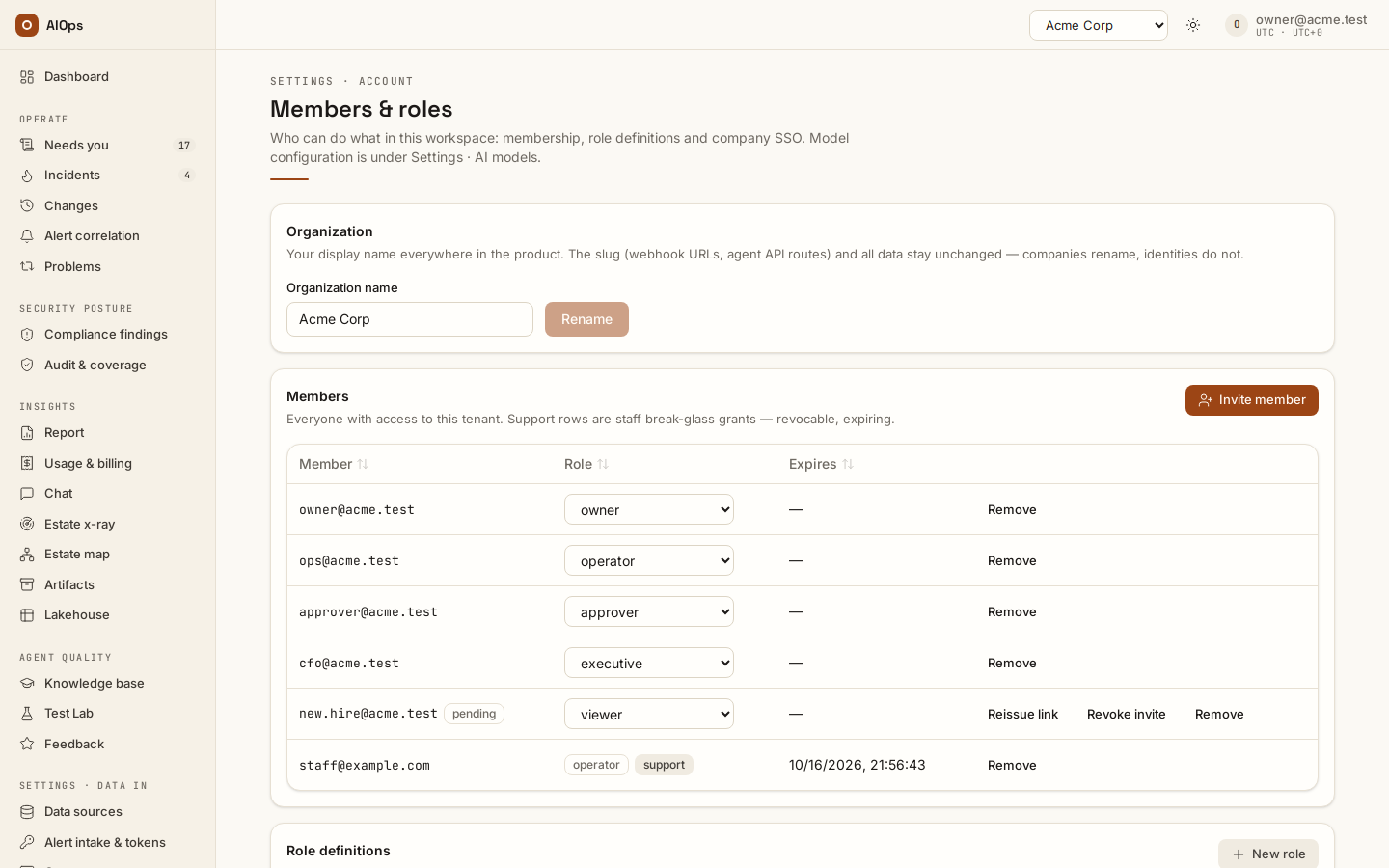
- There is no superadmin bypass. Every tenant-scoped read and write resolves permissions through one function that looks for a real membership row. Platform staff hold no implicit access to your incidents, investigations, chat sessions or lake.
- Unauthorized reads return 404, not 403. A non-member cannot learn that your tenant exists. A member missing a specific permission gets 403 — that distinction is intentional and is enforced on the REST API and the MCP servers alike.
- Expired memberships are absent, not stale. A membership past its expiry is treated as missing and the row is deleted on the spot.
- A disabled tenant fails closed on both the cookie session path and the SSO bearer path, at the same single choke point.
- Chat sessions are strictly own-user. Another member of your own tenant — superadmin included — gets a 404 on someone else's session. The one processor of every member's turns is a private network agent your owner created with Answers workspace chat; an agent token created without it never receives a chat turn.
- SSO can never mint an administrator. A group-to-role mapping that would grant
members.manageis rejected when the mapping is written, again when the role is edited, and a third time at login.
The precise boundary, stated honestly: platform staff can see tenant configuration and cross-tenant aggregates — the tenant list, counts, connector catalog — through explicit staff-only code paths in the platform console. They cannot see your tenant's incident, investigation, chat or lake data without a membership row. That row is the boundary, and it is visible to you.
Support access is expiring, badged and revocable
When a platform engineer needs to see your data to help, they self-grant a support membership. What that means concretely:
| Property | Value |
|---|---|
| Role granted | operator — everything except members.manage, pillars.manage and approvals.decide |
| Duration | Expires automatically, 24 hours by default |
| Visibility | The member appears on Members & roles with a support badge |
| Audit | support.granted on grant, support.revoked on revocation |
| Who can revoke | The staff member, or anyone in your tenant holding members.manage |
| Can it be disabled entirely | Yes — a platform-wide setting forces staff to be invited by you like anyone else. Ask for it in writing if you want it |
The honest part: the grant is self-served. You are not asked first. You see it and you can end it, and it ends itself.
Revoke a support grant
Permission required: members.manage.
- Open Members & roles.
- Find the member carrying the support badge.
- Select Remove.
You should see the member disappear from the list, and a support.revoked row in Audit naming who removed whom.
The audit trail as evidence
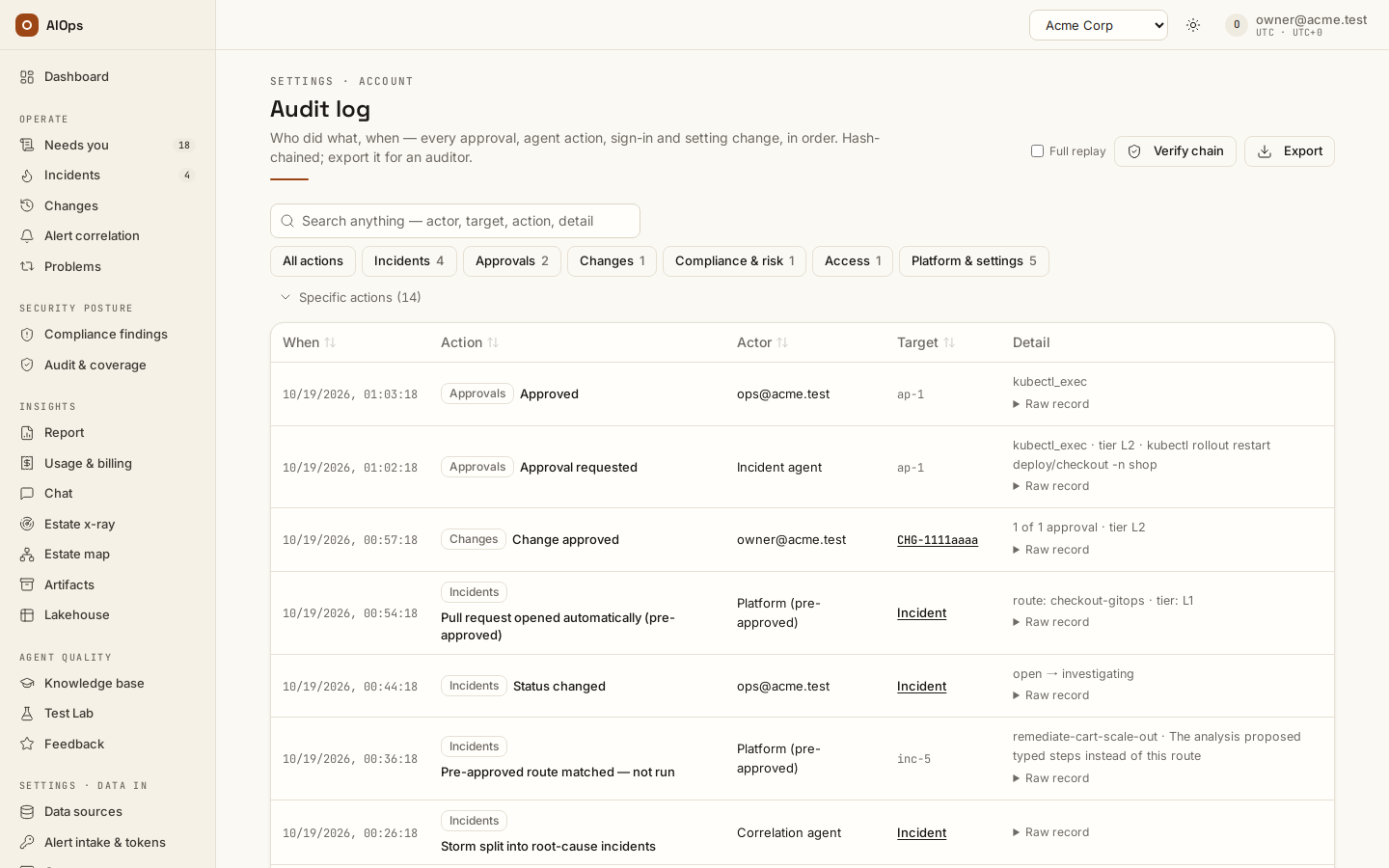
Audit rows are append-only and never updated. Each row carries a tenant, an actor (a user id, agent:<pillar>, or system), a dotted action, the id of the entity touched, a JSON payload and a timestamp. Reading your tenant's audit requires report.view. Filtering is server-side across action, actor, target and payload, and the filter chips are built from the action values your tenant has actually produced — so they cannot drift from what the platform writes.
What the rows that matter actually prove:
| Row | What it proves |
|---|---|
approval.requested |
The agent stopped and asked. The payload names the tool and the rendered invocation, with any credential in it hidden as on the approval itself |
approval.executed |
A named human decided, and the call then ran. The payload carries the decision, the invocation (credentials hidden the same way) and the result status |
approval.edit_rejected |
A human edited a proposed command on a tool with no command surface, and the platform refused to run it rather than silently running the original |
approval.expired |
Nobody decided within the timeout; the request was denied by timeout and the incident escalated |
incident.status |
Every incident state transition, including who or what caused it |
incident.remediate |
A remediation route was executed, or a pull request was opened |
finding.verified |
A post-fix validation, or an operator Verify, read the resource and found the fix in place; the linked scanner findings carry the verified marker until the scanner clears them |
model.escalated / model.downgraded |
The model tier changed mid-run, and why. These decisions are deterministic rules, never another model's judgement |
datasource.create / .update / .delete / .test |
Who changed a connection and which field names changed — never the values |
guardrails.updated / web.allowlist_updated |
Who changed a guardrail, with the before-and-after in the payload |
pii.detected |
The collector found PII in your telemetry; a compliance incident was opened |
chat.ask |
A chat turn occurred, with the question as a hash only |
xray.launched / xray.scheduled / xray.finished / xray.applied / xray.context_adopted |
A scan ran, and what a human later chose to enable from it — or, for a scheduled scan with auto-adopt on, what system:scheduler adopted. xray.scheduled is the re-scan cron's memory: armed, fired with the scan id, or skipped with the reason |
artifact.created |
A durable artifact was written. The payload never carries its content |
support.granted / support.revoked |
Staff access opened and closed, with the account named |
terms.accepted / feature.granted / feature.revoked |
Historical records from the retired feature gate; they no longer control availability |
tenant.webhook_token |
The ingest token was reminted — which invalidates the previous one immediately |
Gaps you should plan around. There is no built-in SIEM forwarder: you pull the trail. Export on the Audit page, or GET /api/aiops/{tenant_id}/audit/export on a schedule with a read-scoped personal access token, returns a period or the next page after a seq cursor (after_seq), with each row's seq, prev_hash and row_hash. scripts/verify-audit-export.py re-verifies an NDJSON file offline, with no access to the platform, before you ship it to your SIEM or archive. And audit rows live in the same database as everything else, chain head included — this is not a write-once store. Keep the exported files in your own write-once storage: that archive is the anchor that shows whether the online trail was rewritten after you took it. The steps are in Audit log → Export evidence for an auditor.
Tokens and session handling
| Credential | Storage | Lifetime | Revocation |
|---|---|---|---|
Personal access token (ntp_…) |
SHA-256 plus the last 4 characters. The raw value is shown once at creation and is never retrievable | Forced expiry: 90 days by default, 365 maximum. There is no non-expiring token | Owner revokes it on Tokens |
| Browser session | SHA-256 of the cookie token, in a server-side row | 7 days by default | Sign out destroys the row and clears the cookie |
| SSO access token | Not stored. Verified per request | Your IdP's expiry | At your IdP. The platform caches discovery and JWKS documents for one hour, not tokens |
| Webhook ingest token | SHA-256 in tenant settings, compared in constant time, uniform 401 on failure | No expiry | Mint a new one on Alert intake & tokens (Mint webhook token, pillars.manage) — which breaks every configured alert source immediately, with no overlap window |
Other properties worth recording in a review:
- A personal access token resolves to its owning user, so that user's RBAC applies unchanged; the token's scope (
read/write/admin) can only cap it further, never widen it. - Session cookies are set
HttpOnlyandSameSite=Lax, andSecurewhenever the request arrives over HTTPS. - Cross-origin mutations are rejected by an origin guard before authentication is even considered, which closes drive-by browser posts and DNS rebinding.
- Sign out performs a real form post so that, for an SSO user, the provider's end-session redirect fires and the next login cannot silently reuse a still-open provider session.
- Disabling a user account takes effect on the very next request, on both the cookie path and the token path.
- SSO bearer authentication requires the
issclaim, matches it against the platform issuer or one of your enabled tenant IdPs, requires the token to name that issuer's client inaudorazp, verifies the RS256 signature against the issuer's JWKS, rejects opaque tokens outright when a client id is configured, and maps only onto an existing account — bearer authentication never auto-creates a user or a membership.
Changing a password, or a staff password reset, ends the account's other browser sessions; a self-service change keeps only the session that made it. Personal access tokens are separate credentials and are not affected.
Two gaps, named: a tenant owner cannot revoke another member's personal access token from the console — tokens are own-user only. And there is no separate "sign out everywhere" control. For both, the escape hatch is disabling the user account, which is a platform-staff action and takes effect immediately. If an employee leaves, disable the account; do not rely on token expiry.
Questions your security team will ask
| Question | The honest answer |
|---|---|
| Are our credentials encrypted at rest? | Yes, with Fernet, when the platform operator sets the secret key. Unset, they are plaintext in the database with a loud startup warning. Get the answer for your instance in writing |
| Can anyone read a credential back out of the platform? | No interface returns one. No REST endpoint, no MCP tool, no console screen. Someone with database access and the key can, which is why the key is the control that matters |
| Does our data go to a third-party model provider? | Only to the model endpoint your platform operator configured. Point it at a model you host and nothing in that category leaves your network. With no model configured the platform runs a deterministic mock and makes no model call at all |
| What exactly is sent to the model? | The agent's prompt, the incident title and correlation key, the labels and annotations of up to five of the incident's alerts, and the output of every read the agent performs. No credentials, no user identities, no session tokens |
| Is that tool output redacted first? | Not by default. The tool-output scrub ships off and is an install-wide setting. Estate x-ray always scrubs, with no off switch. If you need the scrub on for investigations, that is a deployment change to request |
| Can the agent change something in production on its own? | No. Writes are refused during diagnosis on the shipped default, or paused for approval if your operator selects that posture. The floor is in code and your own operators cannot remove it — they can only add gates |
| Can a prompt injection in our logs make the agent do something? | It can influence which reads the agent performs. It cannot execute a write, because the gate is enforced outside the model, and it cannot fetch an arbitrary URL, because http_get is always gated. Fencing is a mitigation; the gate is the boundary |
| What can an estate x-ray touch? | Reads only. Every mutating call is denied, not paused, independently of what the supplied credential is permitted to do. The scan reports the number of blocked write attempts |
| Can your staff read our incidents? | Only through a membership row: a normal invitation from you, or an expiring, badged, audited support grant you can revoke. There is no superadmin bypass. Staff can see tenant configuration and cross-tenant aggregates through separate staff-only paths |
| Is the platform's administration reachable from the internet? | Yes, unless you restrict it. The staff console (/ops), the platform API it calls and the admin MCP server (/mcp/admin) are served at the same address as this portal. Every administrative call needs a platform-superadmin account — over MCP, an admin-scope personal access token or the superadmin's SSO token. A superadmin reads no workspace's incidents without a membership, but the support grant above is one they can give themselves, so treat a stolen superadmin credential as access to your data. If your policy keeps administration off the internet, the one complete control is an inbound CIDR allowlist on the load balancer. It covers the whole platform, so your users, alert sources and private-network agents must then connect from allowed ranges too. A WAF rule on path prefixes is partial: it can fence /ops, /api/aiops/admin, /mcp/admin and /users, but other superadmin operations — creating a workspace, support and feature grants, identity-provider provisioning and connector-catalog changes — live under /api/aiops/... prefixes they share with workspace routes, so no prefix rule isolates them. Separate per-path isolation is not shipped |
| Do you notify us before staff access our tenant? | No. The grant is self-served by staff. It appears immediately on Members & roles with a support badge, writes a support.granted audit row, expires in 24 hours by default, and you can revoke it at any time. Staff self-grant can be disabled entirely for your instance on request |
| Can we ship the audit trail to our SIEM? | Not with a built-in forwarder — there is none; you pull. Export on the audit page, or GET /api/aiops/{tenant_id}/audit/export with a read-scoped token, returns a period or the next page after a seq cursor, with every row's chain fields, so your copy can be re-verified offline |
| Is the audit trail tamper-evident? | Yes — tamper-evident, not tamper-proof. Append-only is enforced by the application and a database trigger, and rows are sealed within about a minute into a per-workspace SHA-256 chain you can verify with GET /api/aiops/{tenant_id}/audit/verify (MCP tenant_audit_verify). The chain head lives in the same database, so keep periodic exports outside the platform as the independent anchor |
| Can you delete all our data? | Lakehouse content can be erased by value or dropped wholesale from the console. Closed records — resolved incidents, finished scans, terminal changes, cleared findings, with their runs and artifacts — age out on the workspace's retention window (Guardrails & cost → Data retention, default one year, 30 days at the shortest); the audit trail never does. With the record archive on, they are archived first and kept there, unalterable, for the archive's retention period (5 years by default); erasing from the archive is an operator break-glass procedure. Artifacts and investigation transcripts have no per-value erase path, and there is no delete-tenant endpoint in this release — full removal is a platform-operator database task |
| Can SSO group membership make someone an administrator? | No. A role carrying members.manage cannot be assigned through SSO. That is rejected when the mapping is saved, when the role is edited, and again at login |
| Does the platform call home? | No. No telemetry, no analytics, no usage beacon, no CDN asset. An egress allowlist containing only your model endpoint, your datasources, your identity provider, the search endpoint, your notification targets and pagers, and the two price lists is sufficient for normal operation |
| What happens if a token leaks? | Revoke it on Tokens — it stops working immediately. Personal access tokens expire in at most 365 days regardless. If the account itself is compromised, have platform staff disable it; that takes effect on the next request and covers sessions and tokens together |
Limits we will not soften
- Secret encryption is at rest only, keyed by an environment variable in the application's own process environment. External key management is a seam, not a feature.
- The tool-output and alert PII scrubs are install-wide and default off. Per-tenant control does not exist.
- Untrusted-input fencing bounds influence, not capability. The write gate is what actually contains the blast radius.
- The audit trail has no SIEM forwarder (exports are pulled, not pushed) and no write-once guarantee.
- Artifacts and investigation transcripts have no erasure path, and there is no delete-tenant endpoint.
- A tenant owner cannot revoke another member's personal access token, and there is no sign-out-everywhere.
- Minting a new webhook ingest token invalidates the old one with no overlap window.
Related reading: Manage connections and Read and write roles for the connection-level view of credentials and roles, Guardrails and cost limits for the approval floors and cost caps, Permissions for the full permission matrix and Members and roles for included feature availability, and REST API for token-authenticated API access.