Write, verify and certify a runbook
A runbook in two parts — the steps the platform runs and the words an approver reads — written, checked and certified in the portal.
How-to · Updated 2026-10-28 · Describes release 0.1.164
What this chapter is for
A step runbook is the fix your team already trusts, written down so the platform can run it the same way every time. This chapter is the walk-through: how to write one, how to check it before anyone relies on it, and how an approver certifies it. The rules each step follows — phases, parameters, the quality check, when a certified runbook makes a change standard or runs on its own — are in Runbooks and automatic fixes.
Before you start
- Writing a runbook route takes
datasources.manage; certifying it takesapprovals.decide, and an approver who edited the runbook since its last certification needs another approver to certify it when the workspace has one. - The runbook runs through a write connection of the cloud it acts on (role write or read_write, with approved execution allowed). Without one you can still write and check a runbook; it only runs once the connection exists.
Walk-through: the EC2 patch runbook
The pictures below come from the sample workspace; your names, connections and accounts differ. The runbook patches one EC2 instance: an image first, the instance isolated while it patches, its own security groups put back, every step validated.
-
Find what exists. Open Agent quality → Runbooks. The Runbook catalog lists every step runbook with what it fixes, the resource types it acts on and whether an approver certified it; type in the search box to narrow it. Check that nobody wrote the runbook you need before you write one.
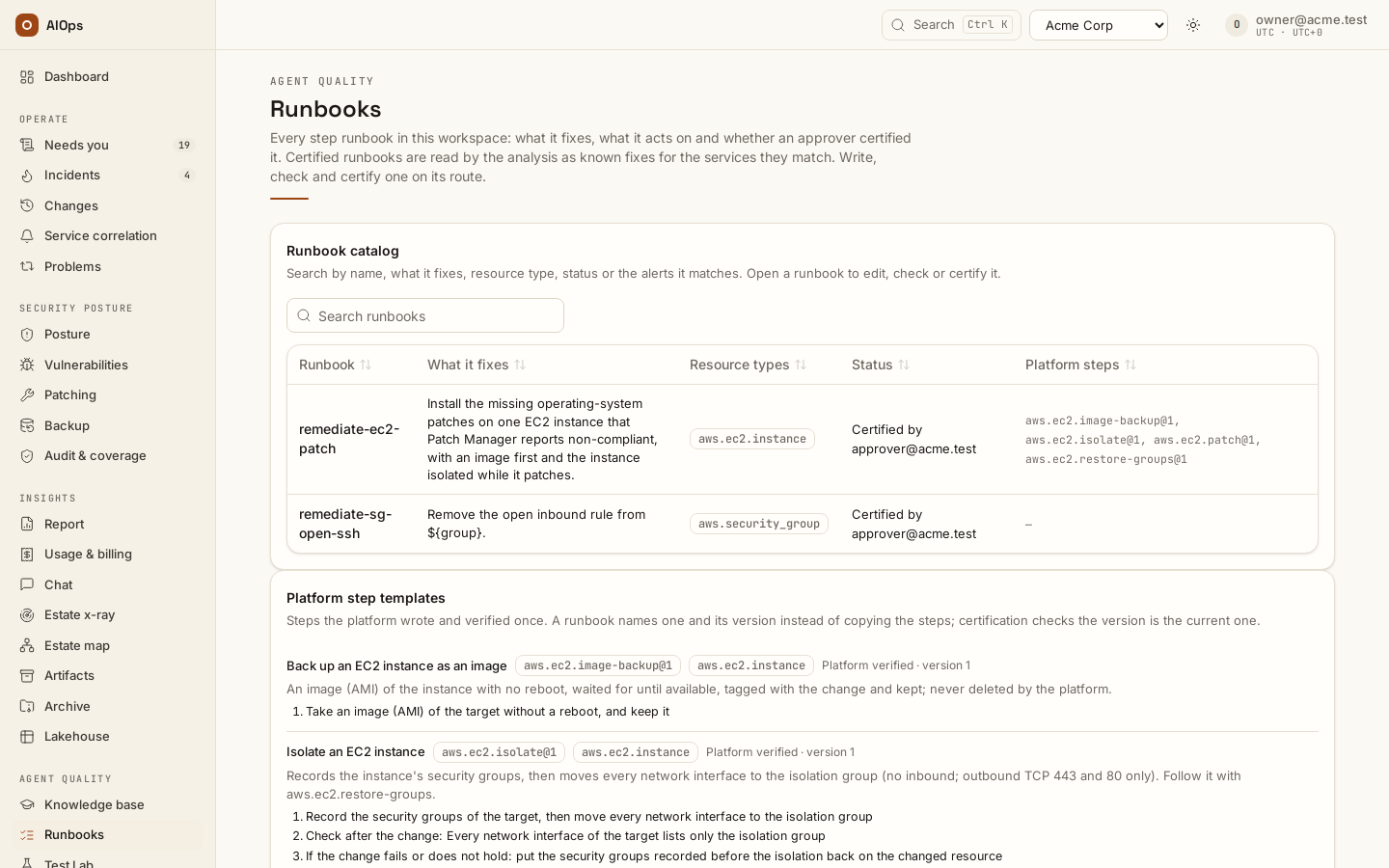
Runbook catalog: the runbooks with what each fixes, its resource types, its certification and the platform steps it references, above the platform step templates. -
Start the runbook. Open Legacy remediation routes (a runbook's name in the catalog opens it there), choose New route, name it
remediate-ec2-patch, set its selector to the alerts it fixes (service = control:PATCH.COMPLIANCE,resource_type = AwsEc2Instance), pick the AWS write connection and choose Add runbook steps. Declare the parameters:instance, kindaws.ec2.instance, fromannotation:resource_arn;isolation_group, kindaws.security_group,literal, with your isolation group's ARN. -
Add the steps. Keep the first step, Check current state on
${instance}. Then, for each of Back up an EC2 instance as an image, Isolate an EC2 instance, Patch an EC2 instance and Put an isolated EC2 instance's security groups back, pick it in Choose a platform step… and choose Add platform step; set each target to${instance}and the isolation's security group to${isolation_group}. Each platform step shows its version and the steps it stands for.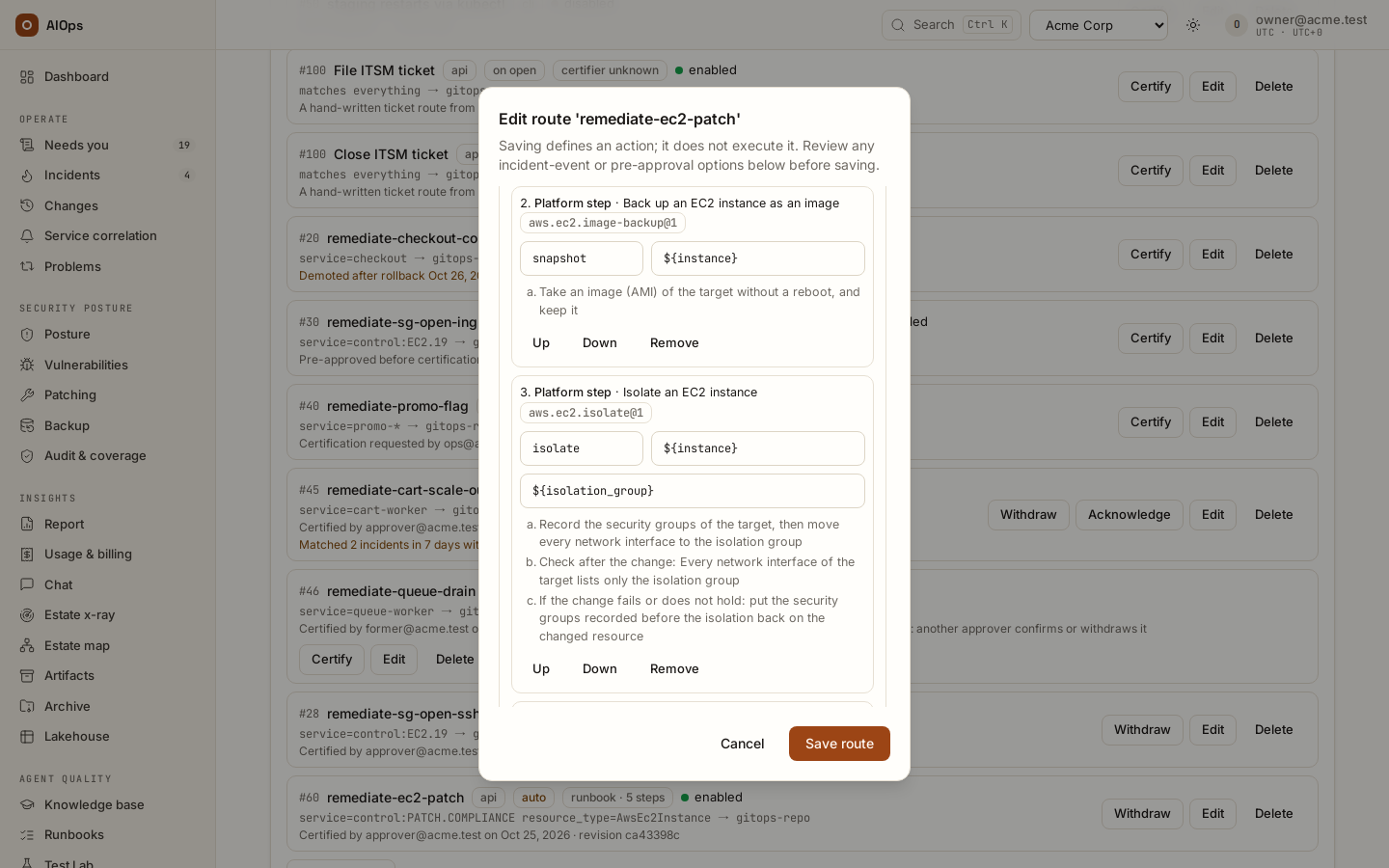
The route editor: the runbook's parameters, its check step, and the platform steps for the backup and the isolation with their targets, args and steps in plain words. -
Write it in plain words. Under Runbook in plain words, write the Purpose and the Risks your team knows about (for example, that the service on these instances has no second node). Leave a field empty to have the platform write it from the steps.
-
Check it. Put a sample alert value in the preview box (
resource_arn = arn:aws:ec2:…:instance/i-…) and choose Check runbook. Fix every quality-check finding it lists — certification is refused while one stands — and read the runbook as an approver will, with the instance bound from your sample. For a saved runbook, Check the write connection's permissions asks AWS whether the write role holds every action the steps need.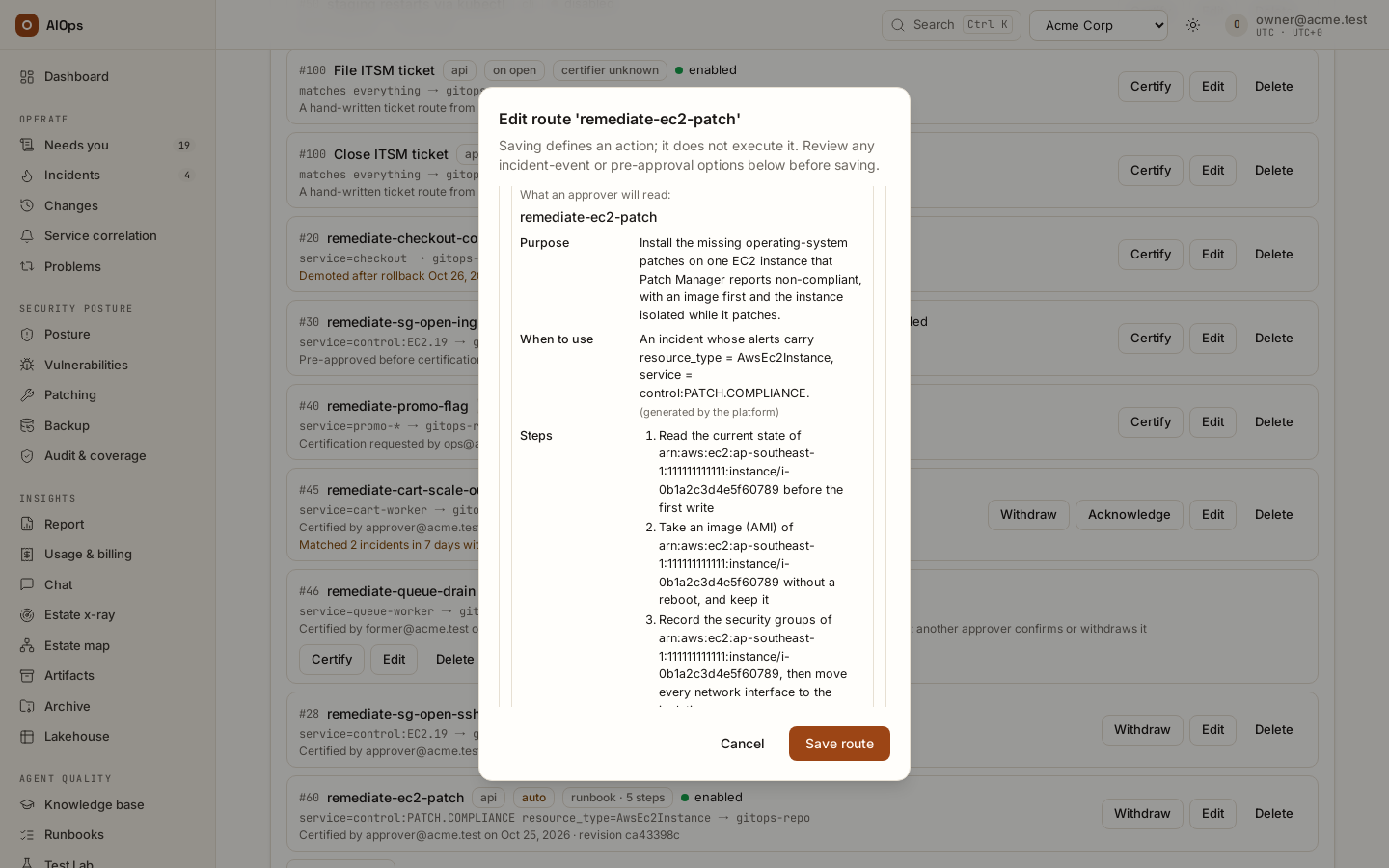
Check runbook: what an approver will read — the purpose, when to use it and the steps with the sample instance bound. -
Save, then certify. Choose Save route. An approver — not the person who wrote or last changed it, when the workspace has another approver — opens Certify on the route, reads the revision, writes Why is this route safe to run without a per-incident click? and chooses Certify revision. The catalog then reads Certified by …. Any later edit, the plain words included, asks for a new certification.
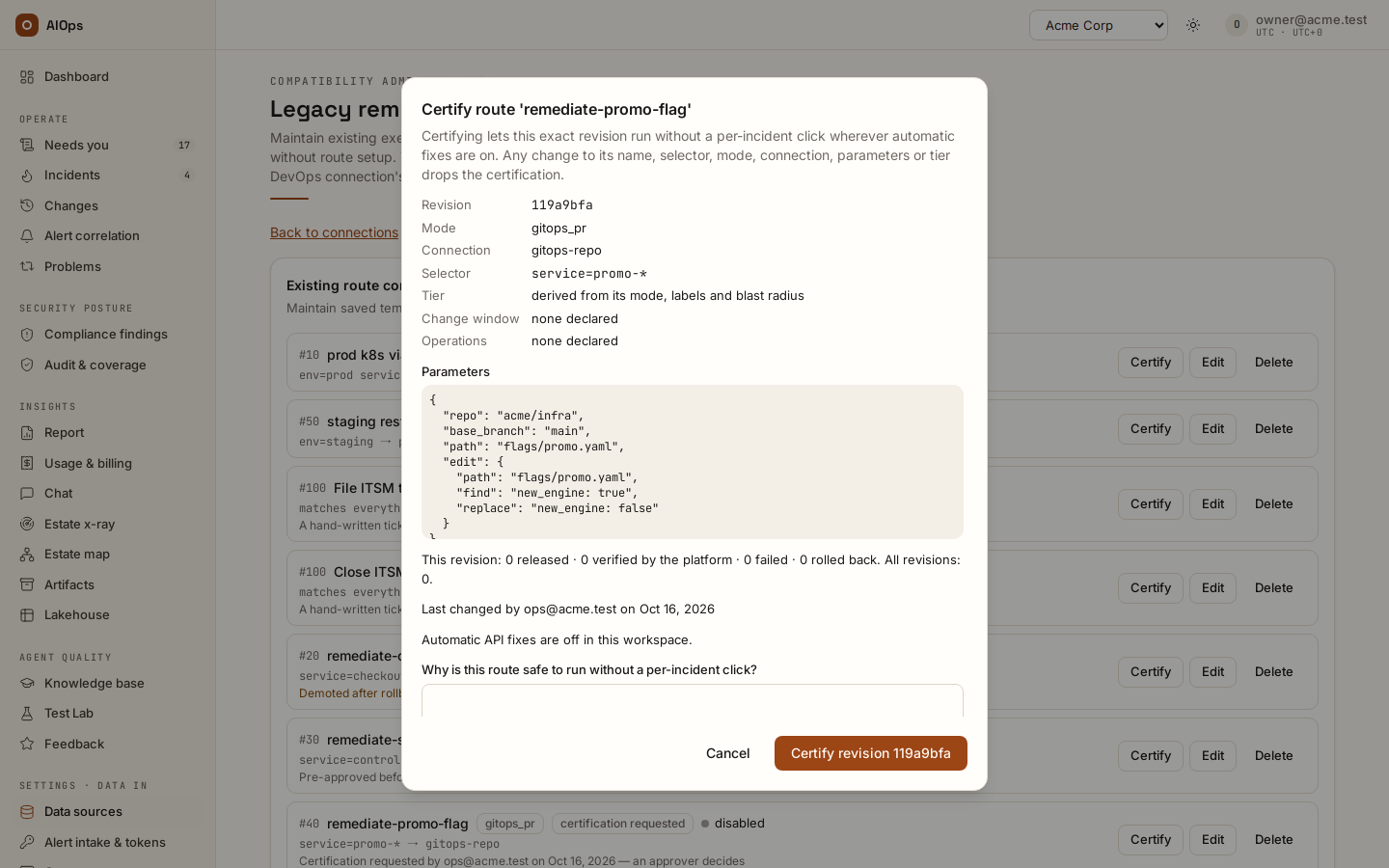
Certify route dialog: the revision and everything it binds, its run history, and the reason an approver must write. -
Read it on a change. When an incident's fix follows the runbook, its change request shows the Runbook in plain words card, bound to that incident's instance, above Runbook steps. This is what the approver of that change reads.
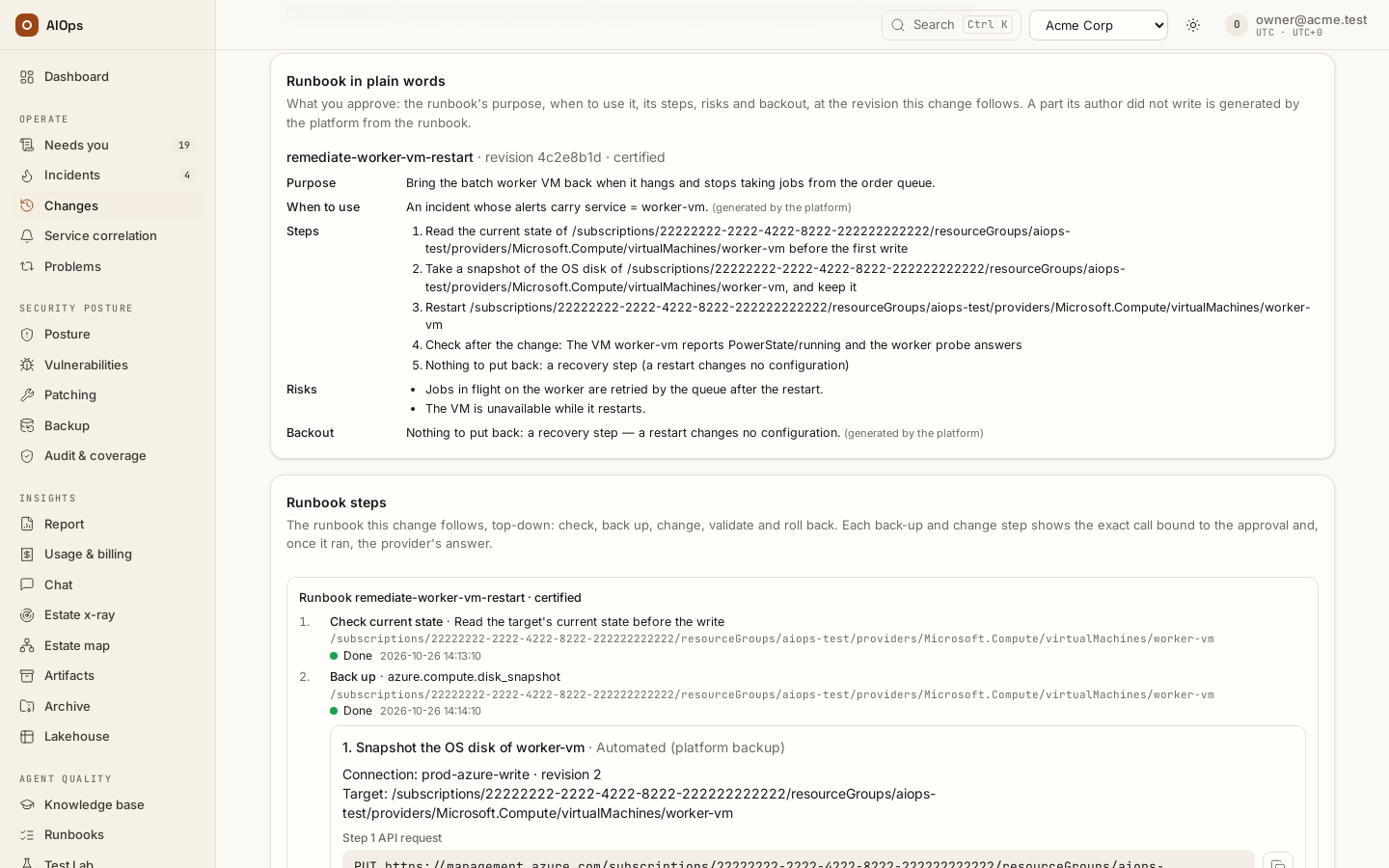
Runbook in plain words on a change: name, revision and certification, purpose, when to use, the bound steps, risks and backout.
The runbook in plain words
A runbook has two parts: the steps and parameters the platform runs, and a part a person reads before approving. The second part is Runbook in plain words: what the runbook is for (Purpose), When to use it, its steps in plain words, its Risks and its Backout. The author may write any of the four in the route editor's Runbook in plain words fields (they are stored in params.runbook.guide: purpose, when_to_use, risks, backout, text of at most 2,000 characters each); a field left empty is generated from the steps — the purpose from the change steps, When to use from the route's selector, the risks from what each change step does (an isolation takes the service down until its groups are back, a patch can reboot the instance, a restore from a backup loses later writes), the backout from the rollback steps. The steps are always generated, so the words cannot drift from what runs.
- Where it shows. Check runbook shows it as an approver will read it, bound from the sample values. A change request that follows a runbook keeps the part of the revision it follows, with every target bound from the incident: the change page shows it in the Runbook in plain words card above Runbook steps, and Section 4 of the change request document prints it ahead of the step table. A part the author did not write reads (generated by the platform).
- You should see the same words in three places: under Check runbook in the editor, in the Runbook in plain words card of every change that follows the runbook, and in Section 4 of its document.
- It is certified with the steps. The prose sits inside
params, so the route revision covers it: editing it asks for a new certification, and a certification is of the words its approver read. It never changes what runs.
Platform step templates
Some steps are the same in every runbook that needs them: an image before a patch, the isolation of an instance and the restore of its groups, the patch itself, a restart. The platform writes those once, checks them, and ships them as platform step templates with a name and a version. Your runbook names the template instead of copying its steps:
{"id": "snapshot", "template": "aws.ec2.image-backup@1", "target": "${instance}"},
{"id": "isolate",  "template": "aws.ec2.isolate@1",      "target": "${instance}",
 "args": {"security_group": "${isolation_group}"}},
{"id": "patch",    "template": "aws.ec2.patch@1",        "target": "${instance}"},
{"id": "restore",  "template": "aws.ec2.restore-groups@1", "target": "${instance}"}
| Template | What it does | Target | Args |
|---|---|---|---|
aws.ec2.image-backup@1 |
An image (AMI) of the instance, no reboot, kept | aws.ec2.instance |
— |
aws.ec2.isolate@1 |
Records the instance's groups, moves every interface to the isolation group; validated; rolled back by putting the groups back | aws.ec2.instance |
security_group |
aws.ec2.restore-groups@1 |
Puts the recorded groups back; validated | aws.ec2.instance |
— |
aws.ec2.patch@1 |
AWS-RunPatchBaseline (Install, reboot if needed); validated; rolled back from the image |
aws.ec2.instance |
— |
aws.ec2.restart@1 |
One reboot, then the status checks | aws.ec2.instance |
— |
azure.vm.disk-snapshot@1 |
A snapshot of the VM's OS disk, kept | azure.vm |
— |
azure.vm.restart@1 |
One restart, then the power state | azure.vm |
— |
- How a reference runs. The platform puts the template's steps where the reference stands: each step's id becomes
<your id>.<its id>(patch.patched),${target}becomes your target and each arg its value. The template's rollback steps go to the end of the runbook, after your own. Everything else reads the expanded steps — the quality check, the binding, the standard-class match, the permissions, the change request — so a template is checked exactly like steps you wrote. The four references above run the same calls, in the same order, as the EC2 patch runbook written out by hand. - Templates do not include each other. A patch or a restart needs a backup before it: reference
aws.ec2.image-backup@1(orazure.vm.disk-snapshot@1) first, or the quality check says so. An isolation needsaws.ec2.restore-groups@1after it. - Certification checks the version. A version is never changed once shipped; a fix ships as the next version. The quality check refuses a template the platform does not know, a version it never shipped, and a version that has been replaced (was replaced by … reference the current version), so an approver always certifies against the current one. A runbook certified on an older version keeps running that version exactly — the reference is part of the revision — until someone moves it to the new one and an approver certifies it again.
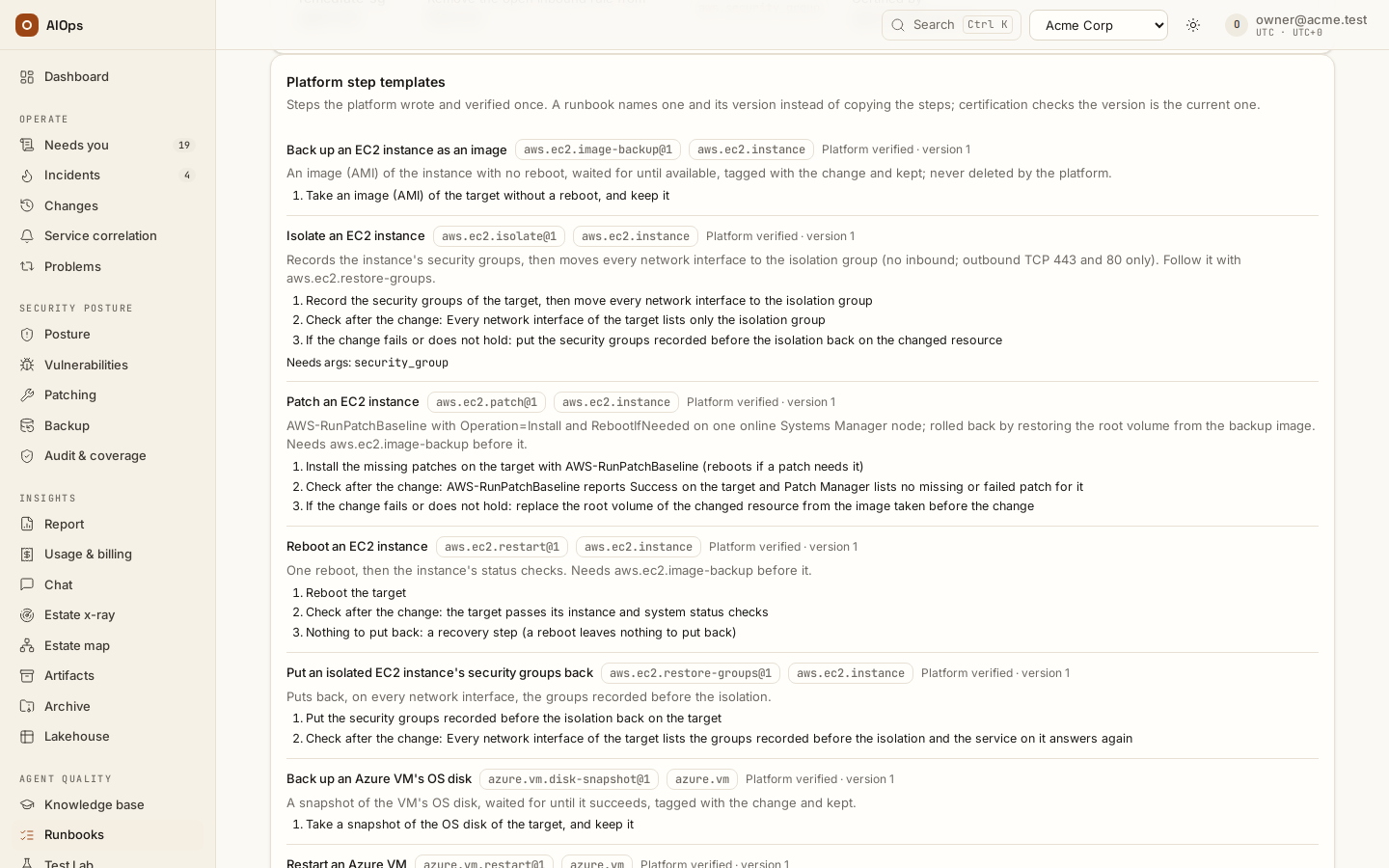
- In the editor. Add platform step appends one (pick it in Choose a platform step…); it shows the template's title and version, its target and args, and its steps in plain words. Check runbook previews the expanded steps.
Find a runbook: the catalog
Agent quality → Runbooks lists every step runbook of the workspace in the Runbook catalog (datasources.view): its name, What it fixes (the purpose of its plain-words part), Resource types (the parameter kinds its backup and change steps act on), Status and the Platform steps it references. The search box matches all of them and the alerts a runbook is for (its selector and When to use), so patch, aws.ec2.instance, control:EC2.19 or requested each narrow the list. The catalog fits its card from 1024 px: a resource type such as aws.s3.account_public_access_block breaks after a dot or an underscore, a platform step after a dot or a hyphen, never inside a word, and the Published by line of a runbook captured from an AWS document breaks between the words of the document's name (ASR-, Disable, Unrestricted …), never inside one.
| Status | Meaning |
|---|---|
| Certified by … | An approver certified the current revision |
| Certified (certifier unknown) | Pre-approved before certification existed; an approver can name themselves by certifying it |
| Changed since it was certified | Edited after its certification: it runs only as a person's release until certified again |
| Certification requested | Someone asked; an approver decides on Needs you |
| Demoted after a rollback, after a failed validation or after a fix that did not hold · Certification withdrawn by <approver> · Pre-approval dropped by an edit · Not certified | It waits for a person every time |
| Certified by <approver> · a recurrence explained by an outside change, certification kept | A fix through it did not hold, but a recorded outside change on the same resource explains the recurrence: it still runs on its own |
· N to fix adds the number of quality-check findings, and · disabled a route that is switched off. A runbook's name opens it on Legacy remediation routes, where it is edited, checked and certified. Below the catalog, Platform step templates lists each template with its version, the resource kind it acts on and its steps in plain words.
Runbooks as triage knowledge
A certified runbook is also what the analysis reads before it starts, so it does not investigate a known problem from zero. Before each analysis of an incident, the platform looks for step runbooks that are enabled, certified at their current revision by a named approver (a Certified (certifier unknown) runbook is not read until someone certifies it), and whose selector matches the incident's alerts (a runbook with no selector matches every incident and is left out). Up to three, by priority, go into the analysis's first prompt, each as one line: its name and id, purpose, when to use it, its steps in plain words, where its targets come from and its backout (at most 900 characters a runbook).
- Data, not instructions. The block is fenced as untrusted data, like alert text: whatever an author wrote in a runbook's prose cannot instruct the agent, and a value a connection's credential repeats is hidden as everywhere else.
- It runs nothing. Reading a runbook does not run it. It runs only as it always has: when the analysis names it, its steps match the fix, and a person — or the workspace's automatic-fix rules — releases the change. A compliance control, scanner finding, vulnerability or security alert still never runs on its own.
- No runbook, no change. An incident with no matching certified runbook gets the prompt it had before, byte for byte. A runbook that is not certified, or changed since its certification, is not read.
API
-
GET /api/aiops/{tenant_id}/runbook-templates(datasources.view; MCPlist_runbook_templates): the current version of each template —name,version,ref,title,summary,kind,args,steps, andplain(its steps in plain words). -
POST /api/aiops/{tenant_id}/routes/runbook-preview(datasources.view) takesparams, samplelabelsandannotations, and optionally the route'snameandselector; its answer carriesguide(name,purpose,when_to_use,steps[]withid,phaseandtext,risks[],backout,written[]= the parts the author wrote). -
GET /api/aiops/{tenant_id}/routescarries, for each step runbook,runbook.guide(unbound),runbook.resource_typesandrunbook.templates(thename@versionit references) — what the catalog reads. -
Incident and change details carry
runbook.blocks[].guide, bound, for a change drafted on this release or later.
Next steps
- Runbooks and automatic fixes: every rule of a step runbook, and when a certified one makes a change standard or runs on its own.
- The change request document: what Section 4 prints for a runbook change.
- How incidents work: the triage steps around the runbook knowledge.