Insights chat
Ask the read-only analyst about incidents, approvals, costs, scores, telemetry and the running estate: what it can answer, what it guarantees, and how sessions work.
How-to · Updated 2026-10-26 · Describes release 0.1.164
Chat
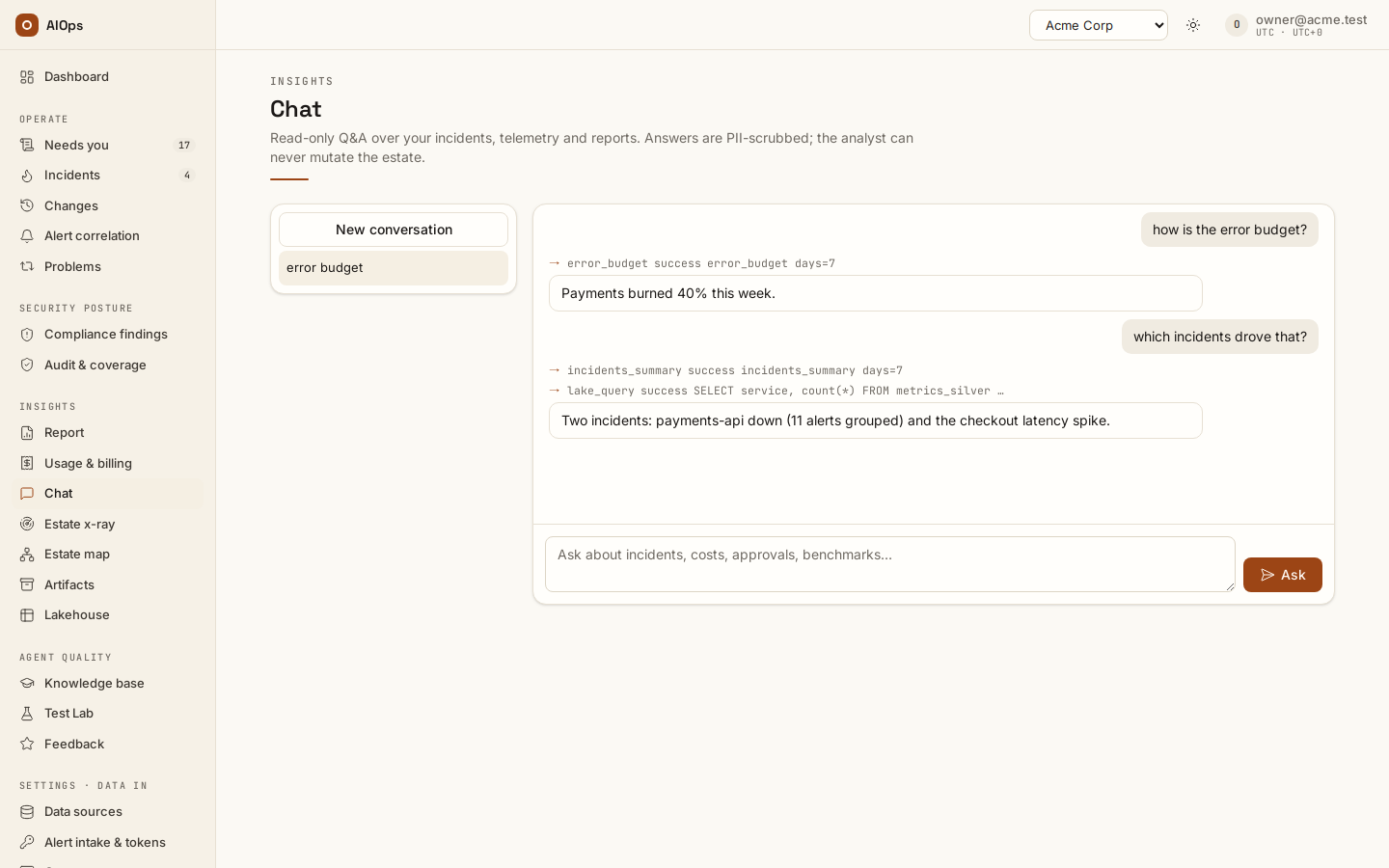
Chat requires chat.ask. It is a read-only analyst over the platform's own state — incidents, approvals, costs, human scores, audit activity, pillar configuration and benchmarks. Only for a member who also holds chat.estate (builtin owner and operator) does it also read the workspace's read-only connectors to answer about the running estate; otherwise it never reads your live infrastructure. A product_docs tool answers how-to questions from this guide, with links. Once a private-network agent has connected to the workspace, chat turns run on that agent rather than on the platform's control plane.
What it can answer
The analyst has a fixed set of read-only internal tools, and each is added to its registry only if you hold the matching permission:
| Tool | Answers questions about | Needs |
|---|---|---|
sys_incidents, sys_incident_detail |
Incident lists, one incident in full with its latest investigation summary | incidents.view |
sys_approvals |
What is waiting for a human decision | approvals.decide or incidents.view |
sys_costs |
Per-pillar token and cost totals, with a per-model breakdown, for a trailing window or a calendar month | report.view |
sys_scores |
Human 1–10 scores by pillar, by model, weekly trend | report.view |
sys_audit_summary |
Audit activity counts and the 20 most recent events | report.view |
sys_benchmarks |
Latest benchmark runs and scores | benchmark.view |
sys_pillars |
Agent enablement, model and schedule | incidents.view |
lake_query |
Your collected telemetry, in SQL, at most 200 rows per query | datasources.view and the active lakehouse feature |
product_docs |
How to use this product: steps, labels and links from this guide | chat.ask alone |
| The workspace's read connections | The running estate: inventory, health, configuration, recent changes. Every mutating call is refused before it runs, and web fetches are not offered | chat.estate |
A tool you may not use is simply absent — asking for it returns "unknown tool", never data. Two members with different roles can therefore get different answers to the same question, and that is the intended behavior.
Guarantees
- The analyst never executes, remediates, approves or configures anything, and is instructed never to promise to.
- It is instructed to cite which tool backed each claim, and to say so rather than invent a number when its tools cannot answer.
lake_queryis read-only by construction: a singleSELECTorWITHstatement, on a read-only connection, with external access disabled at the database level and filesystem-reading table functions rejected.- Answers pass the PII scrubber on the way out, before they are stored or returned, even if a tool output or the model reproduced something personal. Redaction tokens of the form
[REDACTED:kind:hash]are correlation-preserving pseudonyms and are never reconstructed — the analyst cannot tell you the address or IP behind one, and will explain the compliance boundary and offer aggregates instead. - Each turn is audited as
chat.askwith the question stored only as a hash. - Chat transcripts are private to the caller and excluded from ordinary incident investigation feeds. Operational AI spend can include the recorded chat layer without exposing the transcript; the generic investigation endpoints return 404 for chat runs. The Security and data chapter explains why another member's transcript is not readable. When chat runs on a private agent, only the agent an owner created with Answers workspace chat processes the turns (Connect a private network).
Ask about this incident or scan
Open the conversation on the incident or Discovery result itself. Choose a suggested question or ask your own; the source is attached automatically. Each turn uses the latest available records for that source, including its history, so you do not need to paste an RCA or scan transcript into a general conversation.
The conversation belongs to you and remains attached to that source after reload. Follow up in the same thread, inspect the evidence and use Stop reply to request cancellation of an active answer. Asking a question never approves a change. Source access and workspace permissions still apply to every turn.
Manage sessions
- Select New conversation to start a fresh thread. An empty thread offers three example questions you can click to fill the box; the session row itself is created when you send the first question, titled from its first 60 characters.
- Type in the question box and select Ask, or press Enter — Shift+Enter inserts a newline. The answer streams as the turn runs. Each tool call shows as a
→ tool status invocationrow: live while the turn runs, then kept above the saved answer it led to. Hover a row to read an invocation the row cuts short. - Select a session in the left list to reopen it. Sessions are strictly per-user: another member, platform staff included, gets a 404.
- Select the conversation's delete control, review Delete this conversation, then confirm Delete conversation to remove its saved messages.
After deletion, the session list and thread pane update. Cancelling the confirmation retains the conversation.
One turn runs at a time per session: Ask is disabled while a turn is live, and a second request for the same session is rejected with a conflict.
Troubleshooting
Symptoms specific to this page. Sign-in problems, missing nav entries in general, stuck or queued investigations, and $0.0000 costs are in the Troubleshooting chapter.
| Symptom | Cause | What to do |
|---|---|---|
| The chat analyst says "unknown tool" | The tool needs a permission you do not hold, so it was never added to the run | Check the tool table above and ask an owner for the permission. |
| Chat rejects a question with a conflict | A turn is already running in that session | Wait for it, or start a New conversation. |
| A colleague's chat link 404s | Sessions are strictly per-user, platform staff included | Ask them to paste the answer. There is no shared-session feature. |
Next steps
- Lakehouse — what
lake_queryreads. - Incidents — the follow-up conversation on an incident.
- Security and data — why another member's transcript is not readable.
- Knowledge, x-ray and insights — the hub for every page of this group.