Turn on compliance — set it up like the demo
Connect scanner findings, platform checks and change capture for an account, and check what each source covers.
How-to · Updated 2026-10-24 · Describes release 0.1.164
Goal
Connect scanner findings, platform checks and change evidence for an account, then verify what each source actually covers. Scanner posture, platform-check results and a human risk decision are different evidence types.
Prerequisites
- An authorized read connection with the required scanner/audit permissions and selected regions/accounts.
- For AWS, Security Hub enabled with a standard in each intended region, for example
aws securityhub enable-security-hub --enable-default-standards --region <region>once per region. AWS bills Security Hub for the security checks it runs and the findings it ingests, and AWS Config for the recording the checks rely on. An account on the AWS Free plan cannot use Security Hub: the scanner sync then reads Security Hub not available on this account (plan). For Azure, Defender for Cloud prerequisites, Security Reader access and the requiredMicrosoft.Securityregistration. - For vulnerability findings (CVEs) on AWS, Amazon Inspector enabled in each intended region with its Security Hub integration accepted. The pull reads them by default: Pull Inspector vulnerability findings (CVEs) under Advanced connection settings on the read connection stops it when set to
false. Cost: every HIGH or CRITICAL CVE arrives as a P1/P2 finding and, while Analyse P1/P2 findings automatically is on (the default), starts one paid analysis per CVE; MEDIUM and LOW findings land as rows and wait. - On an AWS account shared with workloads the workspace must not analyse, set Only findings on resources tagged under Advanced connection settings on the read connection to one
key=valuepair (for exampleaiops-managed=true): the pull then reads only findings on resources carrying that tag, and a value it cannot read fails the connection withinvalid_tag_scopeinstead of pulling everything. The platform's own backup findings, the Backup coverage figure, the suggested synthetic checks and Built-in detection keep to the same tag. datasources.managefor connection jobs,members.managefor guardrails,pillars.managefor Sync now,incidents.actfor the compliance schedule, and a budget for analyses a pull may start.
Procedure
-
Two settings on two pages decide where and when findings are pulled.
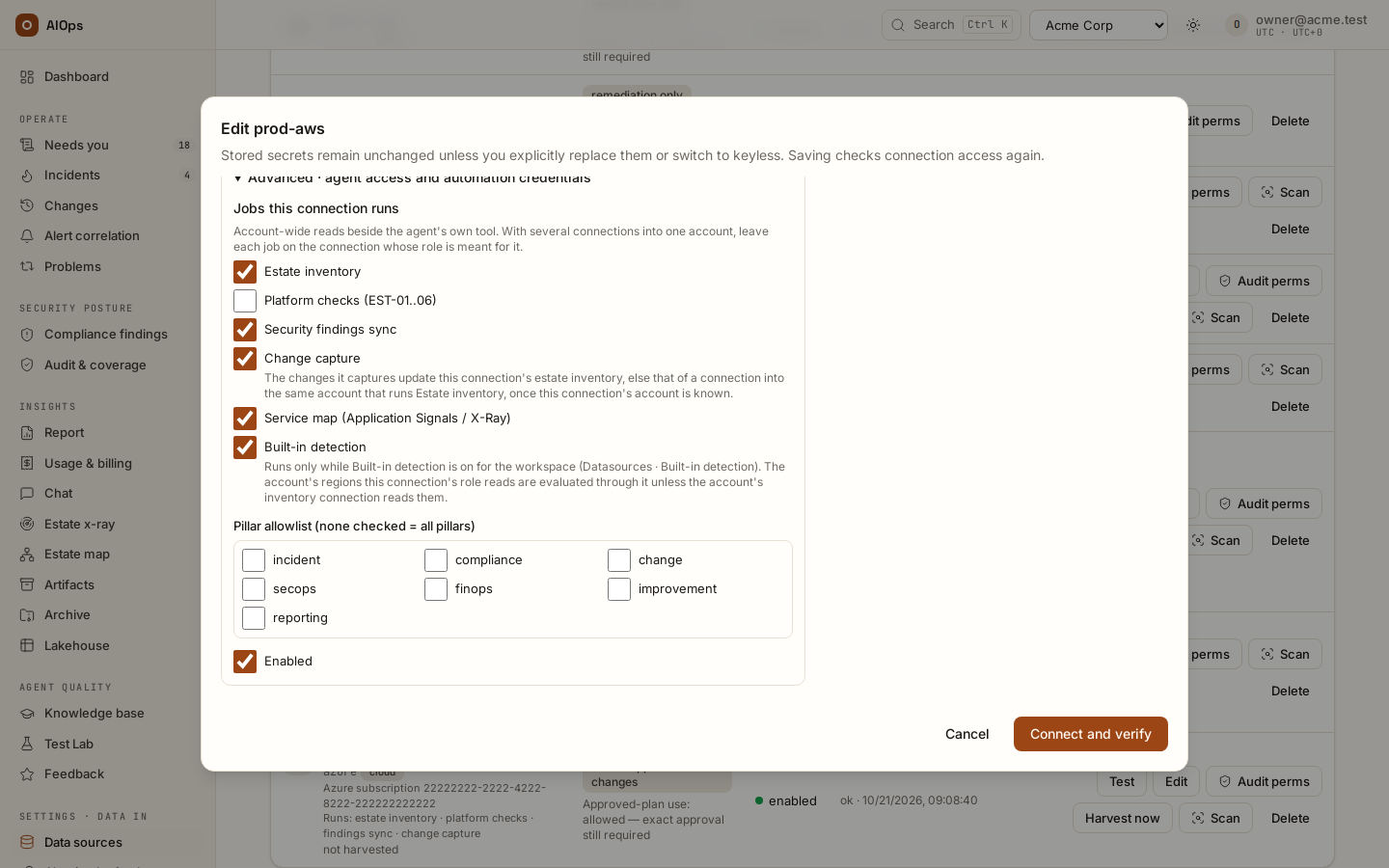
Where: on the read connection, open Advanced · agent access and automation credentials and keep Security findings sync ticked under Jobs this connection runs — the jobs are on unless someone cleared them, and with several connections into one account each job belongs on the connection whose role is meant for it. The job names the connection a pull reads through; it schedules nothing.
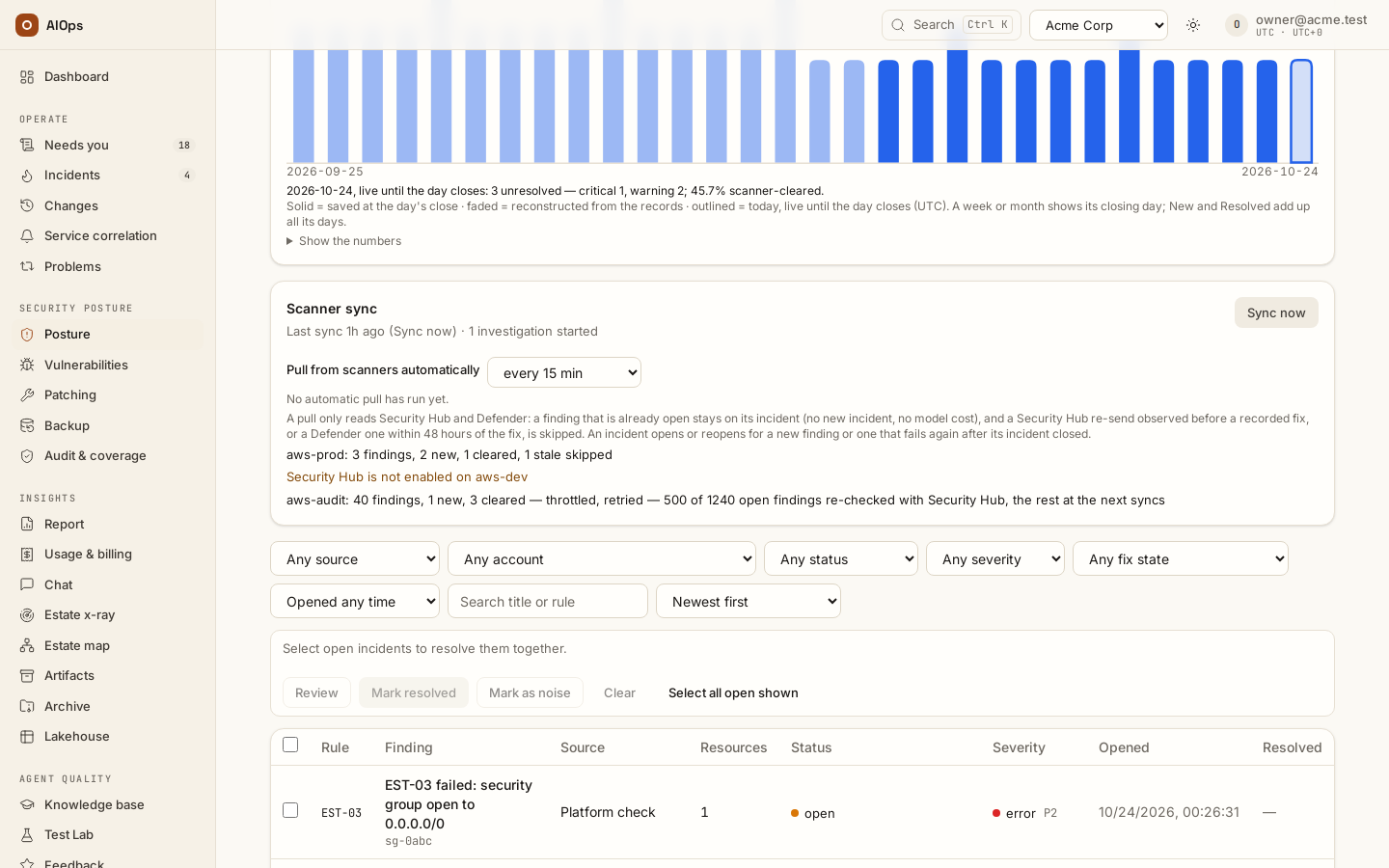
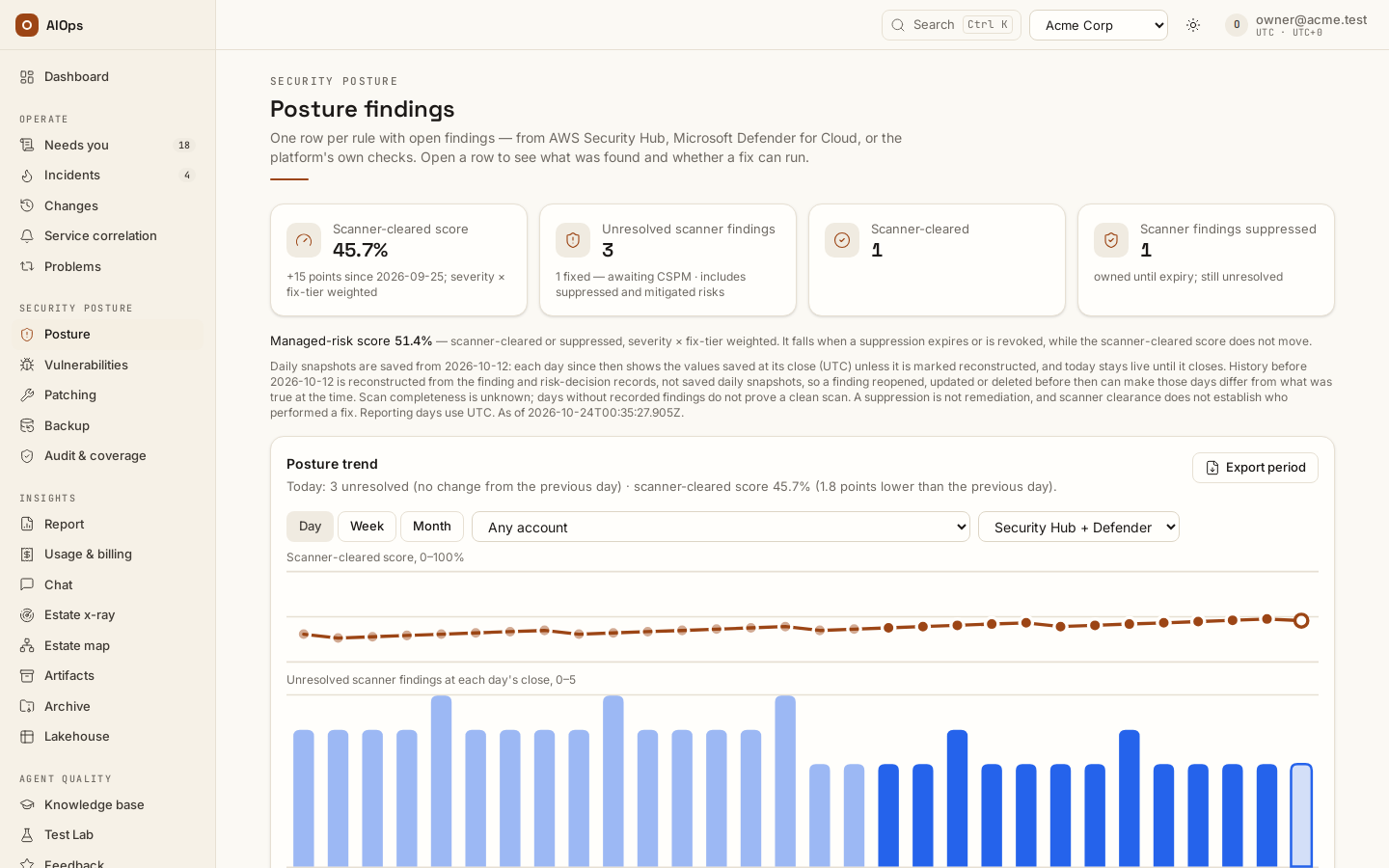
When: under Security posture → Posture, the Scanner sync card holds Pull from scanners automatically (
members.manage; every 15 minutes by default, Off, or every 5 minutes up to daily) and Sync now (pillars.manage, step 2). Keep the default or choose another interval only after understanding the scope and cost — on a large account, set a daily cost limit before the first pull. A pull reads the scanners and costs no model time: only the analyses it starts are paid, and Sync now pulls the last 24 hours on demand. You should see the job ticked on the connection and the interval on the card; anyone who cannot change it reads Scheduled sync is off for this workspace or Scheduled sync every … there.API: connection changes use
PATCH /api/aiops/{tid}/datasources/{id}—datasources.manage; scanner interval usesPATCH /api/aiops/{tid}/guardrailswithscanner_sync_interval_s—members.manage.
-
Use one scoped Sync now when authorized. Read its actual source/account/result, including partial or stale-skipped findings. A finding can represent multiple resources under the same control. You should see the sync receipt and the corresponding finding rows, not a promise that every account or scanner was queried.
API:
POST /api/aiops/{tid}/findings/sync—pillars.manage; the sync/result read usesreport.view. A pull can start prepared-fix or P1/P2 analysis work.
-
If using push instead of pull, configure the correct Security Hub or Defender webhook and authentication. Prefer header-token delivery where supported. Keep path tokens private and retire any token that travelled in a recorded URL before 0.1.120. You should see the source delivery and accepted platform receipt.
API:
/webhook/securityhub/<slug>[/<token>]or/webhook/defender/<slug>[/<token>]with webhook authentication. A GuardDuty threat finding routes to SecOps; other scanner posture families route to compliance. -
Keep Platform checks ticked under Jobs this connection runs on the intended read connection. Every read connection with the job on is probed, and a resource that several of them see in one account is listed once: several connections are not several copies of posture. With the job off on a connection, an account no other connection reads answers probe pending. The read role of the guided AWS setup allows every read EST-01..06 make in the region it was set up for, plus the account-wide IAM and S3 reads, so the job can stay on that connection. One gap: EST-05 reads a multi-region CloudTrail trail's status in the trail's home region, and the guided role reads CloudTrail only in its own region and
us-east-1; with the trail homed elsewhere, EST-05 reads unknown with a failed call, not a pass. You should see EST-01…EST-06 coverage or an explicitprobe pendingreason.API: connection jobs use the datasource PATCH and
datasources.manage. Enabling a job is not proof that its latest check succeeded. -
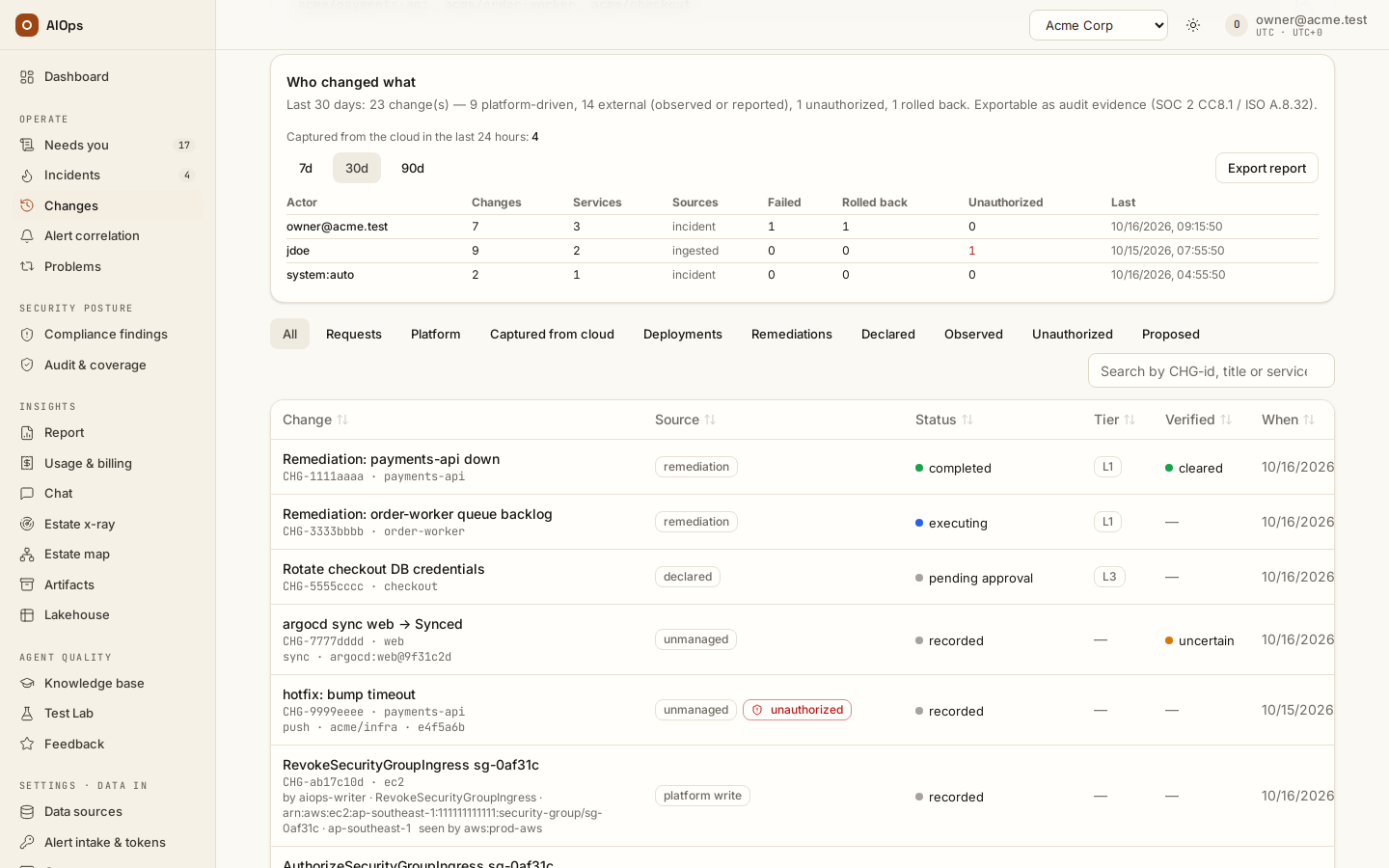
Keep Change capture ticked where it is needed. Cloud audit logs provide observed writes;
config_history: trueasks AWS Config for a recorded before-state. EKSk8s_audit: trueor the kube-apiserver audit webhook provides Kubernetes change evidence. You should see the captured event's source, principal, resource and before-state or explicit absence reason.API: datasource PATCH for the job/options;
POST /api/aiops/{tid}/changes/harvest—pillars.managefor an authorized manual pull. Read the actual recorded timing; cloud delivery can lag.
-
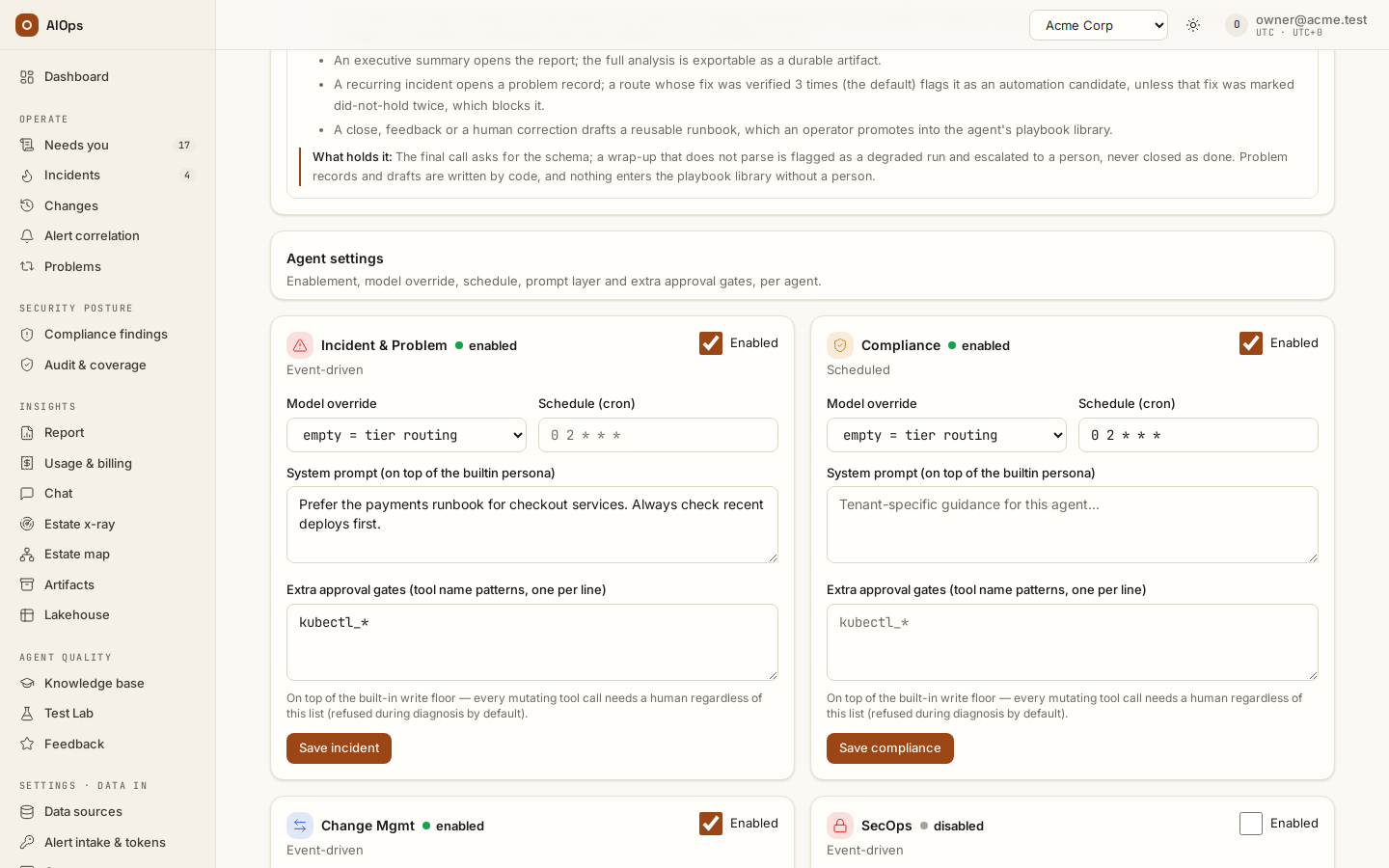
Under Agent behaviour → Compliance, set Schedule (cron) and press Save compliance. A new workspace has no schedule, so no scan runs on its own until you set one; the
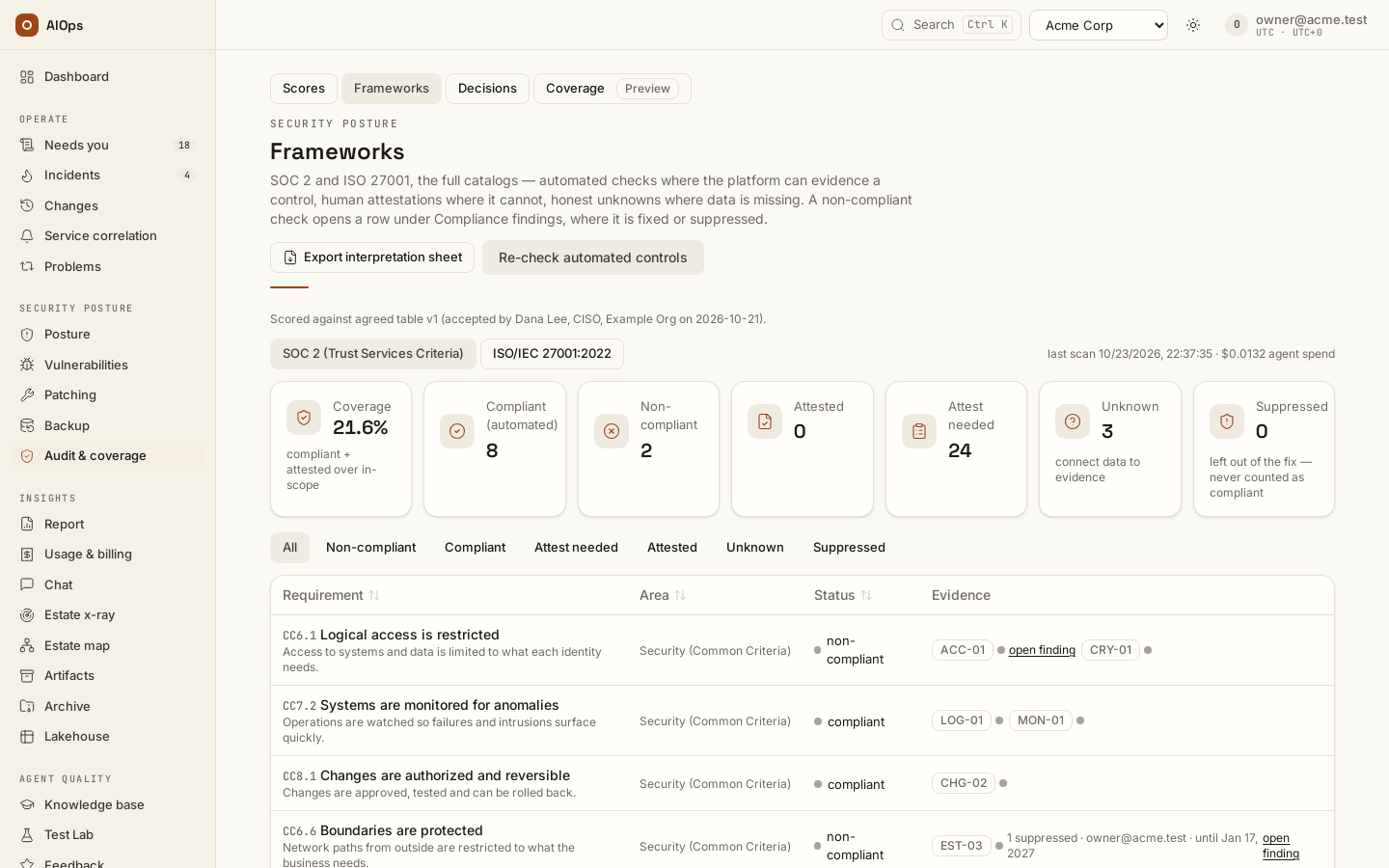
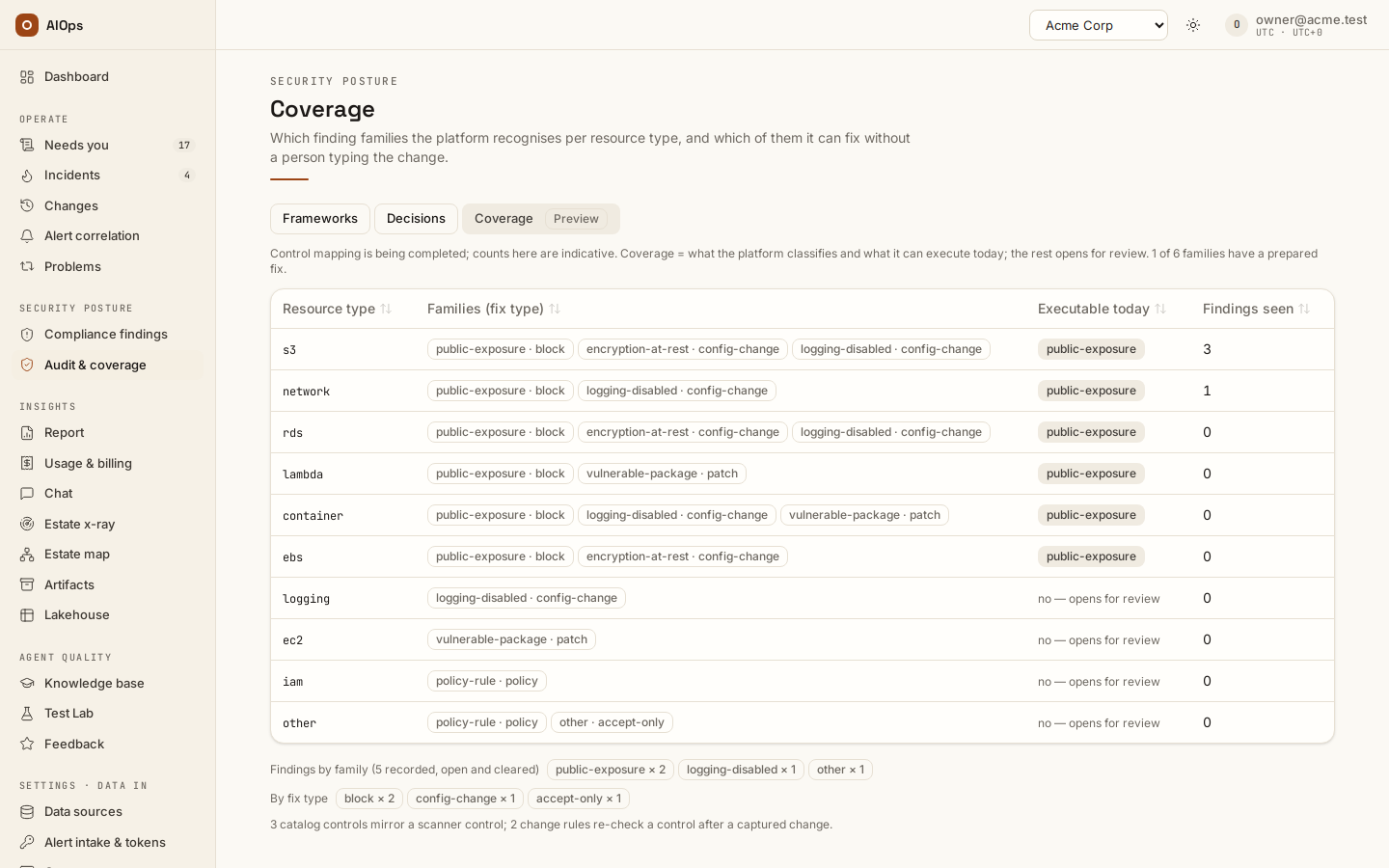
0 2 * * *in the empty field is only a placeholder. Start with0 2 * * *(daily at 02:00 UTC; the schedule is UTC and fires only while the Compliance agent is enabled). A workspace created under Workspaces → New workspace copies the agent settings of its organization's first workspace, the schedule included. An expression the scheduler cannot read is refused when you save, withschedule_cron '<expression>' is not a valid cron expression. A scan runs at most five agent checks. You should see the resulting scheduled scan under Security posture → Audit & coverage → Frameworks → Scan runs; a failed control appears under Compliance findings.API:
PATCH /api/aiops/{tid}/pillars/compliancewith{"schedule_cron": "0 2 * * *"}—incidents.actfor the schedule (onlyapproval_requiredandtoolsetsneedpillars.manage). Manual control scans usePOST /api/aiops/{tid}/compliance/scan—incidents.act. While SOC 2 / ISO 27001 are off (step 7) no check is in scope: the schedule fires no scan and a manual scan answers409.
-
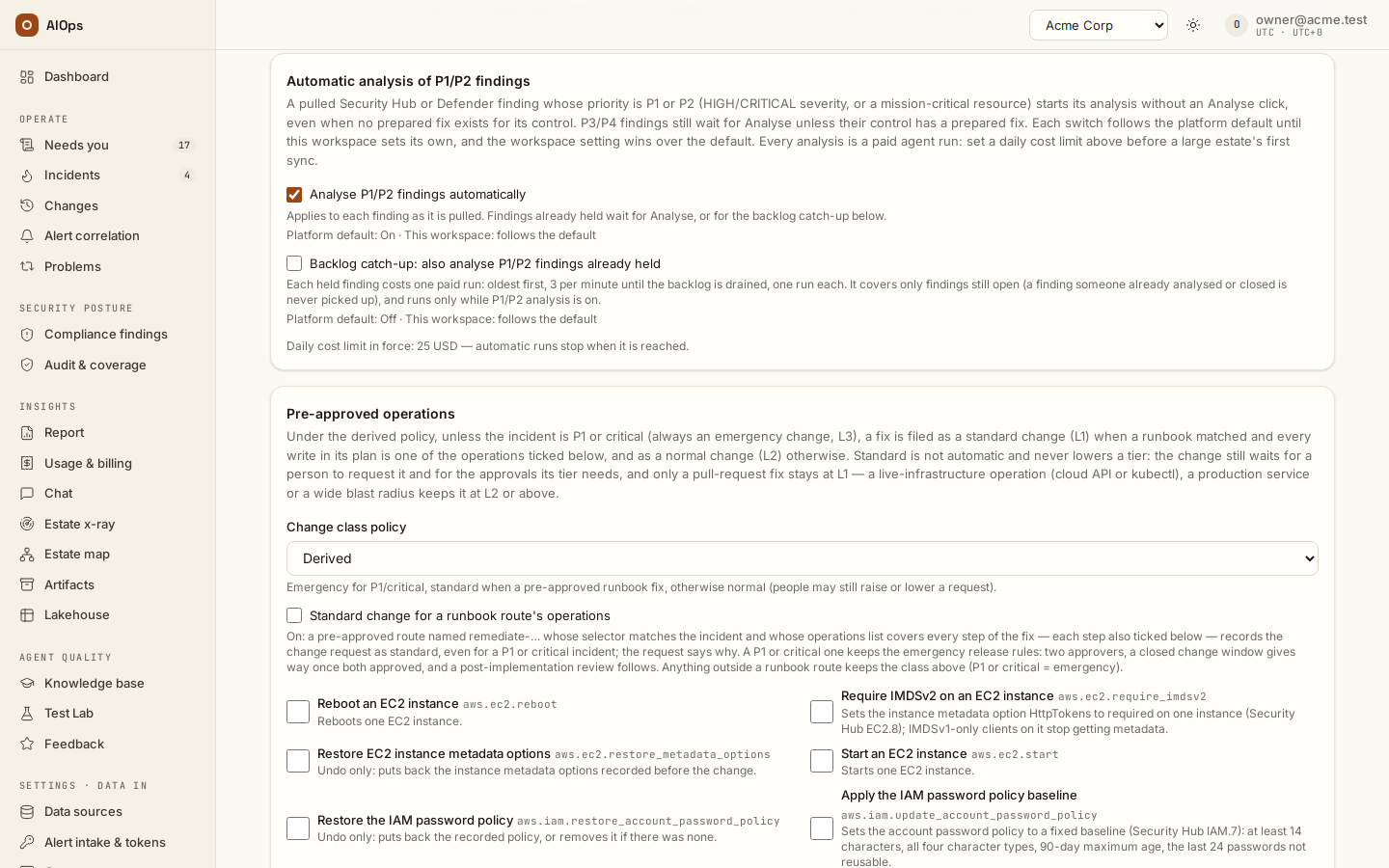
Review Analyse P1/P2 findings automatically and Backlog catch-up separately. Prepared-fix triage also follows
aiops_compliance_auto_triage, on by default: each failing platform check of your estate at P1/P2 starts one paid analysis of its incident, and a P3/P4 one waits for Analyse. The SOC 2 / ISO 27001 score itself is phase 2: off in every workspace until your platform administrator turns it on (AIOPS_COMPLIANCE_FRAMEWORKS) once it is agreed with you; then it is switched under Compliance frameworks (phase 2) in Guardrails (members.manage): Score this workspace against SOC 2 and ISO 27001 (off for a new workspace — tick it at onboarding once the customer has accepted the comparison table; on for a workspace created before the switch) and Count the checks of the platform's own settings (off by default). Switching it off stops every platform check — EST-01 to EST-06 and the platform's own alarms (LOG-01, CRY-01, ACC-04, MON-01) — closes the open finding of each check that stopped and removes the Frameworks tab from Audit & coverage. You should see the effective settings and actual analysis receipt; an enabled switch does not establish that every older finding was processed.Before ticking it, agree the table with the customer. Under Agreed comparison table on the Frameworks tab, Download table (CSV) or Download table (Markdown) gives every SOC 2 and ISO 27001 row with what judges it (platform rules, scanner controls or an attestation), the Security Hub controls, AWS Config rules and Azure Policy groups public mappings put behind it, and the reason a row is left to a person. Add the customer's own rules under Your own requirements first (for example
HA-01judged by the scanner controlsELB.13, RDS.5for "at least two Availability Zones", then Save requirement): each one changes the table's version. Once the customer accepts the version you downloaded, press Record acceptance, fill Accepted by and Accepted on, and Save acceptance. You should see Scored against agreed table v1 (accepted by … on …) above the scores; No agreed table yet until then, and a note that the table has changed since whenever a later scope switch, own requirement or upgrade changes it.API:
GET /api/aiops/{tid}/compliance/agreed-table?fmt=csv—report.view;POST /api/aiops/{tid}/compliance/agreed-table/acceptwith thesha256the export carried, andPUT /api/aiops/{tid}/compliance/custom-requirements/{ref}—pillars.manage. The columns and statuses are in Compliance reference.API: guardrails PATCH —
members.manage. Reserve budget before a manual sync or catch-up change.
-
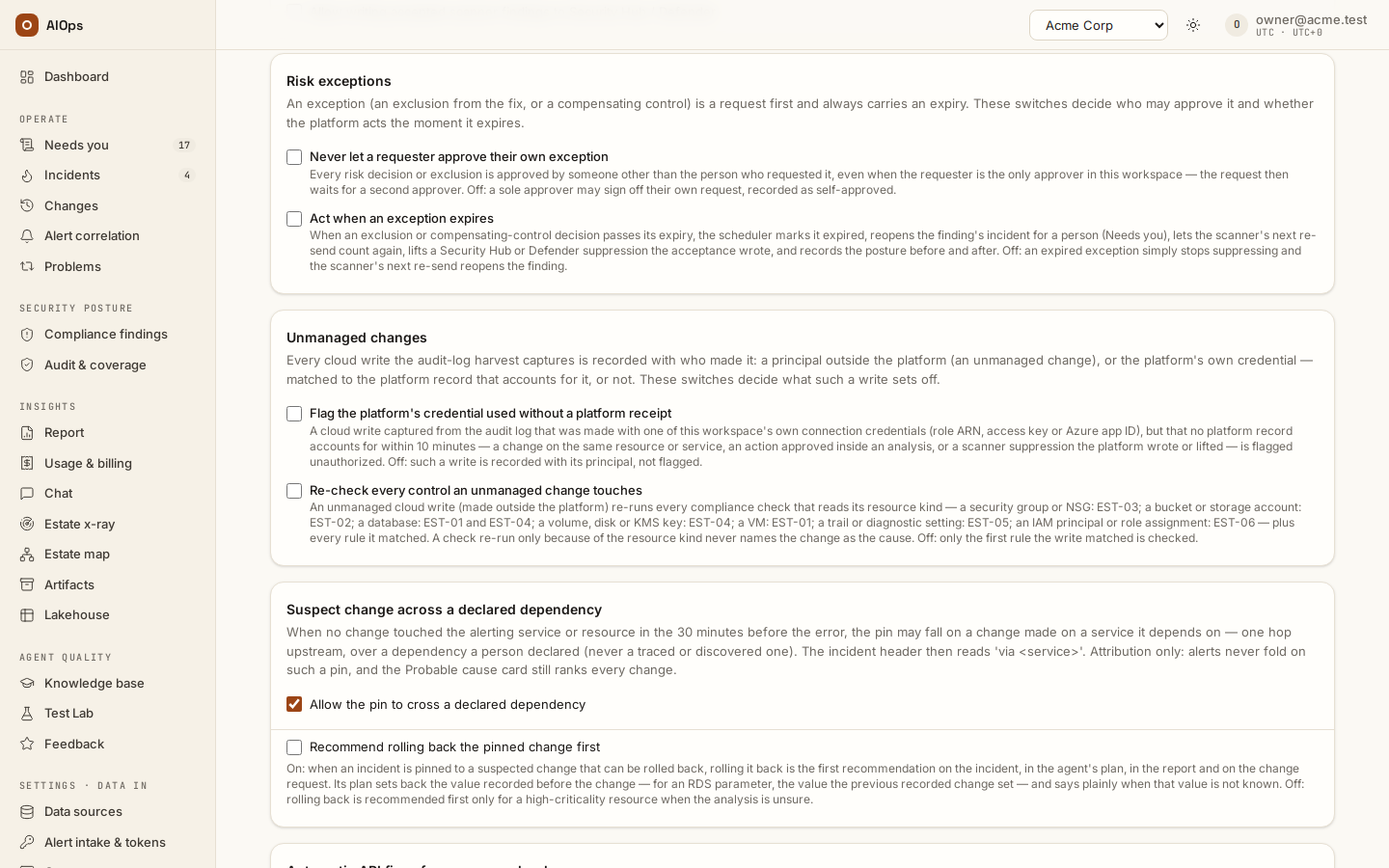
Review Risk exceptions, Unmanaged changes, and Suppress scanner findings at the source. Both Unmanaged changes switches are on by default since 0.1.133: every captured unmanaged write re-runs each platform check for its resource kind (more read calls; a failed check opens its incident), and a write made with this workspace's own credential that no platform record accounts for within 10 minutes is flagged unauthorized. Source suppression needs the separate writer permissions. Security Hub does not supply the platform exception's expiry: the platform lifts suppression on revoke, and at expiry only while Act when an exception expires is enabled. You should see both the platform decision and the independent source-suppression/lift receipt.
API: guardrails PATCH —
members.manage; risk request/approval permissions are in Security posture. For push-fed Security Hub, give the EventBridge rule aWorkflow.Statusfilter (NEW,NOTIFIED) — otherwise a finding suppressed at the source keeps re-sending — and keep forwardingPASSED/RESOLVEDfindings so the clear still arrives (§S7 of the Customer prerequisites & required inputs reference in the delivered documentation).
-
Declare additional risk context only when owned evidence supports it.
risk_contextpatterns can fill unknown context or raise exposure/sensitivity; they do not lower a stronger observed risk. You should see the resulting context and its source on the finding.API:
PATCH /api/aiops/{tid}—members.manage, for example:{"settings":{"risk_context":{"internet_patterns":["<approved resource pattern>"],"internal_patterns":[],"sensitive_patterns":[],"env_map":{}}}} -
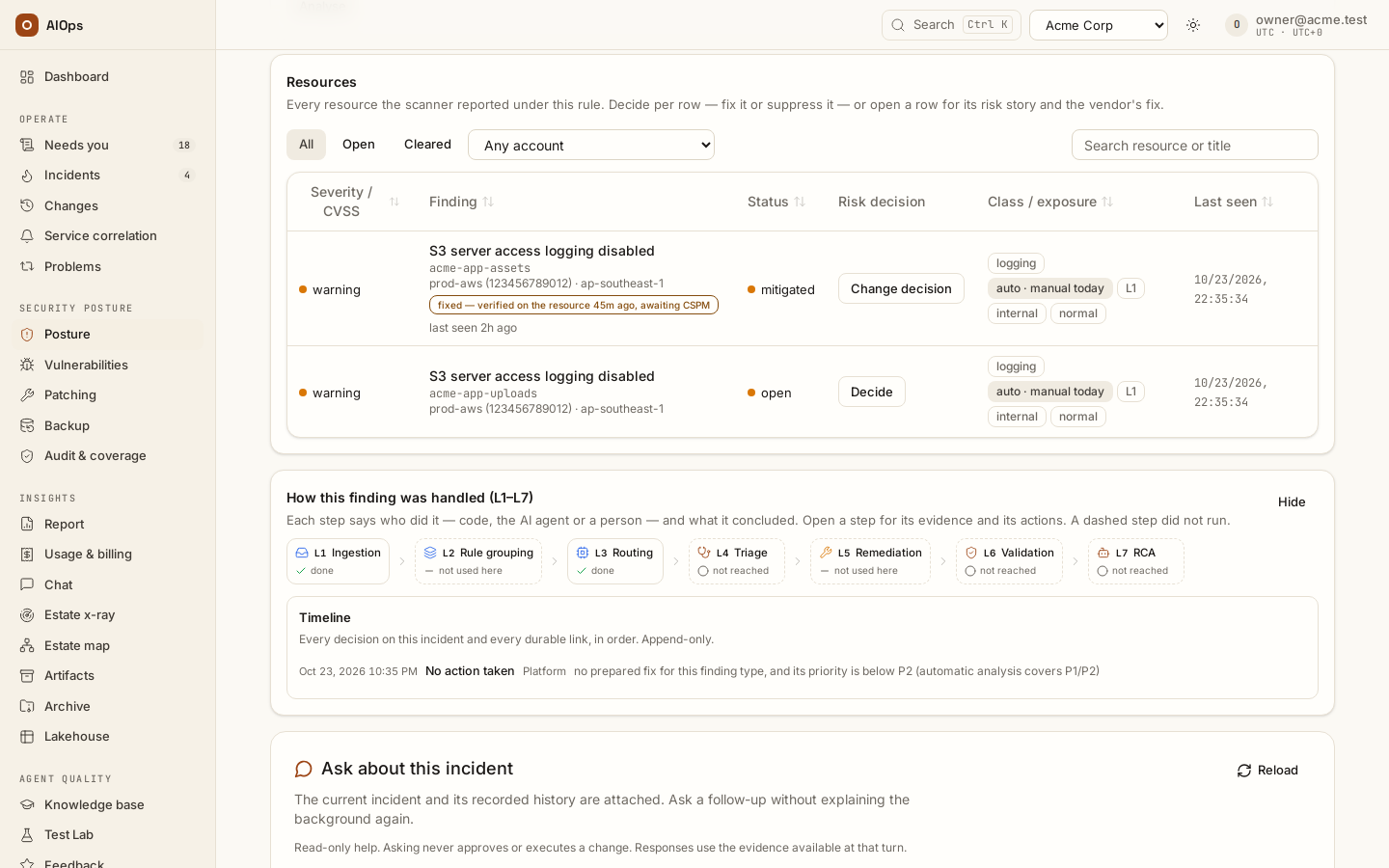
Follow a finding's prepared plan into its change request. A stance labelled
autodoes not mean a scanner finding executes a fix by itself. Read the supported operation/manual reason, target, writer, before-state and approval quorum. You should see the reviewed change and its actual resource verification before claiming remediation.A supported typed fix can be verified by the platform’s compiled read about 30 seconds after execution, without an agent run; the change page badges that verdict platform verdict. A matching metric-validation window takes precedence. The incident can resolve and the change complete before the scanner reports a clear. Read fixed — verified on the resource and its timestamp separately from scanner status; the marker alone is not Security Hub PASSED. Spend shows the actual free/AI check counts.
API: finding/incident reads require
incidents.view; release follows the approved-change process in Write connections and approved fixes.
- Read Posture trend and the Managed-risk score under Security posture → Posture, then Coverage and Scan runs under Security posture → Audit & coverage, by source/account. AWS and Azure coverage differs from other estates: GCP checks can report probe pending; Security Command Center intake is not provided on this checked build; Kubernetes coverage here is change capture, and on-premises compliance is not implied by an SSH connection. You should see the coverage each estate actually has, not one universal score.
Verify and cleanup
Keep the scanner receipt, platform-check evidence, finding/control links, decisions and change receipts separate. A resource read can verify a fix while the scanner still has not sent its clear; label both times. Restore temporary schedules/options and respect the documented retention rules for closed findings and decisions.
Troubleshooting
| Symptom | Check | Next step |
|---|---|---|
| No scanner findings | Scanner enabled, standard, region, permissions and selected sync job | Repair the named prerequisite and use a scoped sync |
| Probe pending | Selected connection, job and estate support | Explain the missing coverage; do not record a pass |
| Unexpected analysis spend | P1/P2, prepared-fix triage, catch-up settings and change-triggered re-checks (Unmanaged changes) | Review effective settings and actual runs before another pull |
| Before-state absent | Config history, resource support and recorded time | Preserve the explicit absence note; never invent a baseline |
| Source suppression failed | Writer consent, permission and provider receipt | Keep the decision the platform recorded and resolve the external write separately |
Related
Security posture · Approved fixes · Guardrails and cost limits · Webhook reference.