Security posture — findings, decisions and frameworks
Read a finding's evidence, request and approve risk decisions, and keep framework evidence honest.
How-to · Updated 2026-10-28 · Describes release 0.1.164
Goal
Read a finding's evidence, request an appropriate human decision, and distinguish scanner clearance, accepted risk, compensating controls and framework attestations.
Prerequisites
- A configured compliance source, with its latest result and known coverage.
incidents.viewfor findings;incidents.actorapprovals.decideto request a risk decision;approvals.decideto approve/reject/revoke it.report.viewfor the register/framework evidence and exports;pillars.managefor control overrides and attestations.
Procedure
-
Under Security posture, open the list of one domain — Posture, Vulnerabilities, Patching or Backup — filter by source/account, and open a rule. A rule opens its finding page (
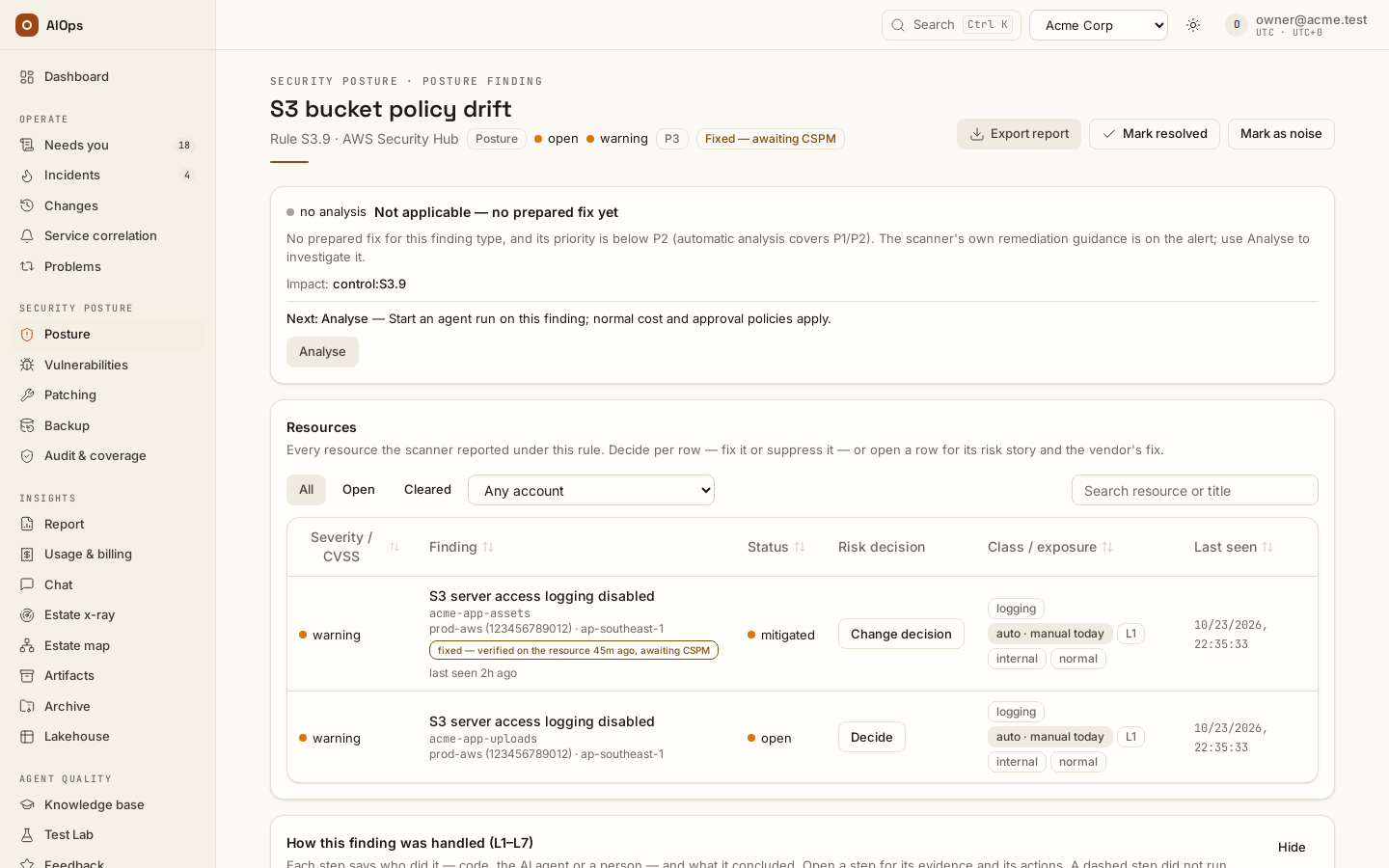
/compliance-findings/<id>, eyebrow Security posture · <Domain> finding): the summary, the resources, the platform check's flagged resources, then the pipeline L1–L7; a link to/incidents/<id>(a notification, a ticket, Needs you) lands there too. Each finding belongs to one domain, derived from its family and control: SSM.1 / SSM.2 are patching, ECR.1 (image scanning off) is posture, the platform's EST-01 check is backup, and a legacy storm incident that holds several rules lists under each of their domains. Read family, stance, tier, affected resources, exposure/sensitivity, CVE/CVSS/fix evidence when present, risk impact and prevention guidance. These are recorded signals, not proof that anautobadge executed a fix. You should see the evidence and the supported next action for that finding.API:
GET /api/aiops/{tid}/findingsand/findings/{id}—incidents.view;?domain=on/findingsand on/incidents?pillar=compliancekeeps one domain.A fix can show fixed — verified on the resource while awaiting CSPM — the scanner's own confirmation; its incident shows Fixed — awaiting CSPM until then, and Fix state filters the list on it. Inspect the linked compiled/resource check and its timestamp; the finding’s scanner status may still be open. Verify now on the linked incident requests a paid agent check, while eligible automatic compiled checks have zero model cost (their verdict is badged platform verdict on the change). Read the incident’s Spend and actual occurrence/check counts without treating a free check as a fresh analysis.
-
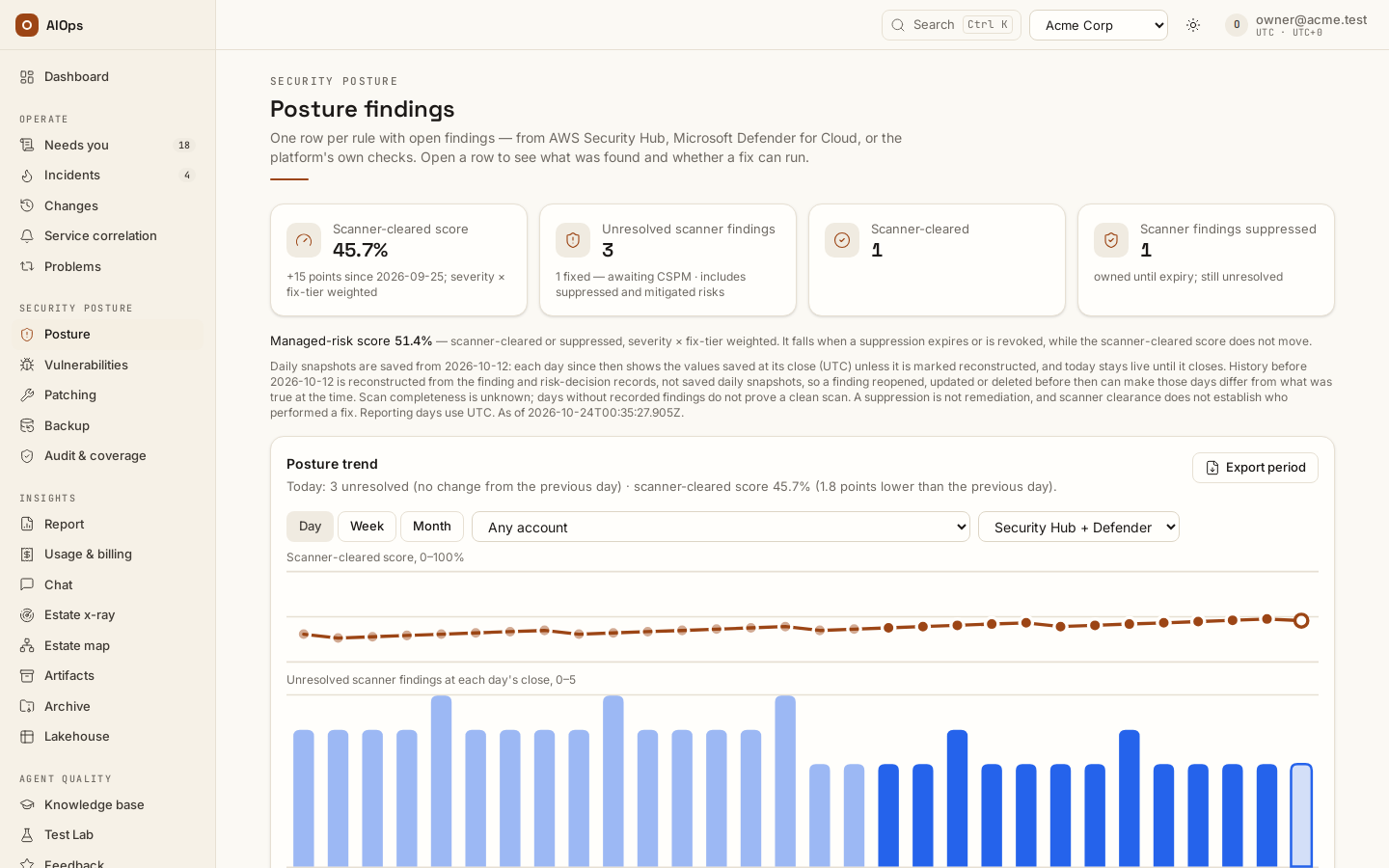
Read Posture trend, its saved/reconstructed/live distinction and Managed-risk score. Accepted/suppressed risk is not identical to scanner-cleared posture. You should see the selected source/account and the evidence period behind each number.
API: finding/posture reads use the relevant incident/report permission;
POST /api/aiops/{tid}/findings/posture-export—report.viewcreates an artifact for the selected period.Before any Security Hub or Defender finding has been pulled, Scanner-cleared score reads
—with No cloud scanner has reported; coverage is unknown, the Managed-risk score line is not shown, and Posture trend reads No findings recorded in this period — that does not prove a clean scan. The platform's own checks (EST-01..06) never feed either score: they are pass or fail per resource, and run only while the SOC 2 / ISO 27001 frameworks are on (step 8). Pick Platform checks in the trend's source list, or Platform check in the page's Source filter (offered only while they run), to count the resources they flagged, and read each check's verdict under Audit & coverage → Frameworks. With a GCP connection in the workspace, a check that finds nothing reads unknown with … probe pending for <connection> (gcp) — verdict withheld: expected, because this build has no GCP probe, and not a defect. Kubernetes connections are outside EST-01..06 (their compliance evidence is change capture), so they add no check result at all.
-
Choose Decide / Request decision and the intended Fix or Suppress option. Select resource or whole-rule scope, give a substantive reason and set the expiry. This submits a request. You should see Requested: the exception is not active yet.
API:
POST /api/aiops/{tid}/findings/{id}/decision—incidents.actorapprovals.decide. The action stays behind independent decision/release gates.
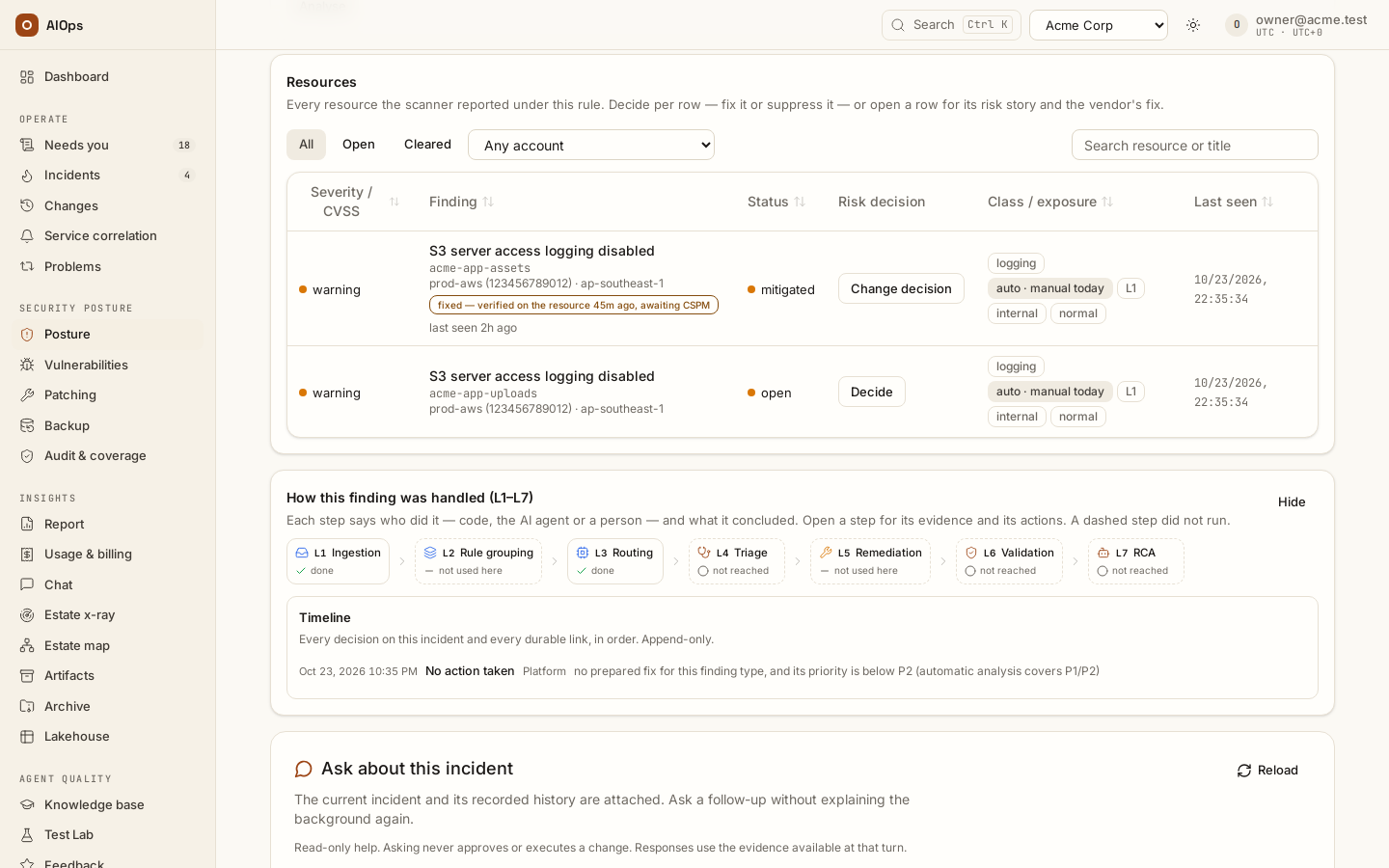
Choose resources for one run. On a scanner rule's incident with more than one open resource, the Resources card has an In this run column. Untick the resources a maintenance window or downtime keeps out of this fix and press Analyse with N of M open resources (incidents.act). That analysis proposes no step for the unticked ones, its change request lists them as Not in this run, the review refuses a step that names one, and a certified runbook never releases that change on its own (A person chose which resources this run fixes — a person releases it). It is not a decision: no risk register row, no approval, nothing expires. The resources stay open, their rows read not in this run, and a later analysis with every row ticked covers them; a suppression approved meanwhile starts a fresh analysis with the same selection, unless it leaves nothing to fix. When the fix verifies while an unticked resource is still open, the change completes but the incident does not resolve: it goes to a person (N resource(s) left out of this run remain — analyse the rest).
API: POST /api/aiops/{tid}/incidents/{id}/reinvestigate with {"defer": ["<resource ARN, else the resource>", …]} — at most 500, open resources of that incident only, at least one left in the run — incidents.act; MCP reinvestigate_incident with body.defer.
Resources at a glance. The Resources card of a scanner rule's incident opens with one line, for example 4 resources at open (first seen Oct 21, 2026) · 1 fixed (last Oct 24, 2026, CHG-5555eeee) · 3 open · 0 not in this run · 1 fixed, awaiting scanner. Fixed means the scanner cleared it — the row stays on the list under Cleared; a record the platform cleared because its resource is outside the tag scope (a Backup, Patch Manager or Security Hub record) is never counted as fixed: the line ends N out of scope (cleared, not fixed); nor is one cleared because Security Hub no longer reports it (a wiped account): N no longer reported by the scanner (cleared, not fixed); awaiting scanner means a fix landed and the scanner has not confirmed it yet; the change named is the newest platform run on the incident that completed. Analyse the rest starts an analysis that leaves out only the resources fixed and awaiting the scanner.
API: GET /api/aiops/{tid}/incidents/{id} → finding_snapshot (total, first_seen_at, open, fixed, last_fixed_at, awaiting_scanner, deferred, and runs — the ten newest executed changes with the resources each set out to fix) — incidents.view.
-
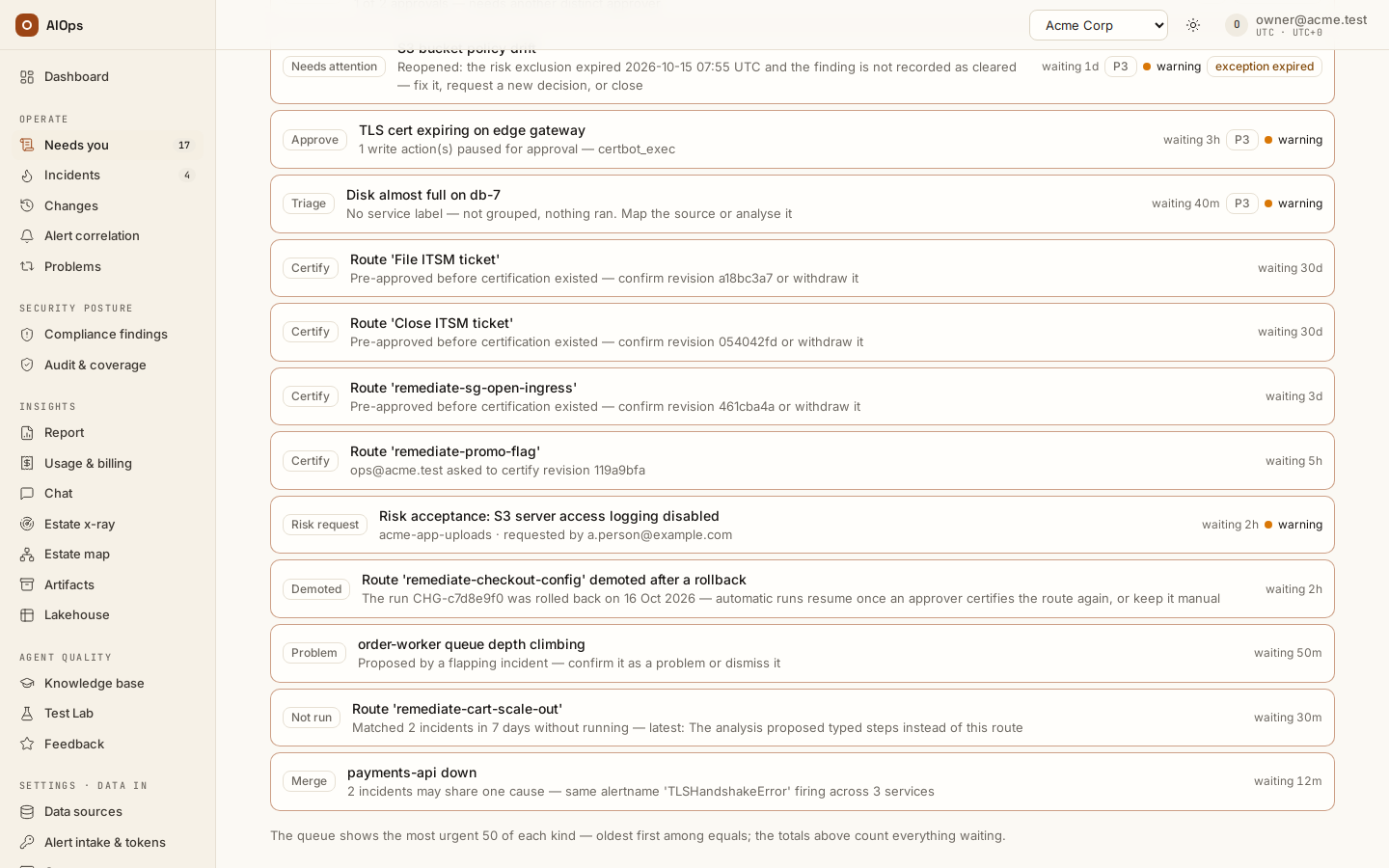
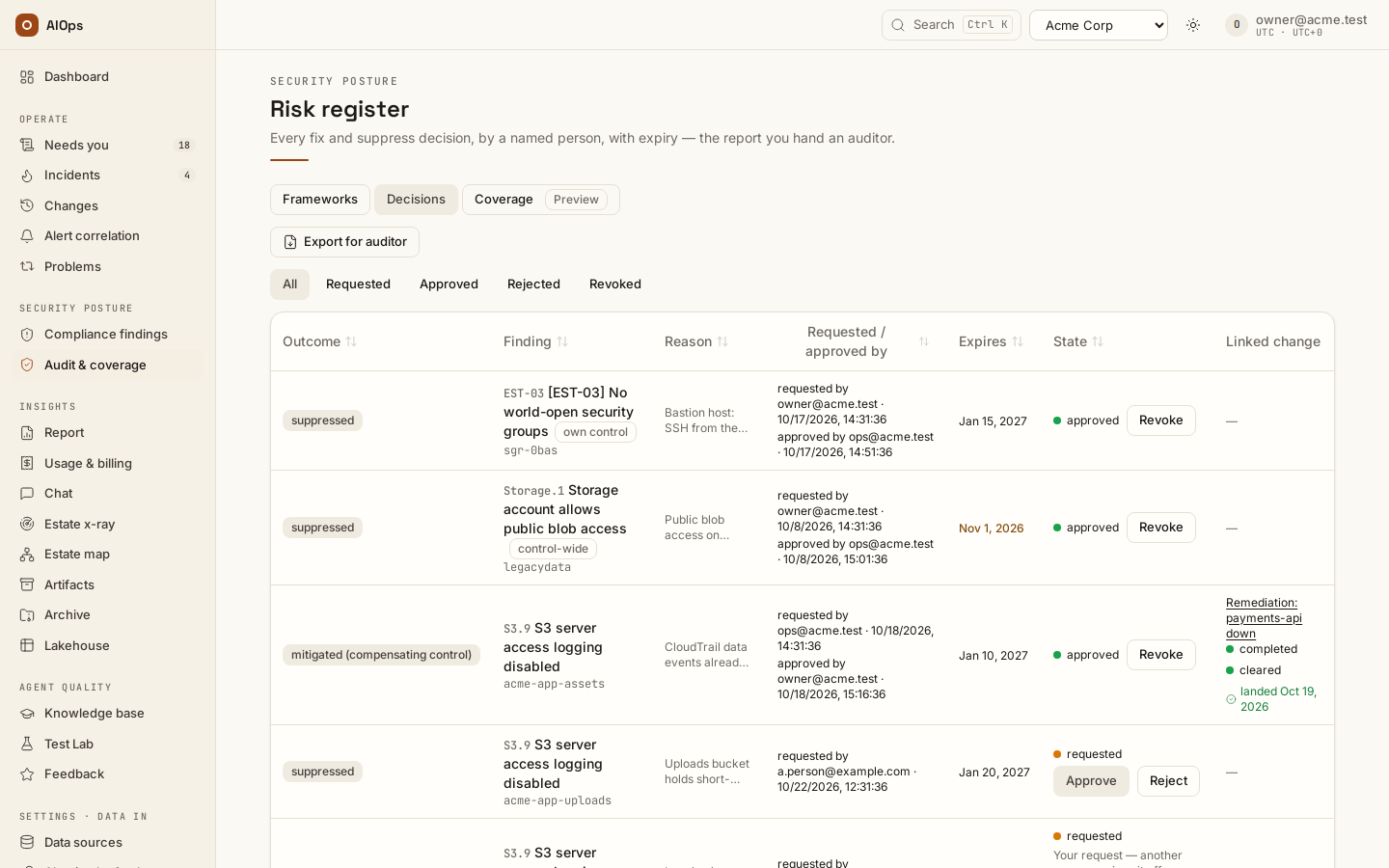
A permitted approver opens the request from Needs you → Risk request (it links to the finding), reviews the scope and reason in the finding's decision record or under Decisions, and chooses Approve or Reject there: Needs you has no decision buttons. The no-self-approval option removes the requester exception; without it, the documented sole-approver path is separately audited. You should see the actual decision, actor distinction and effective state.
API:
POST /api/aiops/{tid}/risk-decisions/{id}/approveor/reject—approvals.decide.
-
Follow the approved outcome. Suppress leaves the resource out of the platform's remediation scope until its expiry/revoke conditions. Fix creates a change-plan request. A compensating-control decision recorded before Fix and Suppress (shown as mitigated (compensating control)) created a compensating-control plan, not an instruction to silently repair the original finding. A resulting change still needs its own execution approval. You should see the decision-to-change link and whether the compensating work actually landed.
-
Use Revoke, Extend or Change decision deliberately. History is append-only. With expiry handling off, a later source resend can drive the next state; with Act when an exception expires on, inspect the actual expiry sweep and any source lift receipt. You should see the recorded expiry and reopen times.
API:
/risk-decisions/{id}/revoke—approvals.decide; follow the decision form's current request/extension flow for a replacement decision. Source suppression is lifted on revoke, and at expiry only while the expiry option is enabled.
-
For a platform check with flagged resources, request suppressions on that control's incident. Review partial and all-resource scope separately. A plan drafted before suppressions may require a fresh analysis. You should see the remaining flagged resources and the new decision scope, not a blanket claim that suppressing one resource fixes the control.
API:
POST /api/aiops/{tid}/compliance/controls/{control_id}/exceptions—incidents.actorapprovals.decide; approval remainsapprovals.decide. -
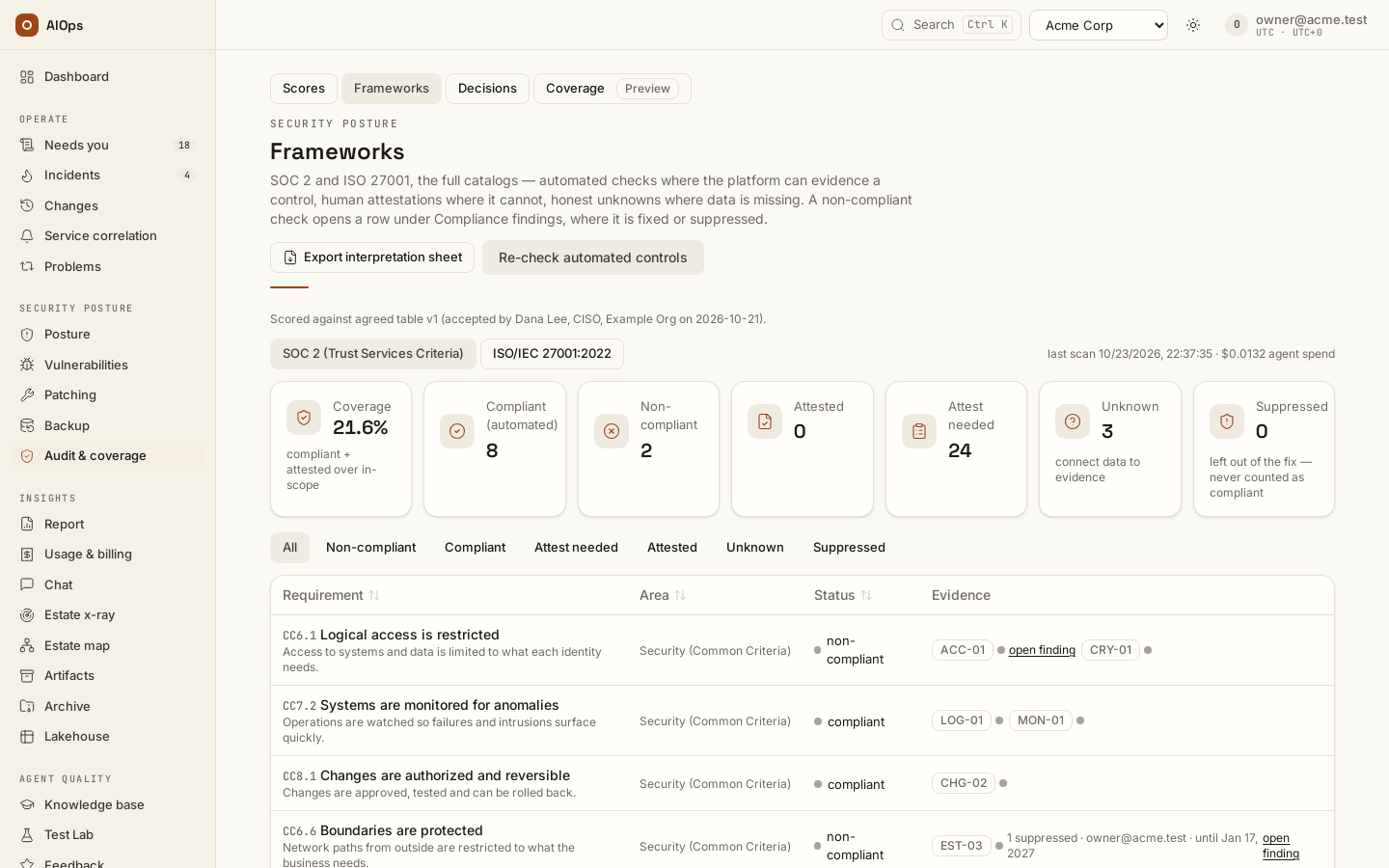
SOC 2 / ISO 27001 are phase 2: off in every workspace until your platform administrator turns them on, once they are agreed with you. Audit & coverage opens on Scores, and its Frameworks tab is there only while Compliance frameworks (phase 2) is on in Guardrails (a card shown only once the platform offers the frameworks). Switching that off stops every platform check (EST-01 to EST-06 and LOG-01, CRY-01, ACC-04, MON-01) and resolves the open finding of each check that stopped. With it on, in Audit & coverage → Frameworks, inspect requirement rows and their automated/manual evidence. Re-check automated controls starts a scan; Scan runs distinguishes manual and scheduled results. You should see the actual result and evidence link for the requirement, with unknown/attestation-needed states left explicit.
API:
POST /api/aiops/{tid}/compliance/scan—incidents.act; scans/catalog/control reads —report.view.
-
Open Audit & coverage → Scores for the score of each standard and the total, patch compliance and backup, read from your AWS accounts once a day. Score per standard lists every standard enabled in Security Hub (for example CIS AWS Foundations Benchmark and AWS Foundational Security Best Practices), every AWS Config conformance pack you run, and SOC 2 / ISO 27001 as this platform maps them while Compliance frameworks (phase 2) is on in Guardrails, then the total; the line chart is the score at each day's read. Each score is passed ÷ (passed + failed + unknown) checks, with no-data checks left out — Security Hub's own rule, so its standards match the Security Hub console. The total counts every check once: a control that CIS and Foundational Security Best Practices share counts once. Patch compliance is the share of Systems Manager managed nodes that Patch Manager reports compliant (target 100%), with missing and failed patch counts, the EC2 instances that report patch data and, listed apart, the EC2 instances Systems Manager does not manage. Backup is the share of AWS Backup jobs that completed in the last 24 hours and 7 days and the backup coverage (every EC2 instance in a backup plan, every RDS database with backup retention; target 100%). Refresh reports reads them now. You should see the time of the read, the connections it went through, and under each card any AWS call that was denied. A figure with nothing read behind it — every region's call denied — reads Not read, with the call and the reason under the figures (for example Could not read patch data: access denied (ssm:DescribeInstanceInformation, ap-southeast-1)), never a zero.
API:
GET /api/aiops/{tid}/compliance/reports—report.view;POST /api/aiops/{tid}/compliance/reports/refresh—incidents.act. The formulas, the read permissions and the optional "patched within N days" rule (aiops_patch_within_days, no default) are in the Compliance reference.Backup findings also come from that daily read: with SOC 2 / ISO 27001 off (so EST-01 does not run) and
aiops_backup_findingson (the default), each EC2 instance with no AWS Backup recovery point (its own or a volume's) and each RDS database with automated backups off and no recovery point opens one Backup finding, source AWS Backup (platform read), controlBACKUP.PLAN, P3 — all of them one incident. A resource a Security Hub backup finding already holds open (RDS.11, RDS.26) is not raised twice; EC2.28 names a volume, so its instance is still its own record. Opening the finding shows Commands: the vault, the AWS Backup service role, a daily plan, this resource in the plan and its first recovery point (for a database, or its own automated backups), each with a copy button. Run them with your own access — the platform holds no backup write path; the next daily read, or Refresh reports, clears the finding. Only a read that covered the account and region in full clears one: a denied, failed or cut-short read (a listing with pages left unread) never does. Only resources carrying the read connection's Only findings on resources tagged tag and the workspace scope tags are read at all — another team's instance on a shared account is neither counted in the coverage nor raised, and a finding already open on one clears at the next read of its region (auditcompliance.backup_out_of_scope). A tag none of the resources read carries (a typo such asaiops-managed=True) clears nothing: the Backup card says the scope matches none of them. They count in the Scanner-cleared score like a scanner's own findings: the daily read is their scanner.Patching findings come from the same daily read: with
aiops_patch_findingson (the default), each Systems Manager managed node Patch Manager reports non-compliant (a missing or failed patch, or older thanaiops_patch_within_dayswhen that rule is set) opens one Patching finding, source Patch Manager (platform read), controlPATCH.COMPLIANCE— all of them one incident; a node with a missing critical patch is HIGH (P2), any other MEDIUM (P3). A node Security Hub's SSM.2 already holds open is not raised twice. Opening the finding shows Commands: an image of the instance, the install (AWS-RunPatchBaseline,Operation=Install, no override) and the read that confirms it; the EC2 patch runbook runs the same with isolation and a restore. A service with a Patch schedules row gets one patch run planned before each of its maintenance windows for its non-compliant instances, approved by a person for the window (change windows). The next daily read, or Refresh reports, clears the finding once the node reports compliant — only a read that covered its account and region in full clears one, and only nodes inside the read connection's Only findings on resources tagged tag and the workspace scope tags are raised. The Patch compliance card holds every node to the target 100 %; with no patch-age rule set it shows a 40-day rule as an example, not applied — a patch-age rule is optional and has no default — with the number of compliant nodes it would flag. -
Use Attest only for a statement a responsible person can support. Record the evidence note, re-review interval and optional evidence artifact. A later attestation supersedes the earlier statement; it does not edit history. You should see the human statement and its next review obligation.
API: POST /api/aiops/{tid}/compliance/requirements/{ref}/attest — pillars.manage. Export interpretation sheet creates an artifact through POST /api/aiops/{tid}/compliance/interpretation-export — report.view.
-
A not-applicable override is API/MCP-driven on the checked build; there is no Mark not applicable portal control to click. Explain the reason and scope. You should see the recorded override and its audit.
API:
PATCH /api/aiops/{tid}/compliance/controls/{control_id}with{"not_applicable":true,"reason":"<supported reason>"}—pillars.manage, oroverride_compliance_controlthrough MCP. -
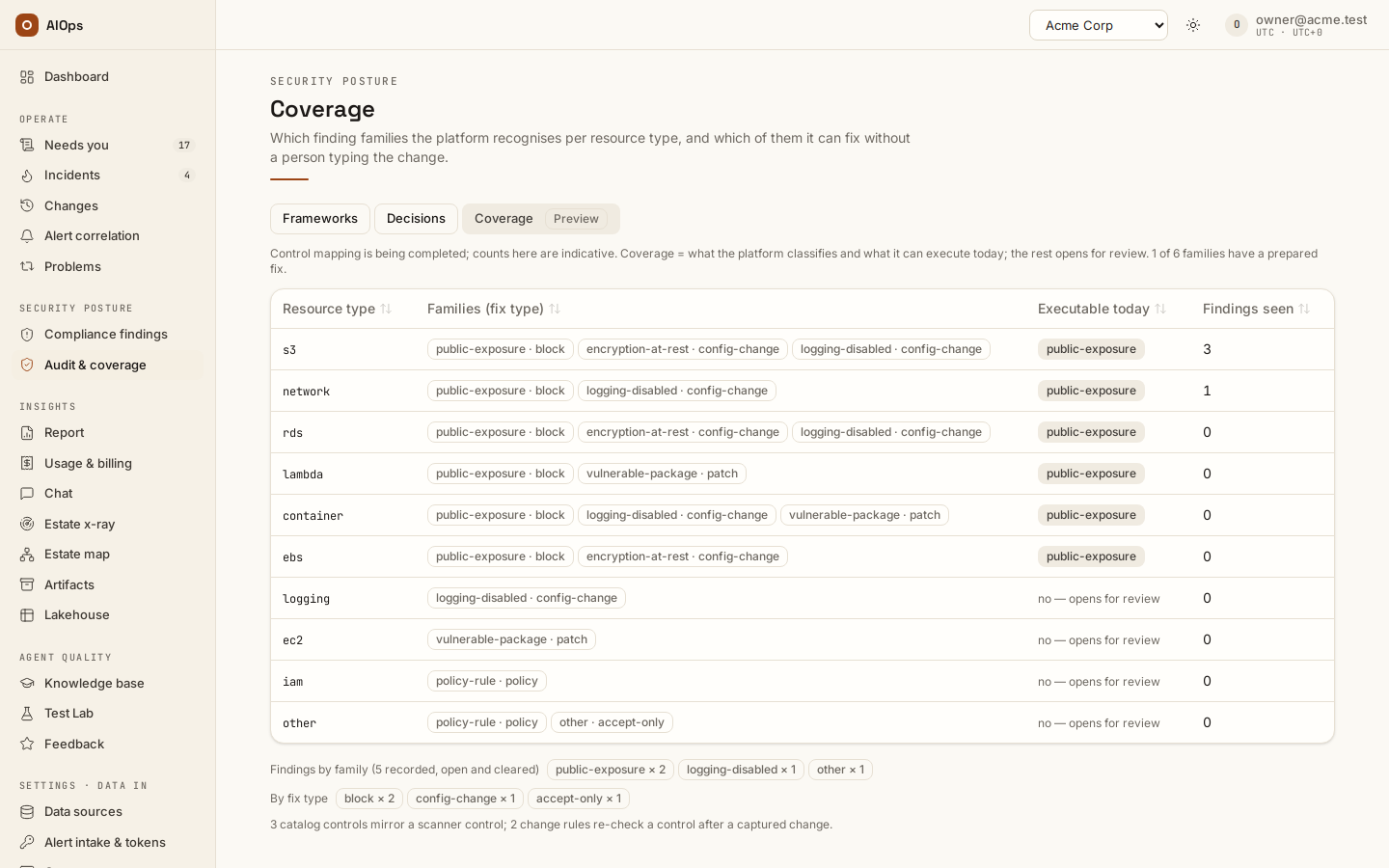
Review the Coverage preview with its actual scope. An estate x-ray's compliance notes are not listed on this page: no control or framework maps them, so they stay in the x-ray report. Export the register, posture period or interpretation sheet when needed, and download the comparison table under Agreed comparison table (what the frameworks are scored against: the version the customer accepted, or No agreed table yet); snapshots and certificates are separate artifact kinds. You should see an artifact with the right source/date, not a generic “compliant” conclusion.
API:
POST /api/aiops/{tid}/risk-register/export—report.view.
Verify
Check requester/approver distinction, recorded scope, expiry state, source suppression/lift result, linked change outcome and the evidence behind each exported number. A verified resource fix and a later scanner clear can be different events. A human attestation is not an automated technical test.
Troubleshooting
| Symptom | Check | Next step |
|---|---|---|
| Requester cannot approve | Effective no-self-approval policy and available approvers | Obtain the permitted independent decision |
| Exception expired but source remains suppressed | Expiry option and source lift receipt | Reconcile the source state; do not claim the source has its own expiry |
| Old plan refused after suppressions | Plan time relative to approved scope change | Request the required fresh analysis or review |
| Unknown framework row | Missing automated or manual evidence | Supply an appropriate attestation or evidence, not a fabricated pass |
Related
Compliance setup · Approved fixes · Change control · Incidents · Audit log.